# NOAH
> NOAH Checkout and Orchestration API Documentation
Noah moves money between local fiat currencies, bitcoin and stablecoins through a single
Business API: bank onramp (fiat-to-crypto), global payouts (crypto-to-fiat), automated
payouts, and hosted checkout.
Every page on this site is also published as Markdown. Append `.md` to any documentation
URL, or send `Accept: text/markdown`, to get the source instead of the rendered HTML.
Facts an agent cannot infer by reading the guides:
- Base URLs: `https://api.sandbox.noah.com/v1` (sandbox) and `https://api.noah.com/v1` (production).
- Every request carries an `X-Api-Key` header. The `Api-Signature` JWT header is mandatory in
production and optional in sandbox only while the API key has no signing public key attached.
- Sandbox cryptocurrencies always carry a `_TEST` suffix, for example `BTC_TEST` and `USDC_TEST`.
- Channel IDs must be read from `GET /channels/sell` at runtime. They are not stable enough to
hardcode or cache, and their limits change.
- Payout sequence: `GET /channels/sell`, then `GET /channels/{ChannelID}/form`, then
`POST /transactions/sell/prepare`, then `POST /transactions/sell`.
- Payin sequence: `POST /workflows/bank-deposit-to-onchain-address` for an API-driven flow, or
`POST /hosted-workflows/bank-deposit-to-onchain-address` to hand the customer to Noah's UI.
- Onboarding starts by choosing a compliance model: Reliance (the business is licensed and shares
its own KYC via `PUT /customers/{CustomerID}`) or Standard (Noah runs KYC via
`POST /onboarding/{CustomerID}` and `POST /onboarding/{CustomerID}/prefill`).
- Track transaction and customer state with webhooks rather than polling.
- Sandbox fiat deposits can be simulated with `POST /sandbox/fiat-deposit/simulate`.
## API Reference
The guides below explain how the flows fit together. The endpoint contracts are not part of
`llms-full.txt`, which carries the guides only — fetch them from here instead:
- Every endpoint, with its method and path: https://docs.noah.com/api-reference/noah-business-api.md
- A single endpoint, with parameters, request fields and responses: append `.md` to its reference
URL, for example `/api-reference/create-sell-transaction.md`.
- The authoritative OpenAPI 3.0 document: https://docs.noah.com/files/oas-schema.generated.json (large; prefer a single endpoint's
`.md` unless you need the whole schema)
Prefer a single page's `.md` over `/llms-full.txt`, which concatenates every guide and costs
roughly 110,000 tokens to read.
## Business Dashboard
## Overview
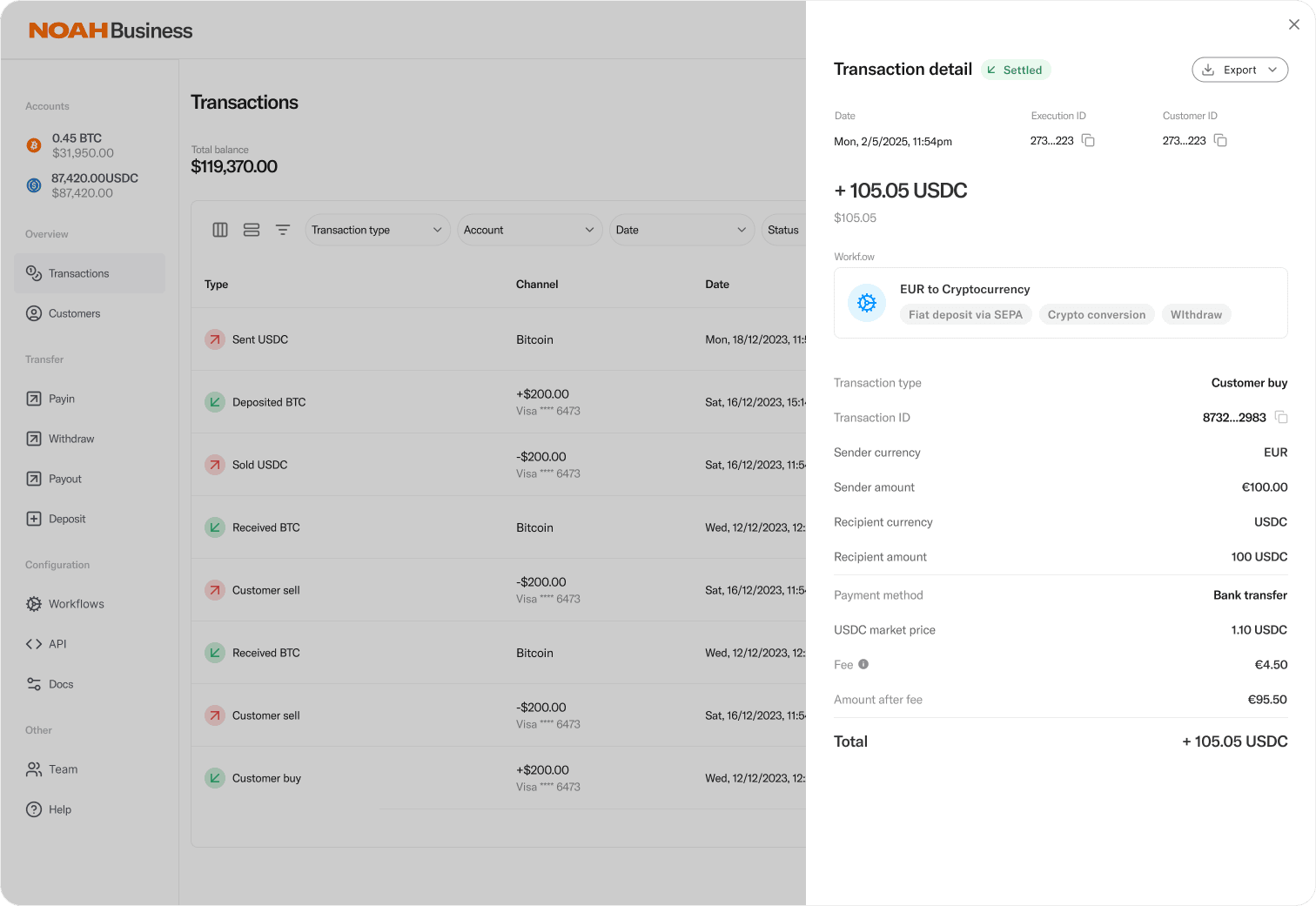
Noah's Business Dashboard provides a streamlined interface for monitoring and managing your users and payment activities.
Key dashboard capabilities include:
- Comprehensive transaction and customer overviews, with functionality to create API keys and webhooks.
- Real-time balance tracking across multiple cryptocurrencies, including BTC and USDC. Be aware that CryptoCurrencies used in the **Sandbox** always have a `_TEST` suffix, such as BTC_TEST and USDC_TEST.
- In-depth transaction details panel showing conversion workflows, fees, and settlement information.
- Integrated account management system for deposits, withdrawals, and customer transactions.
## Create API Keys
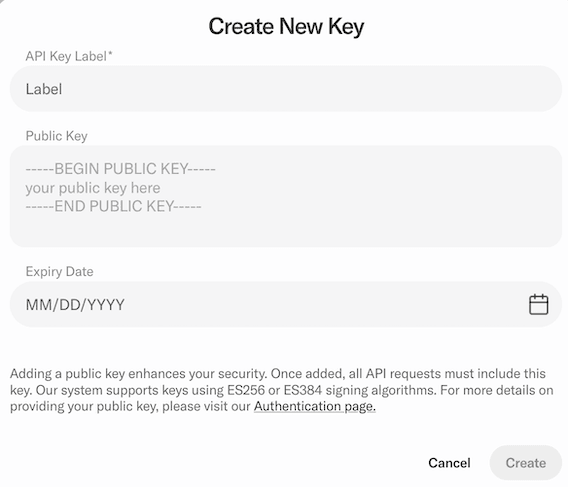
To access Noah's business APIs, you'll need to create an API key that serves as your unique authentication credential. This API key acts as a secure identifier that allows Noah's systems to verify your identity, track your usage, and ensure you have the appropriate permissions to access specific endpoints and data.
Start the API key generation process by logging into the Business Dashboard and clicking API in the Configuration section in the navigation bar on the left. In the API Keys section, click **Create new**.
:::info[Request Signing in Sandbox Environment]
To facilitate easier testing with manual tools such as Postman, it is possible in our Sandbox environment to create an API Key without a **Request Signing Public Key**, allowing unsigned requests. However, before graduation to the Production environment, we require that at least one API Key is created with an associated **Request Signing Public Key**, so that we can verify your system is correctly signing requests.
:::
Once generated, this key must be included in the header of each API request you make to Noah's services, enabling secure communication between your application and the Noah platform while maintaining proper access control and usage monitoring.
For further details, see [Quick Start](../getting-started/quick-start.md).
## Postman Collection
Use our generated Postman collection to test endpoints without building requests from scratch:
- [Download Noah Business API Postman Collection](https://docs.noah.com/files/postman-collection.generated.json)
The collection mirrors the public OpenAPI specification and is kept up to date automatically from schema updates on `main`.
To switch environments:
- Sandbox: `baseUrl` defaults to the sandbox URL
- Production: set `baseUrl` to the value of `prodBaseUrl`
## Create Webhooks
Implementing webhooks is essential for maintaining real-time synchronization and efficient communication between your application and Noah's business platform. Webhooks enable Noah to automatically push notifications directly to your specified endpoints as events occur, eliminating the need for constant polling and reducing API call overhead.
Start the webhook generation process by logging into the Business Dashboard and clicking API in the Configuration section in the navigation bar on the left. In the Webhooks section, click **Create new**.

By configuring webhooks, you ensure that your system receives immediate notifications about important events such as transaction completions, customer onboarding status changes, and fiat deposits, allowing your application to respond instantly and maintain accurate, up-to-date information. This event-driven architecture not only improves system performance and reduces latency but also ensures that your business processes can react promptly to changes in Noah's platform, creating a more responsive and integrated user experience.
For further details, see [Webhook Configuration](../api-concepts/webhooks/configuration.md).
---
## Overview
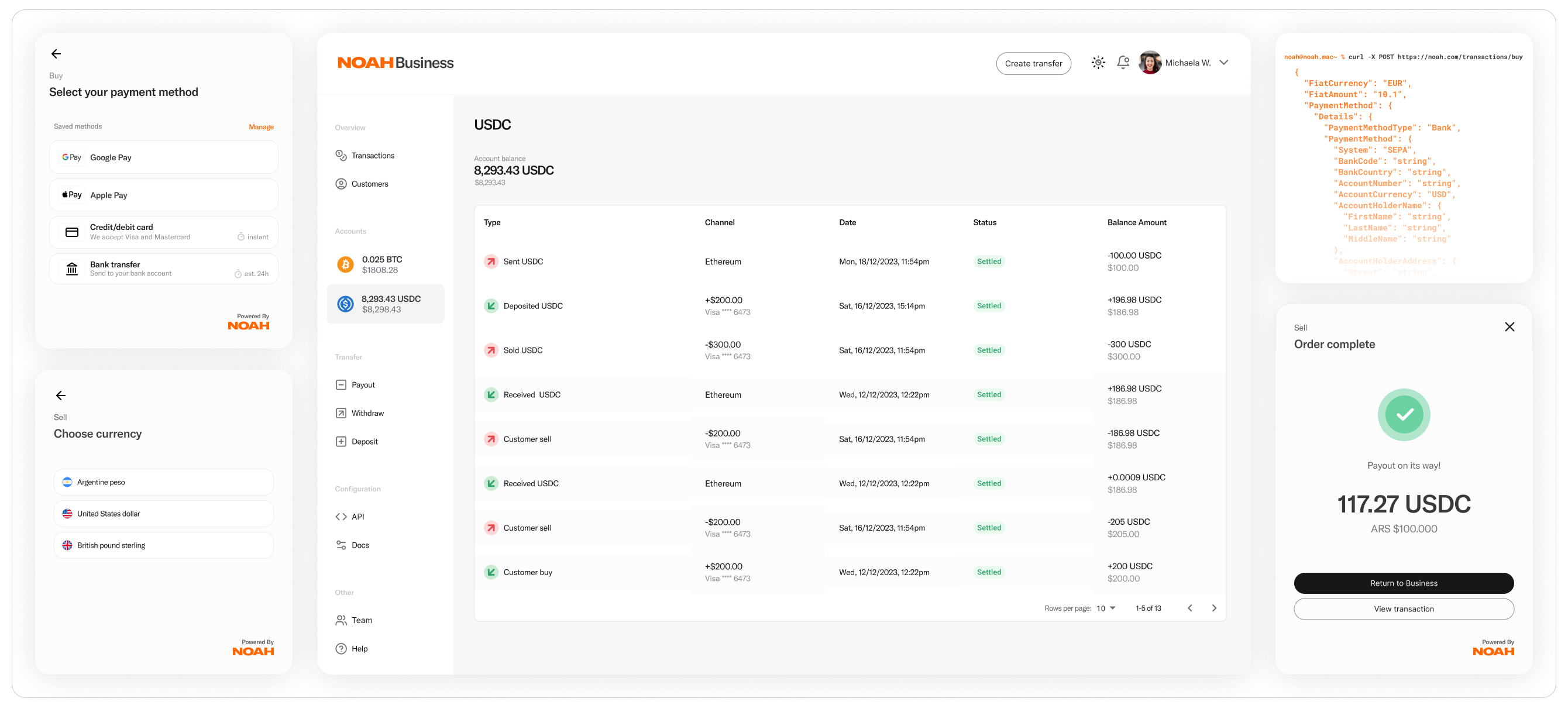
Noah's Business Solutions enable consumer and institutional payment rails in local fiat currencies, bitcoin and stablecoins for your application. Our Business API provides access to a robust and easily integrated payment infrastructure, while Noah's Hosted Checkout offers a straightforward and customer-friendly payment interface.
## Highlights
- **Global Payment Coverage**
Support for transactions in 120+ major and exotic local currencies, Bitcoin, or stablecoins.
→ [Learn about our Global Payment solutions](../products/global-payouts-api)
- **Unified Integration**
One API integration covers global operations, reducing complexity by encompassing multiple payment methods (Card Payments, Bank Transfer, Mobile Money, and more).
→ [Review our Quick Start Guide](./quick-start.md) for integration steps
- **Compliance Tools**
Built-in KYC and AML frameworks to help simplify navigating regulatory requirements and facilitate compliant transactions.
→ [Read more about our Compliance Models](./kyc.md)
- **Fast Settlement Options**
Leverage stablecoins and near real-time payout methods to optimize liquidity operations and accelerate settlement times.
→ [Explore Bank Onramp](../recipes/payin/bank-onramp-us.md) for fast settlements
- **Hosted Checkout & Dashboard**
A fully managed checkout flow and business dashboard for seamless integration management and payment reconciliation, enabling stablecoin-based or local currency settlements.
→ [View our Hosted Checkout Introduction](../recipes/payout/hosted-checkout.md)
## Products
### Bank Onramp
Accept bank transfers in fiat and receive near-instant settlement in crypto.
- [Product page →](../products/bank-onramp)
- [Integration recipe →](../recipes/payin/bank-onramp-us.md)
### Global Payouts API
Convert crypto and stablecoins to fiat, and disburse funds using local payment methods.
- [Product page →](../products/global-payouts-api)
- [Integration recipe →](../recipes/payout/global-payouts-business.md)
### Automated Payouts
Accept deposits in crypto or stablecoins, and automatically payout fiat to local payment methods.
- [Product page →](../products/automated-payouts.md)
- [Integration recipe →](../recipes/payout/automated-payouts.md)
### Hosted Checkout
Offer a streamlined payment interface to your customers to accept or payout fiat in 120+ currencies.
- [Hosted Checkout →](../recipes/payout/hosted-checkout.md)
## Next Steps
- Contact us at [business@noah.com](mailto:business@noah.com), our team will provide support to accelerate your usecase.
- Create your first Customer in Noah using our [Quick Start Guide](./quick-start.md).
- Discover the best regulatory solution for your business by referencing our [Compliance Models](./kyc.md).
- Select your first Product to integrate from our list of [Products](./introduction.md#products).
### API Concepts
Before integrating, get familiar with:
- [Authentication](../api-concepts/authentication/configuration.md)
- [Channels](../api-concepts/channels)
- [Transactions](../api-concepts/transactions)
- [Webhooks](../api-concepts/webhooks/configuration.md)
### API Reference
To view our OpenAPI endpoint documentation, visit our [API Reference](../../api-reference/noah-business-api).
Ready to begin? Contact us at [business@noah.com](mailto:business@noah.com) or complete our [First Contact Form](https://vpmlg6ys6hq.typeform.com/to/gQPQxC6t).
---
## Compliance Overview
## Overview
Noah supports two compliance-forward regulatory models, accommodating both regulated and unregulated businesses, enabling your business to perform compliant transactions across global jurisdictions. We partner with a range of businesses— from those relying on Noah’s regulatory framework to those who already hold their own licenses.
:::tip
Noah has a Trust Center to simplify the Compliance and Security policy handover process.
You can request access to our [Trust Center here](https://trust.noah.com).
:::
---
## Regulatory Models
### Technology Providers
A Technology Provider is an app or organization without the relevant licensing and/or registration, that can use Noah’s regulatory infrastructure to enable fiat/crypto transactions.
- Leverage Noah’s existing regulatory and licensing framework.
- Embed Hosted KYC flows to onboard your customers.
- Facilitate payments across global jurisdictions.
Under the [Standard Model](#standard-model), Noah enters a direct contractual relationship with your end customers. Prefill and token-share flows can reduce hosted steps, but Terms and Conditions acceptance still requires customer involvement via a hosted session. See [Choosing Your Onboarding Method](../recipes/onboarding/choosing-onboarding-method.md#limitations).
### Licensed Providers
Licensed Providers have the required regulatory approvals to conduct KYC and handle regulated transactions in their respective jurisdictions. They can also rely on Noah’s compliance coverage for regions where they do not hold licensing.
- Integrate with Noah through the Reliance Model structure, enabling KYC Data Transfer via API. As an alternative to the Reliance Model, use the Standard Model, in support of which a [Hosted Onboarding journey](../recipes/onboarding/hosted-onboarding.md) is provided.
- Collect and withdraw accrued fees through the Business Dashboard.
- Expand your reach by leveraging Noah's global coverage.
---
## KYC Models
### Reliance Model
In the Reliance Model, your business performs the compliance & regulatory obligations to enable customers to transact through Noah, including KYC & Identity Verification checks; AML, Fraud and Risk checks and Transaction Monitoring.
Once you've verified your customer, you can share the simplified KYC data with Noah when conducting transactions. This data is used to perform ongoing screening and monitoring on payment methods created by your customer, or your customer's counterparties. The Reliance Model data provided by your business is subject to regular spot checks, where you may be asked to provide a Full KYC pack for the customer, to validate the data provided is a match.
#### Requirements
- Your business must be a regulated entity.
- You must complete KYB & compliance onboarding with Noah.
- You must disclose to customers that Noah is a recipient of their data (as per our T&Cs).
- You must ensure that Customers enabled to transact through Noah, via the Reliance Model Customers endpoint, have a valid KYC status in your system, when transacting.
- You must ensure that customers with expired identification are not permitted to transact with Noah.
#### Advantages
- **Streamline Customer Onboardings:** Remove the need for your customers to KYC again.
- **Control Your Customer Data:** You retain ownership and management of your customer's KYC data.
- **Transact Immediately:** Customers are able to transact, after you upload their simplified data to one API endpoint.
- **Onboard En Masse:** Onboard customers programmatically using the PUT Customers endpoint.
---
### Standard Model
Under the Standard Model, Noah enables you to generate and embed a Hosted Onboarding session ([as described here](../recipes/onboarding/hosted-onboarding.md)), where we onboard your customer directly by allowing them to accept our terms and complete their Identity Verification attempt through interface. We will notify you once the customer's KYC status has been updated, via a webhook notification.
:::info
Additional KYC applications for users who have already completed KYC will be rejected. Sumsub flags duplicate applications as a fraud prevention measure. If a user has already completed KYC, do not initiate another KYC session. Instead, retrieve the user's existing verification status.
:::
In this scenario, Noah enters into a contractual relationship with your customer, and absorbs the regulatory-compliance requirements to enable the customer to transact. This includes Transaction Monitoring, AML Fraud and Risk Checks as well as Identity Verification.
:::info Hosted onboarding is required by default
Standard Model onboarding is not fully headless. Token share and prefill methods still require a hosted session so the customer can accept Noah Terms and Conditions and complete any remaining verification steps (such as liveness or document capture when data was not imported from Sumsub).
:::
Your customer may be contacted via email, in regards to their compliance status and transactional activity, including scenarios where we need to conduct Extra Due Diligence to facilitate their transaction.
#### Transaction Receipt Emails
Transaction receipt emails sent by Noah are a regulatory requirement set by state regulators. Each state has individual requirements, and the email format satisfies all of them. As a result, transaction receipts cannot be whitelabeled, customized, or deactivated.
These emails are sent directly to your customers upon transaction completion and are separate from the webhook notifications your application receives. While you have full control over how you use webhook data to communicate with customers through your own channels, the regulatory receipt emails from Noah will always be sent.
#### Advantages
- **Embed a Streamlined Interface:** Avoid the hassle in building a user interface to facilitate onboardings.
- **No License Required:** Noah employs strategic licensing, enabling us to facilitate transactions globally, so that you don't have to worry about it.
- **Secure Management of Data:** Allow us to manage the secure collection and handling of customer data. This data will only be used in the context of the transactions your customers are performing.
- **Compliance, AML, Fraud, Risk and Transaction Monitoring handled:** Leverage our expertise in compliance and our global regulatory frameworks, to build solutions which matter to your customers.
- **Stay True to Web3:** Web3 ecosystems need-not de-anonymise their users. Enable Noah, as a trusted fiat <> crypto exchange to own the compliance relationship with your customers. You can reference your customers by passing their self-custody wallet address as an identifier.
---
## Currency & Model Eligibility
Not all KYC models are available for every currency. The table below shows which models are permitted for each fiat currency and links to the corresponding onboarding method.
| Fiat Currency | Reliance Model | Standard Model | Onboarding Methods |
| ------------- | -------------- | -------------- | --------------------------------------------------------------------------------------------------------------------------------------------------------------------------------------------------------------------------------------------------------------------------- |
| **EUR** | Yes | Yes | Reliance: [PUT Customer](../recipes/onboarding/reliance-onboarding.md). Standard: [Hosted](../recipes/onboarding/hosted-onboarding.md), [Token Share](../recipes/onboarding/token-share-onboarding.md), or [Prefill](../recipes/onboarding/individual-customer-prefill.md). |
| **USD** | No | Yes | [Hosted](../recipes/onboarding/hosted-onboarding.md), [Token Share](../recipes/onboarding/token-share-onboarding.md), or [Prefill](../recipes/onboarding/individual-customer-prefill.md). |
:::warning
USD Virtual Accounts require Standard Model KYC. Reliance Model customers cannot create USD Virtual Accounts. This constraint is enforced at the API level - attempting to create a USD VA for a Reliance-only customer will return an error.
:::
### Which Model Should I Use?
If your business is not approved for a Reliance Model, use the Standard Model, where Noah handles the KYC, AML and compliance obligations on your behalf, through Hosted Onboarding or one of the prefill methods.
If your business is approved for the Reliance Model, you can use it for EUR flows to streamline onboarding. For USD flows, you must use the Standard Model, but you can reduce friction by using [Token Share](../recipes/onboarding/token-share-onboarding.md) or [Individual Customer Prefill](../recipes/onboarding/individual-customer-prefill.md) to pre-populate data.
For help choosing between onboarding methods, see [Choosing Your Onboarding Method](../recipes/onboarding/choosing-onboarding-method.md).
---
## Integration Types
### White-Label Integration
White-label integrations can use either the Reliance Model or the Standard Model (with Hosted KYC). This approach gives you full control of your branding and user experience while relying on Noah's backend compliance and payment functionality.
:::info
**Note on Transaction Receipts:** While your integration can be fully white-labeled, transaction receipt emails will still be sent from Noah directly to customers. This is a regulatory requirement that cannot be customized or disabled. See [Transaction Receipt Emails](#transaction-receipt-emails) above for details.
:::
[Explore Business API →](../api-concepts/introduction.md)
### Hosted Checkout
Hosted Checkout also supports both Reliance and Standard Models. It provides a pre-built, consumer-friendly interface for rapid deployment — and can be configured to perform KYC onboarding checks as part of its user flow.
[Explore Hosted Checkout →](../recipes/payout/hosted-checkout.md)
---
## Quick Start
## Overview
This Quick Start guide prepares you for submitting your first transaction request by walking you through sandbox registration, compliance model selection, and customer onboarding using our Business API.
---
1. Register for Sandbox Access
### Self-Serve Registration
Registration to our Business Dashboard in Sandbox is self-serve.
1. [Register for a Sandbox Account](https://business.sandbox.noah.com) using the business email address responsible for your integration.
2. Once registered, you can immediately access the Business Dashboard and generate API credentials.
:::note
Your Noah Business contact will initiate Know Your Business (KYB) checks and Onboarding review in parallel. You can begin your integration and test in the sandbox while Onboarding is in progress.
:::
---
2. Generate Your API Key
Once registered:
1. Log into your Business Dashboard at [business.sandbox.noah.com](https://business.sandbox.noah.com).
2. Navigate to Configuration → API → API Keys → Create New
3. Provide a Label to identify your API Key.
4. Optionally set an Expiry Date—if provided, your API Key will become invalid as of that date.
We recommend storing your API Key as a securely stored parameter in your Key Storage solution, so that your development team can access our API.
:::tip
Review the [Authentication](../api-concepts/authentication/configuration.md) docs for details on using your API key securely.
:::
### Request Signing
Noah provides additional authentication via Request Signing, where requests are signed with a Public-Private Key Pair. Your Public Key is provided to us via the Business Dashboard when creating an API Key.
| Environment | Requirement |
| ----------- | ----------- |
| Sandbox | Optional |
| Production | Mandatory |
We recommend implementing Request Signing as an integration-readiness step before migrating to Production.
Read more about [Request Signing →](../api-concepts/authentication/signing.md)
---
3. Choose Your Compliance Model
Noah offers two compliance models. Your integration path depends on your licensing status.
### Reliance Model (Licensed Entities)
For businesses with Financial Institution licensing (MSBs, VASPs, or equivalent).
In this model:
- Your licensed entity undergoes an advanced onboarding process where we vet your Onboarding and AML policies.
- You can synchronously onboard customers to Noah via the API.
- Perform stablecoin settlements to and from your Custodian or Pre-Funded balance.
:::warning
USD payments are not available via Reliance Model.
:::
### Standard Model (Unlicensed Entities & USD Payments)
For businesses leveraging Noah's licensing to facilitate payments for their customers.
In this model:
- Your customers are onboarded directly to Noah.
- Noah performs KYC/KYB on your customers and notifies you when approved.
- Customers settle directly to and from Noah's payments infrastructure.
- Stablecoins settle to your customer's self-custody wallet address.
:::tip
For more on compliance requirements, see [Compliance Models](./kyc.md).
:::
---
4. Onboard Your First Customer
Follow the integration path for your compliance model.
### Reliance Model: Synchronous Customer Creation
Call the [PUT Customers endpoint](../../api-reference/create-update-customer) to create a customer with KYC data you've already collected:
```typescript
curl -X PUT "https://api.sandbox.noah.com/v1/customers/cust54321" \
-H "X-Api-Key: YOUR_SANDBOX_API_KEY" \
-H "Content-Type: application/json" \
-d '{
"Type": "Individual",
"FullName": {
"FirstName": "John",
"LastName": "Doe",
"MiddleName": "Tester"
},
"DateOfBirth": "1992-03-25",
"Email": "john.doe@example.com",
"PhoneNumber": "+34671234567",
"Identities": [
{
"IssuingCountry": "ES",
"IDNumber": "123456789",
"IssuedDate": "2019-06-15",
"ExpiryDate": "2029-06-15",
"IDType": "Passport"
}
],
"PrimaryResidence": {
"Street": "Calle Mayor 45",
"Street2": "Piso 2B",
"City": "Madrid",
"PostCode": "28013",
"State": "MD",
"Country": "ES"
}
}'
```
- Replace `YOUR_SANDBOX_API_KEY` with your API Key generated from the Business Dashboard.
- On success, the `200` response confirms the customer record was created.
- View this customer in your Business Dashboard under the Customers section.
### Standard Model: Customer Onboarding Options
Noah performs KYC on your customers. Choose from three onboarding methods:
#### Option A: SumSub Token Share
Share existing KYC data (ID documents + Proof of Liveness) from your SumSub integration.
See: [SumSub Token Share Recipe](../recipes/onboarding/token-share-onboarding.md)
#### Option B: Prefill Customer Data
Prefill and share text-based customer data with Noah, then let the customer complete verification.
See:
- [Business Customer Prefill Recipe](../recipes/onboarding/business-customer-prefill.md)
- [Individual Customer Prefill Recipe](../recipes/onboarding/individual-customer-prefill.md)
#### Option C: Hosted Onboarding
Generate a [Hosted Onboarding Recipe](../recipes/onboarding/hosted-onboarding.md) session for a fully managed KYC flow.
:::info
Noah will notify you via webhook when the customer's Onboarding Status is approved and they're ready to transact.
:::
---
5. Test in Sandbox
### Simulate Fiat Deposits
Use our Fiat Deposit simulation endpoint to test deposits from fiat currencies in sandbox.
### Testnet Currencies
In sandbox, we operate Testnet currencies with custom stablecoin equivalents. These have enough liquidity to test both small and larger transactions.
:::tip
To request testnet funds, contact your account manager.
:::
---
6. Build Your Use Case
Refer to our integration journeys for your chosen use case:
### Fiat-to-Crypto (Bank Onramp)
Create a Virtual Account that automatically converts fiat deposits to stablecoins and withdraws onchain to a destination address.
- **Reliance Model**: Destination is your custodian wallet.
- **Standard Model**: Destination is your customer's wallet address.
See: [Bank Onramp Recipe](../recipes/payin/bank-onramp-us.md)
### Crypto-to-Fiat (Automated Payouts)
**Standard Model**
Create a Deposit Address for your customer to deposit stables, which automatically convert to fiat and withdraw to the beneficiary.
See: [Automated Payouts Recipe](../recipes/payout/automated-payouts.md)
### Global Payouts
**Reliance Model**
Prefund Noah via the Dashboard, then instruct last-mile payouts to beneficiaries worldwide.
See: [Global Payouts Recipe](../recipes/payout/global-payouts-business.md)
### Hosted Checkout
Offer a streamlined payment interface to your customers to accept or payout fiat in 120+ currencies.
See: [Hosted Checkout](../recipes/payout/hosted-checkout.md)
---
7. Configure Webhooks
Set up webhook subscriptions to receive real-time updates on transaction and onboarding statuses.
See: [Webhook Subscriptions →](../api-concepts/webhooks/configuration.md)
---
8. Migrate to Production
Once your Onboarding and KYB procedures are complete, our team will guide you through migration to production:
1. Complete integration testing in sandbox.
2. Enable Request Signing (required for production).
3. Coordinate production credentials with your Noah contact.
4. Perform production validation testing.
We'll work closely with you to ensure a frictionless production launch.
---
:::tip
#### Additional Resources
• [Compliance & Identity](./kyc.md) – Dive deeper into KYC and AML requirements.
• [API Reference](../../api-reference/noah-business-api) – Full endpoint documentation, request/response schemas, and usage notes.
• [Postman Collection](https://docs.noah.com/files/postman-collection.generated.json) – Import the latest public collection for manual endpoint testing.
• [Global Payouts API](../products/global-payouts-api.md) – If you need to send funds globally in multiple payout methods.
For questions or additional support, reach out anytime at [business@noah.com](mailto:business@noah.com).
:::
---
## Security Overview
## Overview
At Noah, we prioritize the security of your digital assets and personal information. Our approach to fraud prevention and security is comprehensive, employing state-of-the-art technology and best practices to safeguard every customer interaction.
:::tip
Noah has a Trust Center to simplify the Compliance and Security policy handover process.
You can request access to our [Trust Center here](https://trust.noah.com).
:::
---
## 1. Security Architecture
### 1.1 Multi-Party Computation (MPC)
Noah leverages a proven Multi-Party Computation (MPC) framework for on-chain transactions. This cryptographic method splits private key data among multiple parties and requires distributed approval for each blockchain transaction. By doing so, we achieve robust security without compromising usability:
- Reduced single-point-of-failure risk
- Resilient architecture that can continue operation even if part of the signature node network is compromised
- Automatic checks ensuring only verified, authorized users can complete on-chain actions
### 1.2 Ledger System (Aurora PostgreSQL)
Our transaction data is stored in Amazon Aurora PostgreSQL, providing ledger-grade guarantees through a purpose-built design:
- Immutability: A dedicated history table captures every state transition, with guardrails that prohibit modification and deletion of historical records.
- Transparency: PostgreSQL triggers automatically propagate all write operations to the history table, ensuring a complete and verifiable audit trail.
- Integrity: The append-only history model prevents tampering, preserving a high level of trust in the ledger.
### 1.3 Key Enclave
The Key Enclave is our isolated environment for securely storing and retrieving transaction signing information. This ensures that:
- Private keys and sensitive signing data never leave the enclave.
- All signing operations are controlled and verified, preventing unauthorized access.
- Even if an attacker compromises other infrastructure, enclave operations remain isolated and protected.
### 1.4 Data Scrubbing
We employ data scrubbing to remove personally identifying information (PII) from transaction logs:
- Each user is assigned a unique UserID for ledger transactions, obscuring direct personal identifiers.
- Our scrubbing process ensures that raw PII cannot be accessed by unauthorized parties during routine analytics or logging.
- This approach supports privacy-by-design principles, helping you comply with data protection regulations.
### 1.5 User Data Protection
Safeguarding personal information is fundamental to our platform design:
- Strict access controls and encryption at rest and in transit.
- Regular penetration testing and audits to continuously evaluate our defensive layers.
- Ongoing training of Noah personnel on data handling and compliance requirements.
---
## 2. Dashboard & API Access Security
### 2.1 API Key Management
API keys are generated through the [Business Dashboard](./business-dashboard.md) and are scoped to a single environment (Sandbox or Production). Each key can optionally be assigned a label for identification and an expiry date.
Key lifecycle:
- **Creation**: Generate keys via Configuration → API → API Keys → Create New.
- **Revocation**: Existing keys can be revoked at any time through the dashboard.
For details on API key configuration, see [Authentication](../api-concepts/authentication/configuration.md).
### 2.2 Request Signing
Request Signing is the primary mechanism for verifying that API requests originate from an authorised caller. It uses a public-private key pair: you sign requests with your private key, and Noah verifies them using the public key you provide when generating your API key.
- **Sandbox**: Optional (recommended for testing your signing implementation).
- **Production**: Required for all API requests.
Request Signing protects against API key compromise - even if an attacker obtains your API key, they cannot forge valid requests without your private key.
For implementation details, see [Request Signing](../api-concepts/authentication/signing.md).
### 2.3 PIN Signing
Critical actions within the Business Dashboard - such as executing transactions and generating API keys - are protected by a PIN signing mechanism. This uses blockchain-level cryptography to encrypt and authorise access keys for core functionality, providing transaction-level security for sensitive operations.
---
## 3. Fraud Prevention
### 3.1 Threat Monitoring
Noah’s advanced threat detection systems and real-time behavioral analytics help us proactively identify and mitigate illicit activities. We monitor for:
- Suspicious account behavior and abnormal transaction patterns
- Early signs of money laundering, phishing, or scam-related activity
- Unusual login locations, repeated failed attempts, and other red flags that may indicate account takeover
### 3.2 AML & Compliance Checks
In both Reliance and Standard KYC models, our AML framework includes:
- Thorough verification of user credentials and identity documents
- Continuous monitoring of customer profiles and transactions for high-risk activity
- Identification of “red flags” that warrant enhanced due diligence, reporting, or account suspension
For more on our compliance policies and KYC requirements, see the [Compliance Models](./kyc.md) documentation.
---
## 4. PCI Compliance
:::info PCI Compliance
If you’re using Noah’s Hosted Checkout solution, rest assured that we handle cardholder data via a PCI Compliant entity. This means your business does not have to maintain its own extended PCI licensing.
:::
- Noah aligns with PCI SAQ A standards, representing our ongoing commitment to payment security.
- Merchants collecting cardholder data via Noah’s solutions must still ensure they meet fundamental PCI DSS requirements for their environment.
Learn more about PCI DSS at the official [PCI Security Standards Council](https://www.pcisecuritystandards.org/pci_security/) website.
---
## 5. Customer Communications
Noah sends certain communications directly to your customers as part of regulatory compliance. Understanding the distinction between these emails and your developer notifications is important for setting customer expectations.
### 5.1 Transaction Receipt Emails
Transaction receipt emails are sent by Noah directly to customers upon transaction completion. These are a regulatory requirement set by state regulators—each state has individual requirements, and our email format satisfies all of them.
**Key points:**
- Transaction receipts cannot be whitelabeled, customized, or deactivated
- Emails are sent from Noah, not from your brand
- This applies even for white-label integrations
### 5.2 Developer Webhooks vs. Customer Emails
| Communication Type | Recipient | Purpose | Customizable |
| -------------------- | ------------- | -------------------------------------------------- | ------------------------ |
| Webhooks | Your server | Real-time event notifications for your application | Yes—use however you like |
| Transaction receipts | Your customer | Regulatory-mandated proof of transaction | No |
| Compliance emails | Your customer | EDD requests, account status updates | No |
You have full control over how you use webhook data to build your own customer communications. The regulatory emails from Noah are sent in addition to any notifications you choose to send.
For more details on webhook configuration, see [Webhook Configuration](../api-concepts/webhooks/configuration.md).
---
## 6. Further Questions
If you have further inquiries around security, compliance, or fraud prevention, reach out to us at [business@noah.com](mailto:business@noah.com). We're dedicated to ensuring a secure, reliable environment that instills confidence in both you and your customers.
---
## Automated Payout
Transform your crypto-to-fiat operations with Noah's Automated Payout solution. Accept customer deposits in cryptocurrency and automatically disburse local currency payments worldwide—reducing processing time from days to minutes while cutting operational costs.
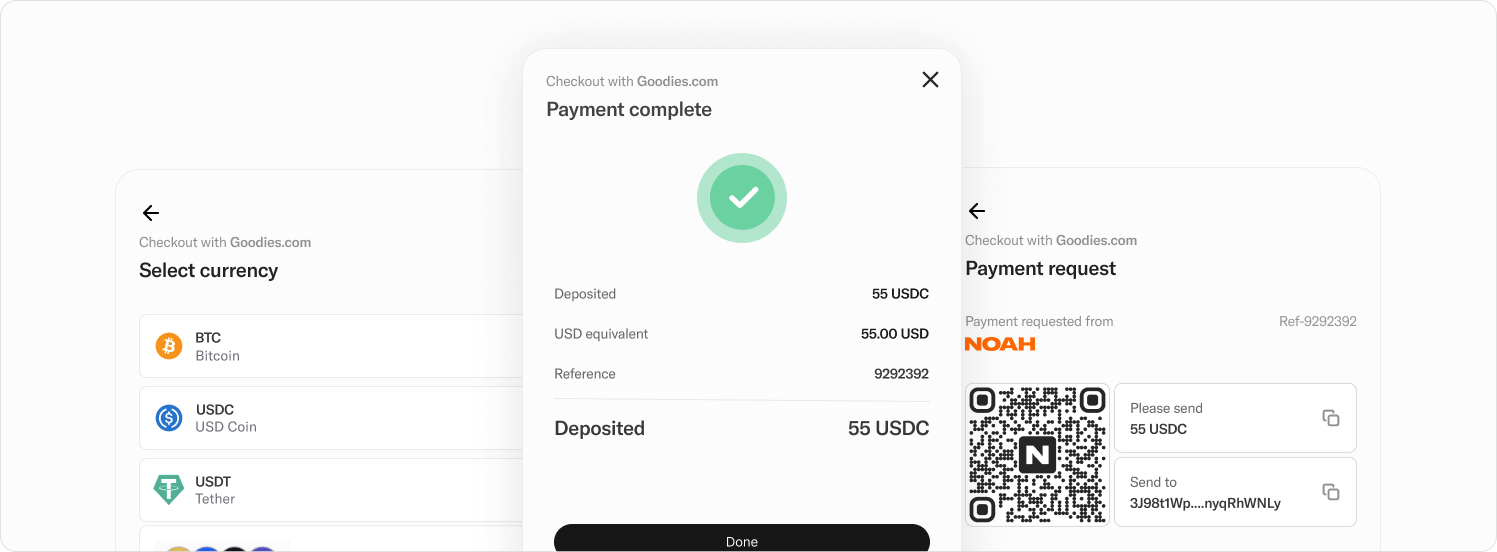
#### Accept deposits in crypto or stablecoins, and automatically payout fiat to a business or customer.
## The Business Challenge
**Manual crypto-to-fiat operations are killing your efficiency:**
- Processing times of 3-7 days frustrate customers and hurt retention
- Manual intervention for every transaction increases operational costs
- Complex multi-step processes create operational bottlenecks
- Limited geographic reach restricts market expansion
- Compliance and regulatory complexity across jurisdictions
- Unpredictable exchange rates and hidden fees impact profitability
## Our Solution
Noah's Automated Payout solution eliminates manual processes by automatically converting crypto deposits into local fiat payments worldwide. When your customer sends cryptocurrency to a designated wallet address, our system instantly triggers a local fiat payout to their chosen destination—no manual intervention required.
**How It Works (Business View):**
1. **Customer deposits crypto** to a unique wallet address you provide
2. **System automatically detects** the deposit and verifies the sender
3. **Smart payment rules** instantly trigger the appropriate fiat payout
4. **Local currency is delivered** to your customer via their preferred method
5. **You receive notifications** at each step for complete visibility
Our solution leverages Noah's payments processing platform to detect when crypto or stablecoins arrive in your account and automatically trigger fiat payouts through our Global Payouts network. Your business creates smart rules that generate unique deposit addresses for chosen currencies, which can be displayed to customers as QR codes or blockchain addresses.
## Key Business Benefits
### Operational Efficiency
- **Eliminate manual processing**: Reduce staff time spent on routine transactions
- **24/7 automated operations**: Process payments around the clock without human oversight
- **Instant settlements**: Funds available immediately in your Noah account or settle instantly on blockchain
- **Single integration**: One system handles global payouts across 60+ countries
- **Automatic disbursement**: Transactions trigger automatically based on customer deposits
- **Flexible settlement options**: Choose instant settlements from your reserve balance or direct from customer crypto deposits
### Cost Reduction
- **Lower operational costs**: Reduce transaction processing costs
- **Transparent pricing**: Real-time exchange rates aligned with mid-market rates from top currency exchanges
- **Customizable fee structure**: Fully or partially absorb costs, or pass fees to customers
- **No hidden charges**: Complete fee transparency upfront with real-time estimates
### Customer Experience
- **Faster payouts**: Same-day or instant delivery vs. traditional 3-7 day processing
- **Global reach**: Serve customers in 60+ countries with local payment methods
- **Multiple payout options**: Bank transfers, mobile money, digital wallets, cash pickup
- **Real-time tracking**: Customers see their transaction status instantly
- **Simplified experience**: QR codes and blockchain addresses make deposits easy
### Business Growth
- **Market expansion**: Enter new geographic markets without local banking relationships
- **Competitive advantage**: Offer faster, cheaper payouts than competitors
- **Scalable operations**: Handle volume growth without proportional staff increases
- **Risk management**: Built-in compliance and fraud protection
- **Global access**: One integration unlocks all available jurisdictions throughout our growing network
## Use Cases by Industry
### Digital Marketplaces
**Challenge**: Paying sellers globally while managing currency conversion and compliance
**Solution**: Sellers receive crypto from buyers, automatically converted to local currency
**Benefit**: Expand globally without complex multi-currency banking relationships
### Cryptocurrency Exchanges
**Challenge**: Customers want fast fiat withdrawals to local payment methods
**Solution**: Instant crypto-to-fiat conversion with direct delivery to customer accounts
**Benefit**: Improve customer satisfaction and reduce support ticket volume
### Gaming & Entertainment Platforms
**Challenge**: Distributing winnings or payments to global user base
**Solution**: Automated payouts to winners in their preferred local currency and method
**Benefit**: Enhance user experience while reducing operational complexity
### Remittance Services
**Challenge**: Expensive traditional correspondent banking for cross-border transfers
**Solution**: Crypto-enabled transfers with local currency delivery
**Benefit**: Reduce transfer costs while improving speed
## Smart Payment Rules System
Our automated system uses intelligent payment rules that consist of three components working together:
- **Triggers**: Activated when crypto or fiat lands in your Noah accounts (specifically crypto deposits in this case)
- **Conditions**: Requirements that must be met for actions to execute, such as identifying transactions by source wallet address
- **Actions**: Financial transactions, notifications, or service calls executed when triggers and conditions activate successfully
This flexible framework supports various business use cases and can be configured to match your specific operational requirements.
## Implementation Overview
### Business Requirements
- **Timeline**: 2-4 weeks from contract to go-live
- **Resources**: Minimal technical resources required for integration
- **Training**: Standard onboarding process for your operations team
- **Compliance**: Noah handles regulatory requirements across all jurisdictions
### Setup Process
**Prepare Your Payout:**
- Add recipients to our system with simplified identity or business details
- Select payout country and currency to see compatible payment channels with fees and settlement times
- Configure payment details through our dynamic forms or provide existing customer payment data
- Review real-time currency exchange estimates that can be presented to customers with or without fees
**Create Your Smart Rules:**
- Set up rules using your prepared payout session details
- Configure triggers and conditions to identify inbound crypto deposits by source wallet address
- Add actions specifying your chosen payout methods
- Receive deposit addresses that can be rendered as QR codes or copied for customer deposits
- Get webhook notifications when customers make deposits and when payout transactions are created
### What We Handle
- **Regulatory compliance** across all supported markets with simplified KYC processing
- **Currency exchange** at competitive mid-market rates
- **Local payment processing** via established banking partnerships
- **Customer verification** and KYC requirements (choose between customer KYC-share or utilize Noah's global compliance framework)
- **Risk monitoring** and fraud prevention
- **24/7 system monitoring** and support
- **Complete transaction reconciliation** through business dashboard
### What You Control
- **Fee structure**: Choose how to handle transaction costs
- **Payment rules**: Configure automatic triggers based on your business logic
- **Customer communication**: Maintain your brand throughout the process
- **Settlement preferences**: Instant settlements or reserve balance funding
## Integration Options
### White-Label Solution
Our Automated Payouts are offered as a comprehensive white-labeled solution providing maximum flexibility:
- **Complete control**: Full control of user flows and branding within your application
- **Single integration**: Integrate with one back-end endpoint to accept fiat payments via bank transfers
- **Seamless experience**: Easy addition of fiat payment capabilities to your existing platform
## Global Coverage & Payment Methods
### Supported Payment Methods
- **Bank Transfer**: Direct deposits to customer accounts
- **Real-Time Payment Systems**: Instant transfers like PIX, UPI, and other regional systems
- **Mobile Money**: Popular across African and Asian markets
- **Digital Wallets**: PayPal and regional wallet providers
- **Cash Pick-Up**: Physical locations for unbanked populations
- **Card Payouts**: Direct to debit/credit cards (available via Hosted Offramp)
- **ACH, Wire, RTP & FedNow**: Popular across US markets
### Supported Cryptocurrencies & Networks
:::tip
#### Sandbox Cryptocurrency Naming Convention
Be aware that CryptoCurrencies used in the **Sandbox** always have a `_TEST` suffix, such as BTC_TEST and USDC_TEST.
:::
### Supported Countries & Currencies
Our solution currently supports **60+ countries** across four major regions. Additional countries and currencies are available for card payouts via Hosted Offramp.
#### Asia-Pacific (APAC)
| Currency | Country |
| -------- | ------------ |
| AUD | Australia |
| NZD | Cook Islands |
| FJD | Fiji |
| HKD | Hong Kong |
| INR | India |
| IDR | Indonesia |
| MYR | Malaysia |
| NZD | New Zealand |
| PHP | Philippines |
| WSM | Samoa |
| SGD | Singapore |
| KOR | South Korea |
| THB | Thailand |
| TOP | Tonga |
| AED | UAE |
| VUV | Vanuatu |
#### Africa
| Currency | Country |
| -------- | --------------------- |
| XOF | Benin |
| XAF | Chad |
| XOF | Cote D'Ivoire |
| ETB | Ethiopia |
| XAF | Gabon |
| GHS | Ghana |
| MWK | Malawi |
| NGN, USD | Nigeria |
| RWF | Rwanda |
| SLL | Sierra Leone |
| ZAR | South Africa |
| XAF | The Republic of Congo |
| UGX | Uganda |
#### Europe
| Currency | Country |
| -------- | -------------- |
| EUR | Austria |
| EUR | Belgium |
| EUR | Croatia |
| CZK | Czech Republic |
| DKK | Denmark |
| EUR | Estonia |
| EUR | Finland |
| EUR | France |
| EUR | Germany |
| EUR | Greece |
| EUR | Ireland |
| EUR | Italy |
| EUR | Latvia |
| EUR | Lithuania |
| EUR | Luxembourg |
| EUR | Netherlands |
| NOK | Poland |
| EUR | Portugal |
| RON | Romania |
| EUR | Slovakia |
| EUR | Slovenia |
| EUR | Spain |
| SEK | Sweden |
| CHF | Switzerland |
| TRY | Turkey |
| GBP | United Kingdom |
#### Latin America (LATAM)
| Currency | Country |
| -------- | -------------- |
| USD | United States |
| ARS | Argentina |
| BRL | Brazil |
| CLP | Chile |
| COP | Colombia |
| DOP | Dominican Rep. |
| USD | Ecuador |
| MXM | Mexico |
| PYG | Paraguay |
| PEN | Peru |
| UYU | Uruguay |
## Pricing & Business Model
### Transparent Fee Structure
- **No setup fees**: Start processing immediately
- **Competitive exchange rates**: Mid-market rates with minimal spread aligned with top currency exchanges
- **Flexible cost allocation**: Fully or partially absorb fees or pass to customers
- **Volume discounts**: Pricing scales with your transaction volume
- **Real-time estimates**: Present accurate costs to customers including or excluding fees
### Revenue Impact
- **Increase profit margins**: Lower processing costs improve bottom line
- **Expand addressable market**: Serve customers in previously inaccessible regions
- **Improve customer lifetime value**: Faster, cheaper service increases retention
- **Reduce operational expenses**: Automation cuts manual processing costs
## Risk Management & Compliance
### Regulatory Coverage
- **Licensed operations**: Noah maintains licenses across supported jurisdictions
- **Compliance monitoring**: Automated AML/KYC checks on all transactions
- **Regulatory reporting**: We handle required reporting to local authorities
- **Risk assessment**: Continuous monitoring for suspicious activity
- **Global compliance framework**: Utilize Noah's licensing framework for customer KYC collection
### Business Protection
- **Transaction monitoring**: Real-time fraud detection and prevention
- **Customer verification**: Identity checks prevent unauthorized transactions
- **Audit trails**: Complete transaction history for regulatory compliance
- **Insurance coverage**: Protection against operational risks
## Getting Started
### Evaluation Process
1. **Business consultation**: Discuss your specific use case and requirements
2. **Technical assessment**: Review integration requirements and timeline
3. **Pilot program**: Start with limited volume to validate the solution
4. **Full deployment**: Scale to production volumes with ongoing support
### Next Steps
- **Schedule a demo**: See the solution in action with your specific use case
- **Review pricing**: Get custom pricing based on your expected volume
- **Plan integration**: Develop implementation timeline with our team
- **Start pilot**: Begin processing transactions within 2-4 weeks
**Ready to transform your crypto-to-fiat operations?** Contact our business development team to schedule a consultation and see how Noah's Automated Payout solution can drive growth for your business.
_For technical integration details, see your [Automated Payout Journey](../recipes/payout/automated-payouts.md)._
---
## Payin via Virtual Account
Transform your fiat-to-crypto operations with Noah's Virtual Account solution. Accept bank transfer payments in local currency and receive instant settlement in cryptocurrency—eliminating conversion delays while significantly reducing operational costs compared to traditional crypto onramps.
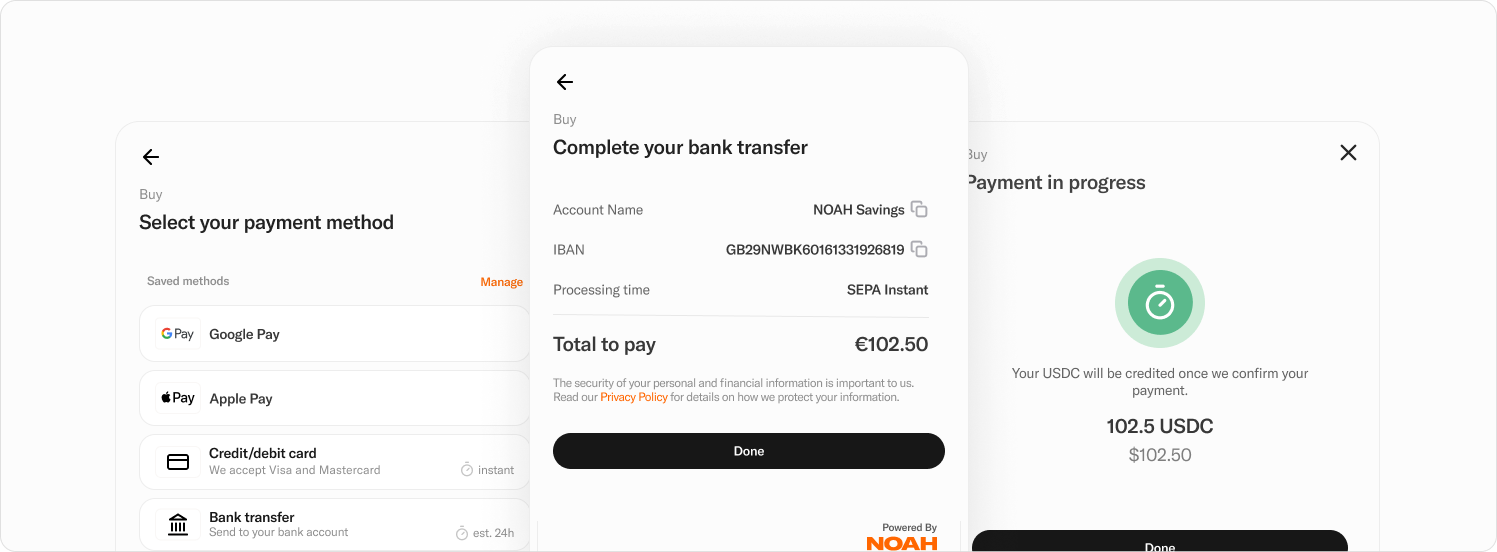
#### Accept bank transfer payments in fiat and receive immediate settlement in crypto.
## The Business Challenge
**Traditional fiat-to-crypto conversion is holding back your growth:**
- Complex multi-step processes confuse customers and increase drop-off rates
- Manual reference codes create errors, failed transactions, and customer support headaches
- Delayed settlements tie up working capital for days
- High conversion fees eat into profit margins
- Limited payment methods restrict customer acquisition
- Manual reconciliation increases operational overhead and error rates
## Our Solution
Noah's Virtual Account solution automates fiat-to-crypto conversion by providing each customer with a unique bank account number (IBAN, ACH routing) for direct deposits. When customers send fiat to their dedicated account, our system automatically converts it to your chosen cryptocurrency and settles instantly to your business account—with optional automatic fee deduction.
**How It Works (Business View):**
1. **Generate unique account** for each customer (IBAN for EUR, ACH routing for USD)
2. **Customer deposits fiat** directly to their dedicated bank account number
3. **Automatic conversion** to your specified cryptocurrency at real-time market rates
4. **Instant settlement** to your Noah business account with optional fee withholding
5. **Optional auto-withdrawal** to customer's external wallet if required
6. **Complete reconciliation** through webhooks and business dashboard
Our Bank Onramp Workflow executes cost-optimized transactions in a seamless automated sequence, with your system notified at each step through webhooks for complete visibility and control.
## Key Business Benefits
### Customer Experience Excellence
- **Eliminate drop-off**: Unique account numbers remove reference code confusion, significantly reducing abandonment
- **Faster transactions**: Direct bank transfers are familiar and trusted by customers
- **Error reduction**: No manual reference entry eliminates most transaction errors
- **Simplified refunds**: Dedicated accounts make refund processing instant and automatic
- **Trusted payment methods**: Bank transfers provide security and familiarity customers expect
### Operational Efficiency
- **Automated processing**: End-to-end workflow requires zero manual intervention
- **Instant settlements**: Funds available immediately rather than traditional multi-day delays
- **Simplified reconciliation**: Unique accounts make transaction matching effortless
- **Reduced support tickets**: Fewer errors mean substantially fewer customer service inquiries
- **Single integration**: One endpoint handles the entire conversion workflow
### Revenue Optimization
- **Automatic fee collection**: System withholds your service fees during conversion
- **Real-time pricing**: Mid-market exchange rates maximize conversion value
- **Lower operational costs**: Automation significantly reduces processing costs
- **Improved margins**: Transparent fee structure and automatic collection improve profitability
- **Available fee withdrawal**: Accumulated service fees can be withdrawn anytime
### Business Growth
- **Market expansion**: Support customers across 27 European countries via SEPA
- **Scalable operations**: Handle volume growth without proportional staff increases
- **Competitive advantage**: Offer superior user experience vs. traditional onramps
- **Brand control**: White-label solution maintains your customer relationship
## Use Cases by Industry
### Cryptocurrency Exchanges
**Challenge**: Customers need simple, reliable ways to deposit fiat and receive crypto
**Solution**: Unique bank accounts for each customer eliminate reference codes and errors
**Benefit**: Reduce customer onboarding friction and support costs substantially
### Gaming & NFT Platforms
**Challenge**: Players want easy fiat-to-crypto conversion to purchase in-game assets
**Solution**: Seamless bank transfer to crypto conversion with automatic wallet delivery
**Benefit**: Increase conversion rates and significantly reduce payment abandonment
### Investment Platforms
**Challenge**: Investors need reliable, cost-effective ways to fund crypto portfolios
**Solution**: Direct bank deposits with instant crypto settlement and fee transparency
**Benefit**: Attract traditional investors comfortable with bank transfers
### E-commerce Platforms
**Challenge**: Accept fiat payments while settling in crypto for international expansion
**Solution**: Traditional payment experience with crypto settlement benefits
**Benefit**: Access global markets while maintaining crypto treasury advantages
## Virtual Account Workflow System
Our automated Bank Onramp Workflow provides a comprehensive payment solution through intelligent automation:
**Unique Account Assignment**: Each customer receives dedicated bank account details (IBAN for EUR, ACH routing for USD), eliminating reference codes and associated errors.
**Automated Conversion Process**: Deposited fiat is automatically converted to your specified stablecoin or cryptocurrency using real-time market rates from top exchanges.
**Flexible Settlement Options**:
- Crypto remains in your Noah business account for immediate use
- Optional automatic withdrawal to customer's external wallet addresses
- Configurable fee withholding from converted cryptocurrency
**Complete Transparency**: Full workflow visibility through webhooks and reconciliation via Noah's business dashboard.
## Implementation Overview
### Business Requirements
- **Timeline**: 1-2 weeks from contract to go-live for white-label integration
- **Resources**: Minimal technical resources required for single endpoint integration
- **Compliance**: Noah handles banking relationships and regulatory requirements
- **Training**: Standard onboarding process for your operations team
### Integration Options
**White-Label Integration**
- **Complete control**: Full control of user flows and branding within your application
- **Single endpoint**: Integrate with one back-end call to handle entire conversion workflow
- **Custom experience**: Seamlessly add fiat-to-crypto capabilities to existing platform
- **Brand maintenance**: Maintain customer relationships throughout the process
**Hosted Onramp Interface**
- **Streamlined setup**: Consumer-friendly interface guides users through bank transfer process
- **Multiple payment methods**: Access to additional fiat payment options beyond bank transfers
- **Reduced development**: Minimal integration effort for immediate market access
- **Enhanced features**: Leverage broader payment ecosystem for comprehensive solutions
### What We Handle
- **Banking relationships**: Established connections with financial institutions across supported regions
- **Regulatory compliance**: Full compliance framework across all supported jurisdictions
- **Currency exchange**: Real-time conversion at competitive mid-market rates
- **KYC processing**: Choose between customer KYC-share or utilize Noah's global compliance framework
- **Transaction monitoring**: Automated fraud detection and prevention
- **Settlement processing**: Instant crypto settlement and optional auto-withdrawals
### What You Control
- **Fee structure**: Configure service fee percentages and collection methods
- **Customer experience**: Design user flows that match your brand and requirements
- **Settlement preferences**: Choose to hold crypto or auto-withdraw to external wallets
- **Notification handling**: Receive real-time webhooks for complete workflow visibility
## Supported Payment Methods & Coverage
### Current Fiat Payment Methods
- **EUR/SEPA Bank Transfer**: Live across 27 European countries
- **US ACH / Wire Transfers**: Live across North American markets
### Supported Cryptocurrencies & Networks
:::tip
#### Sandbox Cryptocurrency Naming Convention
Be aware that CryptoCurrencies used in the **Sandbox** always have a `_TEST` suffix, such as BTC_TEST and USDC_TEST.
:::
### European Market Coverage (SEPA)
Currently supporting **27 European countries** with EUR bank transfer capabilities:
**Western Europe**: Austria, Belgium, France, Germany, Ireland, Italy, Luxembourg, Netherlands, Spain
**Northern Europe**: Denmark, Estonia, Finland, Latvia, Lithuania, Sweden
**Central Europe**: Croatia, Czech Republic, Hungary, Poland, Slovakia, Slovenia
**Southern Europe**: Bulgaria, Cyprus, Greece, Malta, Portugal, Romania
_US ACH and Wire transfer support is available to enable North American market access._
## Pricing & Business Model
### Transparent Fee Structure
- **Low-code integration**: Single endpoint significantly reduces development costs
- **Real-time exchange rates**: Mid-market rates aligned with top currency exchanges
- **Automatic fee collection**: System handles service fee deduction and accumulation
- **No hidden charges**: Complete fee transparency with real-time pricing
- **Instant settlement**: No working capital delays or additional financing costs
### Revenue Optimization
- **Configurable service fees**: Set fee amounts automatically collected during conversion
- **Immediate availability**: Accumulated fees available for withdrawal anytime
- **Improved margins**: Lower operational costs and automated collection increase profitability
- **Reduced processing costs**: Significant savings vs. traditional conversion methods
- **Enhanced customer lifetime value**: Better experience increases retention and transaction volume
## Risk Management & Compliance
### Regulatory Framework
- **Banking partnerships**: Established relationships with licensed financial institutions
- **Compliance coverage**: Full regulatory compliance across all supported jurisdictions
- **KYC flexibility**: Choose customer KYC-share model or utilize Noah's compliance framework
- **Transaction monitoring**: Automated AML and fraud detection systems
- **Audit capabilities**: Complete transaction trails for regulatory reporting
### Business Protection
- **Error reduction**: Unique accounts eliminate most transaction errors and disputes
- **Automated reconciliation**: Simplified accounting and financial reporting
- **Fraud prevention**: Real-time monitoring and automated risk assessment
- **Refund automation**: Streamlined refund processing reduces operational burden
- **Insurance coverage**: Protection against operational and technical risks
## Getting Started
### Evaluation Process
1. **Business consultation**: Discuss your specific conversion requirements and volume projections
2. **Technical assessment**: Review integration approach and timeline requirements
3. **Pilot program**: Start with limited customer segment to validate performance
4. **Full deployment**: Scale to complete customer base with ongoing optimization
### Implementation Steps
1. **Choose integration type**: White-label vs. hosted solution based on your requirements
2. **Configure workflow**: Set up conversion currencies, fee structures, and settlement preferences
3. **Integrate endpoint**: Single API integration for complete workflow automation
4. **Test and validate**: Comprehensive testing with sample transactions
5. **Go live**: Launch with full customer access and monitoring
### Next Steps
- **Schedule a demo**: See the solution in action with your specific use case
- **Review technical requirements**: Assess integration effort and timeline
- **Pilot planning**: Design limited rollout to validate business impact
- **Contract and launch**: Begin processing within 1-2 weeks
**Ready to eliminate fiat-to-crypto friction?** Contact our business development team to schedule a consultation and see how Noah's Virtual Account solution can accelerate your customer acquisition and reduce operational costs.
_For technical integration details, see your [Payin via Virtual Account Journey](../recipes/payin/bank-onramp-us.md)._
---
## Global Payout
Transform your crypto-to-fiat distribution with Noah's Global Payout solution. Convert cryptocurrency to over 120 fiat currencies and deliver payments through local methods worldwide—from bank transfers to mobile money—eliminating complex international banking relationships while reducing settlement times from days to minutes.
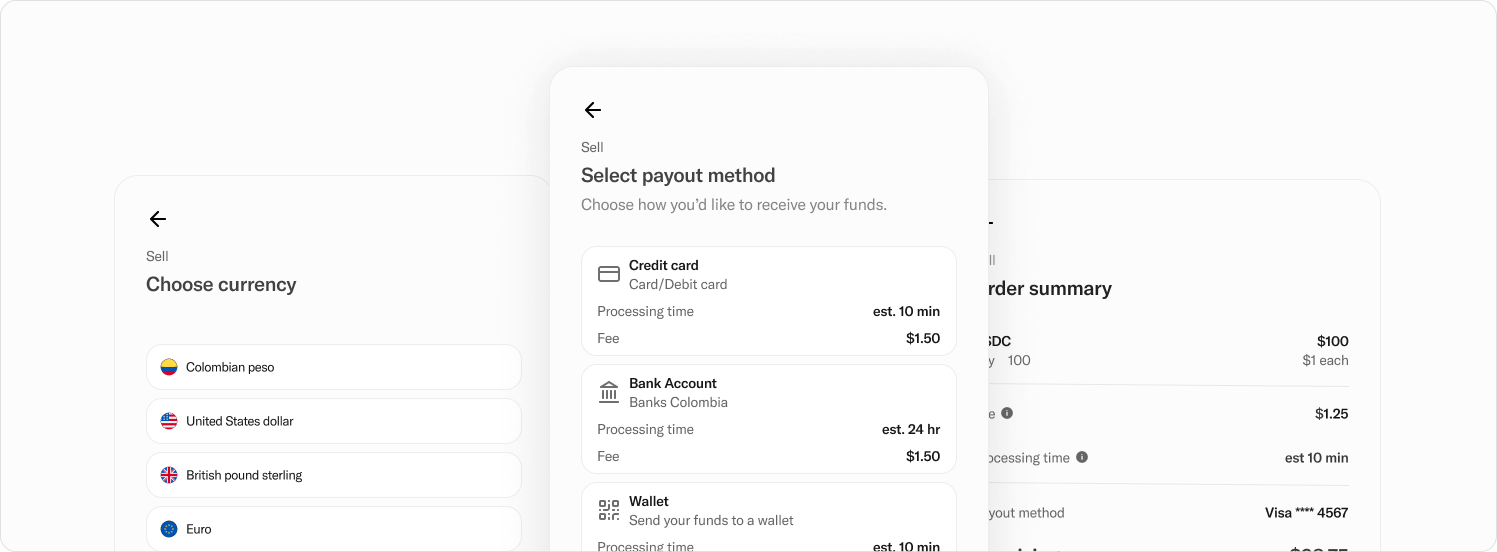
#### Convert crypto and stablecoins to fiat, and payout through local payment methods.
## The Business Challenge
**Global crypto-to-fiat distribution is limiting your reach:**
- Complex international banking relationships restrict market expansion
- Multiple payment provider integrations create operational overhead
- Manual currency conversion processes delay settlements and increase costs
- Limited local payment options exclude large customer segments
- Compliance complexity across jurisdictions creates legal risks
- High cross-border transfer fees eat into profit margins
- Inconsistent settlement times frustrate customers and partners
## Our Solution
Payouts API can facilitate first or third party transactions to businesses and customers, supporting a range of usecases such as offramping, remittance and B2B settlements. The [Reliance Model](../getting-started/kyc#reliance-model) allows your business to share KYC and KYB data with Noah to remove the need for redundant resubmission of information. As an alternative to the Reliance Model, use the [Standard Model](../getting-started/kyc#standard-model), in support of which a [Hosted Onboarding journey](../recipes/onboarding/hosted-onboarding.md) is provided.
Noah's Global Payout solution provides instant crypto-to-fiat conversion with delivery through local payment methods across 60+ countries. Convert your cryptocurrency holdings to local currencies and distribute payments via the most appropriate channels for each region—bank transfers, mobile money, digital wallets, or cash pickup—all through a single integration.
**How It Works (Business View):**
1. **Add recipients** with simplified identity or business details
2. **Select destination** country and currency to see available payment channels
3. **Choose optimal method** based on lowest fees, fastest settlement, or balanced options
4. **Get real-time pricing** with transparent exchange rates and fee breakdowns
5. **Submit payout request** with instant settlement and automated processing
6. **Track completion** through notifications and comprehensive dashboard reconciliation
Our solution supports both first-party and third-party transactions for offramping, remittances, and B2B settlements, with flexible funding from your crypto accounts or triggered automatically by customer deposits.
## Key Business Benefits
### Global Market Access
- **Universal reach**: Serve customers across 60+ countries with local payment preferences
- **Local expertise**: Native payment methods for each region increase acceptance rates
- **Single integration**: One system replaces multiple regional payment providers
- **Market expansion**: Enter new territories without establishing local banking relationships
- **Competitive positioning**: Offer superior payment options vs. competitors limited to traditional methods
### Operational Efficiency
- **Automated processing**: End-to-end conversion and distribution without manual intervention
- **Instant settlements**: Funds delivered through local systems rather than slow international transfers
- **Dynamic forms**: Automated field management across hundreds of payment method requirements
- **Simplified reconciliation**: Complete transaction tracking through unified dashboard
- **Flexible funding**: Choose direct crypto settlement or customer-triggered transactions
### Cost Optimization
- **Transparent pricing**: Real-time exchange rates aligned with mid-market rates
- **Fee flexibility**: Absorb costs or pass fees to customers based on your business model
- **Reduced overhead**: Eliminate multiple payment provider relationships and associated costs
- **Lower settlement costs**: Local payment networks reduce traditional correspondent banking fees
- **Optimized routing**: System recommends lowest-cost channels for each transaction
### Customer Experience
- **Familiar payment methods**: Local options customers trust and understand
- **Faster delivery**: Regional payment systems offer same-day or instant settlement
- **Global consistency**: Unified experience regardless of recipient location
- **Multiple options**: Bank transfers, mobile money, digital wallets, cash pickup
- **Real-time transparency**: Customers see exact costs and delivery timeframes upfront
## Use Cases by Industry
### Cryptocurrency Exchanges
**Challenge**: Customers need fast, reliable fiat withdrawals to local payment methods globally
**Solution**: Instant crypto conversion with delivery through preferred local channels
**Benefit**: Expand customer base globally while reducing withdrawal processing complexity
### Remittance Services
**Challenge**: High costs and slow settlement times for cross-border money transfers
**Solution**: Crypto-enabled transfers with local currency delivery via mobile money and bank transfers
**Benefit**: Compete with traditional remittance providers while offering superior speed and cost
### Gig Economy Platforms
**Challenge**: Paying freelancers and contractors worldwide through diverse payment preferences
**Solution**: Automated crypto-to-fiat conversion with local delivery methods for each region
**Benefit**: Attract global talent by offering payment methods that work in their local markets
### E-commerce Marketplaces
**Challenge**: Settling with sellers across multiple countries using different payment systems
**Solution**: Convert marketplace crypto revenues to local currencies via appropriate regional methods
**Benefit**: Enable truly global marketplace operations without complex multi-currency banking
### Gaming & Entertainment
**Challenge**: Distributing winnings and payments to global user base efficiently
**Solution**: Automated payouts to winners in their preferred local currency and payment method
**Benefit**: Enhance user experience while simplifying international payment operations
## Global Payout Workflow System
Our comprehensive payout system provides intelligent routing and optimization capabilities:
**Recipient Management**: Add recipients using simplified identity verification, with support for both individual consumers and business entities through our Reliance Model for KYC data sharing.
**Channel Optimization**: Select optimal payment channels based on your priorities—lowest settlement time, lowest fees, or balanced options—with real-time comparison data.
**Dynamic Forms**: Automatically render appropriate payment forms for each method, eliminating the complexity of managing hundreds of form fields across different payment systems.
**Real-Time Pricing**: Receive instant currency exchange estimates that can be presented to customers with or without fees, depending on your business model.
**Flexible Settlement**: Fund payouts through instant settlements from your crypto reserves or enable customer-triggered transactions from designated blockchain addresses.
**Complete Reconciliation**: Track and manage all transactions through comprehensive business dashboard with detailed reporting capabilities.
## Implementation Overview
### Business Requirements
- **Timeline**: 2-3 weeks from contract to go-live for white-label integration
- **Resources**: Single API integration replaces multiple payment provider relationships
- **Compliance**: Noah handles regulatory requirements across all supported jurisdictions
- **Training**: Comprehensive onboarding for your operations and finance teams
### Integration Options
**White-Label Integration**
- **Complete control**: Full control over user flows and branding within your application
- **Direct backend integration**: Single API endpoint handles global payout capabilities
- **Custom experience**: Seamlessly integrate fiat payout capabilities into existing platform
- **Brand consistency**: Maintain customer relationships throughout the entire process
**Hosted Offramp Interface**
- **Streamlined setup**: Consumer-friendly interface guides users through payout process
- **Minimized drop-off**: Optimized user experience reduces abandonment rates
- **Multiple payment methods**: Access to comprehensive range of regional payment options
- **Reduced development**: Minimal integration effort for immediate global market access
**Dashboard Payouts**
- **Direct processing**: Execute payouts directly through business dashboard
- **Manual control**: Perfect for B2B settlements and ad-hoc payments
- **Batch processing**: Handle multiple payouts efficiently through unified interface
### What We Handle
- **Global compliance**: Regulatory adherence across all supported jurisdictions
- **Payment relationships**: Established connections with local payment providers worldwide
- **Currency exchange**: Real-time conversion at competitive rates from top exchanges
- **KYC processing**: Comprehensive identity verification or data sharing through Reliance Model
- **Risk monitoring**: Automated fraud detection and transaction monitoring
- **Settlement processing**: Instant crypto conversion and local currency delivery
### What You Control
- **Fee structure**: Choose to absorb costs or pass fees to customers
- **Payment routing**: Select optimal channels based on your business priorities
- **Customer experience**: Design user flows that match your brand requirements
- **Funding preferences**: Direct crypto settlement or customer-triggered transactions
- **Reconciliation approach**: Access detailed transaction data for accounting and reporting
## Supported Payment Methods & Coverage
### Local Payment Methods
- **Bank Transfer**: Direct deposits to local bank accounts
- **Real-Time Payment Systems**: Instant transfers (PIX, UPI, FasPayments, etc.)
- **Mobile Money**: Popular across African and Asian markets
- **Digital Wallets**: PayPal, regional wallet providers, and local solutions
- **Cash Pick-Up**: Physical locations for unbanked populations
- **Card Payouts**: Direct to debit/credit cards (available via Hosted Offramp)
- **ACH, Wire, RTP & FedNow**: Popular across US markets
### Supported Cryptocurrencies & Networks
:::tip
#### Sandbox Cryptocurrency Naming Convention
Be aware that CryptoCurrencies used in the **Sandbox** always have a `_TEST` suffix, such as BTC_TEST and USDC_TEST.
:::
### Global Market Coverage
Currently supporting **over 120 fiat currencies** across **60+ countries** in four major regions. Additional countries and currencies available for card payouts via Hosted Offramp.
#### Asia-Pacific (APAC)
| Currency | Country |
| -------- | ------------ |
| AUD | Australia |
| NZD | Cook Islands |
| FJD | Fiji |
| HKD | Hong Kong |
| INR | India |
| IDR | Indonesia |
| MYR | Malaysia |
| NZD | New Zealand |
| PHP | Philippines |
| WSM | Samoa |
| SGD | Singapore |
| KOR | South Korea |
| THB | Thailand |
| TOP | Tonga |
| AED | UAE |
| VUV | Vanuatu |
#### Africa
| Currency | Country |
| -------- | --------------------- |
| XOF | Benin |
| XAF | Chad |
| XOF | Cote D'Ivoire |
| ETB | Ethiopia |
| XAF | Gabon |
| GHS | Ghana |
| MWK | Malawi |
| NGN, USD | Nigeria |
| RWF | Rwanda |
| SLL | Sierra Leone |
| ZAR | South Africa |
| XAF | The Republic of Congo |
| UGX | Uganda |
#### Europe
| Currency | Country |
| -------- | -------------- |
| EUR | Austria |
| EUR | Belgium |
| EUR | Croatia |
| CZK | Czech Republic |
| DKK | Denmark |
| EUR | Estonia |
| EUR | Finland |
| EUR | France |
| EUR | Germany |
| EUR | Greece |
| EUR | Ireland |
| EUR | Italy |
| EUR | Latvia |
| EUR | Lithuania |
| EUR | Luxembourg |
| EUR | Netherlands |
| NOK | Poland |
| EUR | Portugal |
| RON | Romania |
| EUR | Slovakia |
| EUR | Slovenia |
| EUR | Spain |
| SEK | Sweden |
| CHF | Switzerland |
| TRY | Turkey |
| GBP | United Kingdom |
#### Latin America (LATAM)
| Currency | Country |
| -------- | -------------- |
| USD | United States |
| ARS | Argentina |
| BRL | Brazil |
| CLP | Chile |
| COP | Colombia |
| DOP | Dominican Rep. |
| USD | Ecuador |
| MXM | Mexico |
| PYG | Paraguay |
| PEN | Peru |
| UYU | Uruguay |
## Pricing & Business Model
### Transparent Fee Structure
- **Single integration cost**: Replace multiple payment provider relationships
- **Real-time exchange rates**: Mid-market rates aligned with top currency exchanges
- **Flexible fee allocation**: Absorb costs or pass fees to customers based on your model
- **No hidden charges**: Complete transparency with real-time cost estimates
- **Optimized routing**: System recommends most cost-effective channels for each transaction
### Revenue Impact
- **Reduced operational overhead**: Single integration vs. multiple payment provider relationships
- **Improved margins**: Lower settlement costs and transparent pricing improve profitability
- **Market expansion revenue**: Access previously unreachable customer segments
- **Enhanced customer lifetime value**: Superior payment options increase retention
- **Competitive differentiation**: Offer payment methods competitors cannot match
## Risk Management & Compliance
### Regulatory Framework
- **Global licensing**: Noah maintains compliance across all supported jurisdictions
- **KYC flexibility**: Choose customer data sharing or utilize Noah's compliance framework
- **Transaction monitoring**: Automated AML and fraud detection across all channels
- **Regulatory reporting**: Complete audit trails for compliance requirements
- **Risk assessment**: Continuous monitoring across all payment methods and regions
### Business Protection
- **Multi-channel redundancy**: Alternative payment methods ensure transaction completion
- **Fraud prevention**: Real-time monitoring across all supported channels
- **Transaction guarantees**: Clear settlement timeframes and completion assurance
- **Reconciliation support**: Comprehensive reporting for financial management
- **Insurance coverage**: Protection against operational and technical risks
## Getting Started
### Evaluation Process
1. **Business consultation**: Review your global payment requirements and target markets
2. **Integration assessment**: Evaluate technical requirements and implementation timeline
3. **Market prioritization**: Identify highest-value regions and payment methods for initial launch
4. **Pilot program**: Test with limited markets to validate performance and customer response
5. **Global deployment**: Scale to full market coverage with ongoing optimization
### Implementation Steps
1. **Choose integration approach**: White-label, hosted, or dashboard-based solution
2. **Configure payment channels**: Set up preferred methods and routing rules for each market
3. **Integrate API endpoint**: Single integration for complete global payout capabilities
4. **Test across markets**: Comprehensive testing with various payment methods and currencies
5. **Launch and scale**: Begin processing with full global coverage and monitoring
### Next Steps
- **Schedule a demo**: See the solution in action with your specific global markets
- **Review market coverage**: Assess which regions and payment methods best serve your customers
- **Plan integration**: Develop implementation timeline and market rollout strategy
- **Pilot launch**: Begin processing in priority markets within 2-3 weeks
**Ready to unlock global markets?** Contact our business development team to schedule a consultation and see how Noah's Global Payout solution can accelerate your international expansion while simplifying operations.
\_For technical integration details and API documentation, see your [Global Payouts Journey](../recipes/payout/global-payouts-business.md).
---
## Building with LLMs
## Overview
If you are integrating Noah with the help of a coding agent, you do not have to paste screenshots of
this site into a chat window. Everything here is published in a form an agent can fetch directly.
- **Append `.md` to any URL on this site** to get its Markdown source instead of the rendered page.
- **[`/llms.txt`](pathname:///llms.txt)** is the entry point: a short index of every page plus the
facts about base URLs, authentication and call sequences that are easy to get wrong. It follows
the [llmstxt.org](https://llmstxt.org) convention and is small enough to read in full.
- **[`/llms-full.txt`](pathname:///llms-full.txt)** is every guide concatenated, when you want an
agent to hold the whole set at once.
## Markdown for every page
The page you are reading is at `/recipes/building-with-llms`, and its Markdown is at
[`/recipes/building-with-llms.md`](pathname:///recipes/building-with-llms.md). The same holds for
every guide and every API reference page.
If your client cannot easily change the URL, ask for Markdown by content negotiation instead:
```bash
# Both of these return the same Markdown
curl -H "Accept: text/markdown" https://docs.noah.com/getting-started/quick-start
curl "https://docs.noah.com/getting-started/quick-start?format=md"
```
Ordinary browsers are unaffected — they ask for HTML and get the rendered page. Every page also
declares its Markdown twin in the HTML head, so a crawler can discover it without knowing the rule:
```html
```
The **Copy page** button at the top of each page does the same job interactively. It copies the
page's Markdown, opens it raw, or starts a Claude or ChatGPT conversation already pointed at it.
## The API reference
The reference is published three ways, in increasing order of size:
- [`/api-reference/noah-business-api.md`](pathname:///api-reference/noah-business-api.md) lists
every endpoint with its method and path. Fetch this first to find the endpoint you need.
- Any single endpoint, with its parameters, request fields and responses, is one `.md` away — for
example [`/api-reference/create-sell-transaction.md`](pathname:///api-reference/create-sell-transaction.md).
- [The OpenAPI 3.0 document](pathname:///files/oas-schema.generated.json) is the authoritative
machine-readable description, and the right input for a client generator such as
[openapi-generator](https://openapi-generator.tech) or [oapi-codegen](https://github.com/oapi-codegen/oapi-codegen).
Error responses are the same across every endpoint, so the endpoint pages link to
[Error Responses](../api-concepts/errors.md) rather than repeating the envelope.
## Calling the API from your editor
To let an agent call the sandbox API while it works, install Noah's MCP server: see
[Set Up Noah MCP in Cursor](./mcp-cursor.md). The Markdown explains which sequence of calls a flow
needs; MCP lets the agent run those calls and see real responses — for example querying
`GET /channels/sell` for the country you are building for instead of guessing at channel IDs.
:::caution
Use a Sandbox API key when an agent can make calls on your behalf, and review what it produces.
Sandbox cryptocurrencies carry a `_TEST` suffix, so a flow that runs there cannot move real funds.
:::
---
## Set Up Noah MCP in Cursor
## Overview
**Explore Noah's Business API through natural language.** With the Model Context Protocol (MCP) integration for [Cursor (The AI Code Editor)](https://cursor.com), you can enhance your developer journey by:
- **Asking questions in plain English** about Noah's API and getting instant, contextual responses
- **Exploring API capabilities** without switching between documentation and tools
- **Getting immediate answers** about business profiles, transactions, and payment methods
- **Learning through interaction** as you progress through Noah's developer guides
**Perfect companion for your developer journey.** Instead of constantly referring back to documentation or making manual API calls, simply ask Cursor's AI about Noah's functionality and get the answers you need to keep learning.
**Ready to enhance your development experience?** Let's get you set up in just a few minutes.
---
:::caution
**Important: Always Verify AI Outputs**
- **Double-Check All Results**: AI responses may contain errors or misinterpretations. Always validate API data, and business logic before acting on them.
- **Environment Safety**: Use Sandbox API keys for development and testing. Never use Production keys unless absolutely necessary.
:::
1. Set Up Noah MCP in Cursor
### Prerequisites
You'll need a Business API key from the [Noah Business Dashboard](../getting-started/business-dashboard.md) to get started. Both Production and Sandbox environments are supported.
:::warning
Make sure that your Node version is **20.18.1 or later**. Lower versions are not supported by the Noah MCP Cursor integration described below. When troubleshooting, start by checking your Node version.
:::
### Configure Noah MCP in Cursor
- If not installed, download and install Cursor, start it up, and go to **Settings** | **Cursor Settings**, click **Tools & Integrations**, and then
click **New MCP Server**.
- Copy and paste the content below to define the Noah MCP Server:
```typescript
{
"mcpServers": {
"noah": {
"command": "npx", // or bunx
"args": ["@noah-labs/noah-business-api-mcp"],
"env": {
"NOAH_API_KEY": "your-api-key-here",
}
}
}
}
```
- Note the following settings for the above:
- Required:
- NOAH_API_KEY: API key created in the dashboard.
- Optional:
- NOAH_ENVIRONMENT: Possible values: sandbox, production (default: sandbox).
- NOAH_API_BASE_URL: Base path of the API, e.g., https://api.sandbox.noah.com/v1.
- Check that you see this in the editor area, with your API key replacing the placeholder API text shown below:
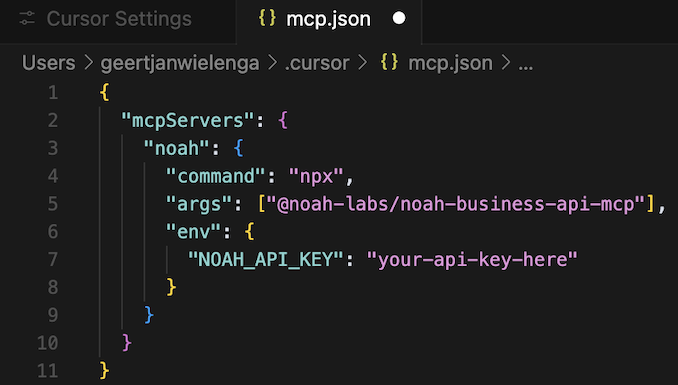
### Enable Noah MCP in Cursor
Switch the enable/disable switch to **on**, so that it is shown in green, together with the available Noah MCP Cursor tools, as shown below.
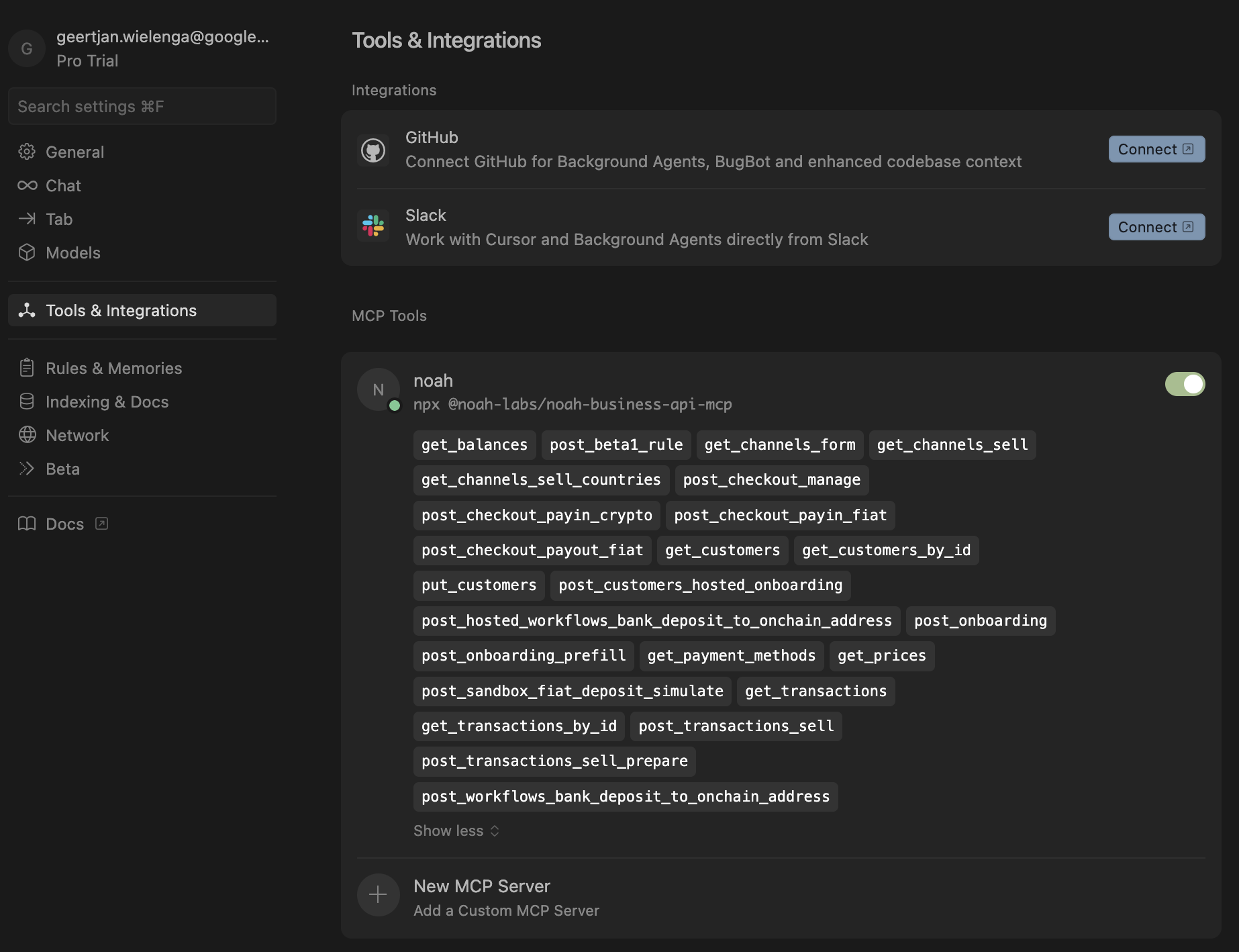
### Verify Your Setup
To confirm Noah MCP is working correctly:
1. **Restart Cursor** after enabling the MCP server
2. **Open a new chat** in Cursor
3. **Test the connection** by asking: `"List my available Noah tools"`
You should see Cursor acknowledge the Noah MCP tools are available. If you encounter issues, check that:
- Your API key is valid and has proper permissions
- Node.js version is 20.18.1 or later
- The MCP server shows as "Connected" in the settings
---
2. Use Cursor AI to Call the Noah Business API
Once your Noah MCP has been set up, open the Cursor chat and try these example prompts:
**Customer Management:**
- `"Create a customer onboarding session for cust1234, with return URL https://example.com for USD and EUR"`
- `"Get payment details for customer cust1234"`
- `"Show me the transaction history for customer xyz789"`
**Payment Operations:**
- `"List all available ACH payout channels"`
- `"Create a new payment method for customer abc123"`
- `"Check the status of payment transaction tx_456"`
**API Exploration:**
- `"What Noah API endpoints are available?"`
- `"Show me how to create a business profile"`
- `"Generate a code example for processing a USD payment"`
Take note of the result returned by Cursor, as shown below.
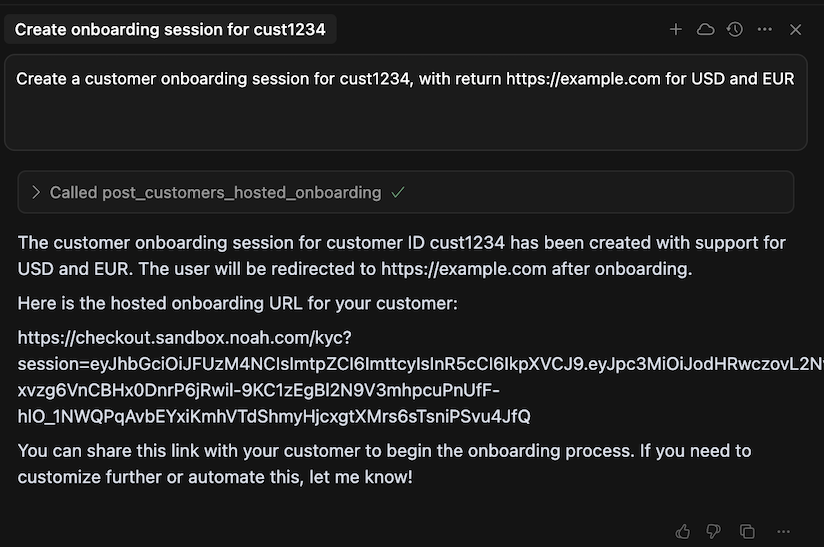
---
:::tip
**Next Steps:**
- Explore the [Noah Business API documentation](../getting-started/business-dashboard.md) for advanced capabilities
- For questions or support, reach out at [business@noah.com](mailto:business@noah.com)
**Troubleshooting:**
- If tools aren't appearing, verify your API key has the correct permissions
- For connection issues, check Node.js version and restart Cursor
- Review the Cursor MCP logs in Settings → Developer Tools for detailed error messages
:::
---
## Accounts
## Overview
Your business's Balances are the total amount of each supported digital currency available in your accounts. You can view these balances by querying the [GET `/balances`](../api-reference/balances) endpoint or by logging into the Business Dashboard.
### Supported Currencies and Networks
Noah supports multiple digital currencies, each available on one or more networks:
## Using Accounts
### View Your Balances
Use the [GET `/balances`](../api-reference/balances) endpoint to retrieve real-time information about the balances in your business accounts, as shown below.
```typescript
curl -L 'https://api.sandbox.noah.com/v1/balances' \
-H 'Accept: application/json' \
-H 'X-Api-Key: '
```
We recommend that you check your balances before initiating any transaction to ensure you have an up-to-date account status.
### Use Balances and Networks
In Noah, USDC balances are considered 'network agnostic' meaning that any inbound or outbound onchain transactions will reflect an overall change to your USDC account balance, reducing the complexity of accessing network-specific balances.
:::tip
For details on Noah's USDC_TEST token, see [Sandbox Testnet Currencies](../api-concepts/testnet-currencies.md).
:::
---
## Address Validation
## Overview
Many Noah API endpoints accept a `StreetAddress` object — for example `PrimaryResidence` on customer prefill and create/update, `RegisteredAddress` on business customers, and billing addresses on checkout sessions.
The OpenAPI schema defines field lengths and which fields are required. Noah also applies additional validation at request time. This page documents those rules so you can validate addresses **before** calling the API.
## Field requirements
| Field | Required | Length | Notes |
| ---------- | -------- | ---------------- | ----------------------------------------------- |
| `Street` | Yes | 2–200 characters | Primary street line |
| `Street2` | No | — | Secondary line (apartment, suite, etc.) |
| `City` | Yes | 1–100 characters | City or town |
| `State` | Yes | 1–100 characters | See [State rules](#state-rules) below |
| `PostCode` | Yes | 1–20 characters | See [Postcode rules](#postcode-rules) below |
| `Country` | Yes | — | ISO 3166-1 alpha-2 code (e.g. `US`, `GB`, `DE`) |
`State` and `PostCode` are **always required**, including for countries that do not use administrative subdivisions or postal codes in everyday addressing. Empty strings and placeholder values are rejected.
## Character set
All `StreetAddress` string fields must be **printable ASCII**. Noah normalises input by removing characters outside the printable ASCII range.
If sanitisation leaves a required field empty (for example, an address written entirely in a non-Latin script with no transliteration), the request fails schema validation. Provide Latin transliterations where your source data uses another script.
## State rules
### United States and Canada
For `Country` `US` or `CA`, `State` must be a valid **ISO 3166-2 subdivision code**:
- **Two uppercase letters** (e.g. `NY`, `TX`, `ON`, `QC`)
- Must match a real subdivision for that country
- Lowercase codes (e.g. `ca`) are rejected
### All other countries
`State` is **free text**. Use the local administrative division name — province, region, county, département, etc. Noah does not validate `State` against ISO 3166-2 outside the US and Canada.
### Countries without states or provinces
If your source data has no subdivision, use the best available real-world value — typically the **city or region name** in `State`. Do not send placeholders such as `NA`, `None`, or `-`.
## Postcode rules
`PostCode` is required for every country. At the `StreetAddress` schema level, Noah checks only that the value is **non-empty** and **at most 20 characters**. There is no per-country postcode format validation on customer or checkout address fields.
Use the postcode format that appears on the customer's official documents or your verified source data.
### Countries without postal codes
If your source system has no postal code for a country, you still must send a non-empty `PostCode`. Use the value your compliance source considers authoritative for that address (for example, a locality code used in that market). **Do not** send generic placeholders such as `00000`, `NA`, `None`, or `Empty`.
:::caution
Sandbox API responses for **bank** addresses (for example virtual account details) may show values such as `00000` in `PostCode`. Those are sandbox artefacts on **response** objects. They are not valid values to send in **request** payloads for customer addresses.
:::
## Payment form addresses
When creating or updating a fiat payment method (for example during a payout), the address fields required by a channel may differ from `StreetAddress`:
- Field names may differ (for example `AccountHolderAddress` with `Address` instead of `Street`)
- A channel's [`FormSchema`](./form-schemas.md) may require a different set of fields
- Additional format rules may apply on top of the base schema
Always retrieve the [`FormSchema`](./form-schemas.md) for the channel you select and validate your payload against that schema before submission.
## Common validation errors
| Symptom | Likely cause |
| ------------------------------------------------------------------------ | ------------------------------------------------------------ |
| `invalid state` on `PrimaryResidence.State` or `RegisteredAddress.State` | Invalid or lowercase ISO 3166-2 code for US/CA |
| Schema validation on `PostCode` or `State` | Empty string, or field became empty after ASCII sanitisation |
| `address could not be converted to ASCII` | Required field contained only non-ASCII characters |
## Related pages
- [Form Schemas](./form-schemas.md) — per-channel payment data requirements
- [Individual Customer Prefill](../recipes/onboarding/individual-customer-prefill.md)
- [Business Customer Prefill](../recipes/onboarding/business-customer-prefill.md)
- [Prefill Customer Details](../../api-reference/prefill-customer-details) — API Reference
- [Create/Update Customer](../../api-reference/create-update-customer) — API Reference
---
## Channels
## Overview
Channels represent a payment route with specific characteristics for processing transactions.
A Channel can be seen as a type of contract where the details are fixed, including fees and transaction limits.
Each Channel is defined by:
- Country
- Fiat Currency
- Payment Method Type
**Important note:** the `Country` code `XX` is used for Channels with multiple compatible countries, these Channels are available internationally.
## Using Channels
### Get Available Countries
To retrieve the list of supported countries and their available fiat currencies, use the [`GET /channels/sell/countries`](../../api-reference/countries) endpoint in the Business API.
```typescript
curl -L 'https://api.sandbox.noah.com/v1/channels/sell/countries' \
-H 'Accept: application/json' \
-H 'X-Api-Key: '
```
### Get Available Channels
Query available channels for a specific country or currency:
To retrieve the list of available channels for a specific country or currency, use the [`GET /channels/sell`](../../api-reference/channels) endpoint in the Business API.
```typescript
curl -L 'https://api.sandbox.noah.com/v1/channels/sell
?Country=GB // Provide country (optional if currency is specified)
&CryptoCurrency=USDC_TEST
&FiatCurrency=EUR // Provide currency (optional if country is specified)
&FiatAmount=1000' // Optional - includes price calculation \
-H 'Accept: application/json' \
-H 'X-Api-Key: '
```
:::tip
For details on the USDC_TEST token, used above, see [Sandbox Testnet Currencies](../api-concepts/testnet-currencies.md).
:::
For each channel returned by the call above, the response body is as follows.
```typescript
{
"Calculated": {
"TotalFee": "2"
},
"Country": "DE",
"FiatCurrency": "EUR",
"FormSchema": {
"$schema": "http://json-schema.org/draft-07/schema#",
"type": "object",
"properties": {
"BankDetails": {
"properties": {
"AccountType": {
"enum": [
"Checking",
"Savings"
],
"title": "Account Type",
"type": "string"
},
"AccountNumber": {
"maxLength": 22,
"minLength": 22,
"pattern": "^DE[0-9]{2}[A-Z0-9]{18}$",
"title": "IBAN",
"type": "string"
}
},
"required": [
"AccountType",
"AccountNumber"
],
"title": "Bank Details",
"type": "object"
}
},
"required": [
"BankDetails"
]
},
"ID": "ebb9736b-08b3-599d-886b-10ee8aea82b5",
"Limits": {
"MinLimit": "1"
},
"PaymentMethodCategory": "Bank",
"PaymentMethodType": "BankSepa",
"ProcessingSeconds": 60,
"Rate": "0.86"
}
```
:::tip
Looking at the above payload, consider the following when you select a channel.
- Transaction limits (`Limits` object).
- Processing time (`ProcessingSeconds`).
- Payment method requirements, some channels may require a Dynamic Form to submit a transaction.
:::
### Get Dynamic Forms
You can retrieve the required form fields for a given channel through two means:
1. **Directly from the Supported Channels Endpoint**. When you query available channels using the [`GET /channels/sell`](../../api-reference/channels) endpoint, the response includes the form schema needed for the selected payment method, as shown above. This method simplifies the process by reducing the number of API calls.
2. **Using the Dynamic Form Endpoint**. After selecting a channel, you can retrieve the required form fields by calling the [`GET /channels/:ChannelID/form`](../../api-reference/dynamic-form) endpoint. This endpoint provides a JSON Form schema specifying the required fields for the selected payment method.
## Code Example
Basic channel retrieval and selection:
```typescript
// 1. Get available countries
const countries = await api.get('/v1/channels/sell/countries');
// 2. Get channels for selected country
const channels = await api.get('/v1/channels/sell', {
params: {
Country: 'GB',
CryptoCurrency: 'BTC',
FiatCurrency: 'GBP',
FiatAmount: '1000',
PageSize: 20,
},
});
// 3. Get form schema for selected channel
const formSchema = await api.get(`/channels/${channelId}/form`);
```
:::tip
**Best Practice 1: Regular Updates**
- Query the available payment channels immediately before displaying them to end users.
- Avoid relying on stale or cached data for prolonged periods — channels and their limits (e.g., max/min transaction amounts) can change frequently.
- Always obtain channel IDs from the Channels API at runtime — they are not suitable for caching or hardcoding.
**Best Practice 2: Error Handling**
- Handle channel disablement gracefully, by attempting to retrieve an equivalent channel.
- Validate transaction amounts against channel limits, before allowing a customer to select a channel.
- Verify all required form fields are available, before allowing a customer to select a channel.
**Best Practice 3: Performance**
- Implement pagination or filtering when listing multiple channels to reduce payload size and improve response times.
- If pricing calculations are required, pass any needed parameters (like `FiatAmount`) in the API request.
:::
## Payin Channels
For payins (fiat → crypto), the channel is determined implicitly by the currency you specify when calling the [POST `workflows/bank-deposit-to-onchain-address`](../../api-reference/convert-fiat-to-crypto) endpoint. Unlike payouts where you query and select from available channels, payins use an orchestrated workflow where Noah assigns the appropriate Virtual Account and payment method based on the customer's eligibility and the requested currency.
| Fiat Currency | Virtual Account Type | Payment Method Type | How It Works |
| ------------- | -------------------- | ------------------- | --------------------------------------------------------------------------------------------------------------------------------------------------------------------- |
| **EUR** | IBAN | `BankSepa` | Customer receives a dedicated IBAN for SEPA deposits |
| **USD** | ACH Routing Number | `BankAch` | Customer receives a dedicated ACH routing/account number. Wire transfers (`BankFedwire`) and international wires (`BankSwift`) are also accepted to the same account. |
To set up a payin channel, call the workflow endpoint with the desired `FiatCurrency`, `CryptoCurrency`, `Network`, and `DestinationAddress`. Noah returns the assigned Virtual Account details (account number, bank code, payment method ID) which you display to your customer.
For step-by-step integration guides, see:
- [Bank Onramp via EUR Virtual Account](../recipes/payin/bank-onramp-eu.md)
- [Bank Onramp via USD Virtual Account](../recipes/payin/bank-onramp-us.md)
### Payin vs. Payout Channel Selection
| Aspect | Payin | Payout |
| --------------------- | ---------------------------------------------------------------------------------------------- | ----------------------------------------------------------------------------------------------------------------------------- |
| **Channel selection** | Implicit - determined by currency and customer eligibility | Explicit - query available channels and select one |
| **API pattern** | Single call to workflow endpoint | Query channels → select → get form → prepare → execute |
| **Payment method** | Assigned by Noah (Virtual Account) | Customer supplies details via Dynamic Form |
| **Endpoint** | [POST `workflows/bank-deposit-to-onchain-address`](../../api-reference/convert-fiat-to-crypto) | [GET `channels/sell`](../../api-reference/channels) + [POST `transactions/sell`](../../api-reference/create-sell-transaction) |
## Payment Method Types
The API uses `PaymentMethodType` values to identify specific payment rails. These appear in channel responses, webhook payloads, and payment method objects throughout the API.
| PaymentMethodType | Description | Currencies | Typical Settlement |
| ----------------- | -------------------------- | ---------- | ------------------ |
| `BankSepa` | SEPA Credit Transfer | EUR | 1-3 business days |
| `BankAch` | ACH transfer (US) | USD | 1-3 business days |
| `BankFedwire` | Fedwire (US domestic wire) | USD | Same day |
| `BankSwift` | SWIFT / International Wire | USD, EUR | 1-5 business days |
Additional payment method types are available across regions, including local bank transfers, mobile money, digital wallets, and card-based methods. The set of available methods is large and changes as new rails are added. Always query the Channels API for the current list.
:::tip
The Channels API is the authoritative source for available payment methods. The table above covers the core banking rails for Virtual Account flows. For the full set of payout methods available in any given country, query the [`GET /channels/sell`](../../api-reference/channels) endpoint at runtime.
:::
Each payment method type belongs to a `PaymentMethodCategory`:
| Category | Description | Form Data |
| -------------- | ------------------------------------------------------------------------ | ----------------------------------------------------------- |
| **Bank** | Bank transfer methods (SEPA, ACH, Fedwire, SWIFT, and local equivalents) | Bank account details (IBAN, routing number, account number) |
| **Card** | Card-based payment methods | Card details (via hosted interface) |
| **Identifier** | Identifier-based methods (e.g. tax ID, phone number, email) | Local identifier as required by the payment rail |
The `FormSchema` returned by a channel tells you exactly which fields to collect for that specific payment method and provider. See [Form Schemas](./form-schemas.md) for details on rendering and submitting form data.
For virtual bank account eligibility by country and rail — covering payin and VA-backed payouts on
SEPA, ACH, Fedwire, FedNow, and SWIFT (generated from channel policy) — see
[Virtual account countries by rail](./supported-fiat-countries.md).
## Related Developer Journeys
- [Form Schemas](./form-schemas.md) — Understanding and using form schemas for automation
- [Dynamic User Interface](./dynamic-ui.md) — Building UIs with dynamic forms
- [Global Payout Journey](../recipes/payout/global-payouts-business.md)
- [Automated Payout](../recipes/payout/automated-payouts.md)
---
## Compliance Freezes, Refunds & Reversals
This page explains how Noah handles compliance freezes, refunds, and reversals across payin and payout flows.
## Compliance Freezes
A compliance freeze occurs when a transaction requires Enhanced Due Diligence (EDD) review before proceeding.
### When Freezes Occur
| Flow | Freeze Point | What Happens |
| -------------------------- | ------------------------ | ------------------------------------------------------------------- |
| **Payin** (Fiat → Crypto) | `FiatDeposit` stage | Fiat is received but not converted to crypto until review completes |
| **Payout** (Crypto → Fiat) | `CryptoSettlement` stage | Crypto is received but not converted and paid out until approved |
### What to Expect During a Freeze
1. **EDD Request**: Noah's Compliance team will request documentation based on your KYC model (Reliance or Standard)
2. **10-Day Window**: Customers have 10 days to provide requested documentation
3. **Resolution**:
- **Approved**: Funds are unfrozen, converted, and sent to the destination
- **Rejected**: Transaction is rejected and funds are automatically refunded
## What Triggers Enhanced Due Diligence
EDD can be triggered by transaction-level conditions, customer risk factors, or a combination of both.
### Transaction-Level Triggers
These thresholds are enforced per Virtual Account currency. When a limit is exceeded, the deposit is frozen at the `FiatDeposit` stage pending review.
| Currency | Single-Transaction Limit | Monthly Aggregate Limit | Third-Party Trigger |
| -------- | ------------------------ | ----------------------- | ------------------------------------------------ |
| **USD** | $10,000 | $20,000 | Non-family third-party deposits exceeding $5,000 |
| **EUR** | €15,000 | €30,000 | - |
For the full guardrails per currency, including third-party deposit rules, see the respective payin recipe: [USD Guardrails](../recipes/payin/bank-onramp-us.md#guardrails), [EUR Guardrails](../recipes/payin/bank-onramp-eu.md#guardrails).
### Customer Risk Triggers
Noah applies Enhanced Due Diligence on B2B2C customers if:
- The customer is identified as a **Politically Exposed Person (PEP)**
- The customer is from a **FATF or EU high-risk third country**
- The customer is from a **highly corrupt country**
- The customer is from a country with a **weak AML/CTF regime**
All jurisdictions that fall under these categories can be found on the official [FATF](https://www.fatf-gafi.org/), [EU](https://finance.ec.europa.eu/financial-crime/anti-money-laundering-and-countering-financing-terrorism_en), and [CPI](https://www.transparency.org/en/cpi) websites.
Additionally, Noah scores customers based on their:
- **Main source of income** - whether the customer has a regular and reliable source of income
- **Employment status**
- **Industry of employment**
- **Transactional forecasts**
### How to Handle EDD in Your Integration
When EDD is triggered, your system will observe the `FiatDeposit` webhook remaining in `Pending` status beyond normal processing times. The deposit is frozen - no conversion or withdrawal occurs until review completes.
- **Reliance Model**: Noah contacts your compliance team to request documentation (Proof of Source of Funds, full KYC pack, purpose of transaction).
- **Standard Model**: Noah contacts your customer directly via their email address on file (Proof of Source of Funds, purpose of transaction).
Your customer has **10 days** to provide the requested documentation. If approved, the deposit is unfrozen and processing continues. If documents are not provided within the window, the transaction is rejected and funds are automatically refunded.
**UX recommendation**: If a `FiatDeposit` remains in `Pending` status for longer than the expected settlement time for the payment method (see [FiatDeposit Event](./webhooks/fiat-deposits.md#expected-settlement-times)), display a message to your user indicating that their deposit is under review and they may be contacted for additional documentation.
## Refunds
Refunds can happen as a result of an EDD/Compliance rejection.
### Refund Destinations by Flow
| Scenario | Refund Destination |
| -------------------------------------------------------- | ---------------------------- |
| **Payin** (Fiat deposit) | Depositing Payment Method |
| **Payout** (Prefunded dashboard balance) | Custodian Stablecoin Account |
| **Payout** (Customer crypto deposit / automated payouts) | Sending Crypto Wallet |
### Refund Lifecycle
Refunds progress through the following statuses:
| Status | Description |
| ------------ | ------------------------------------------- |
| `Pending` | Refund requested, being processed |
| `Successful` | Funds returned to destination |
| `Failed` | Refund could not complete (contact support) |
You will receive `FiatDeposit` webhook updates as the refund status changes. The `Refunds` array in the webhook payload contains the complete refund history.
:::note
The status values above apply to **payin** (`FiatDeposit`) refunds. On **payout** flows, refund entries in a `Transaction` webhook's `Refunds` array use the transaction status set instead — `Pending`, `Settled`, `Failed`.
:::
## Reversals
Reversals are distinct from refunds.
### Key Difference: Refunds vs. Reversals
| Aspect | Refund | Reversal |
| ------------- | -------------------------- | ---------------------------------------- |
| **When** | Before transaction settles | After transaction has settled |
| **Trigger** | EDD/Compliance rejection | Regulatory or banking-level intervention |
| **Frequency** | Standard process | Rare |
### Transaction Finality
Noah transactions are processed with **finality** on `Settled` status for both payins and payouts. Once a transaction reaches `Settled`, under normal circumstances the transaction is complete.
### When Reversals Happen
Reversals occur in rare cases, typically where a banking rail returns a payout after it has already settled (for example, a Swift wire return issued by the receiving bank).
When a reversal occurs, Noah automatically creates a **new** transaction that credits the original crypto-asset back to the customer's account. The original transaction is **not** modified — it remains `Settled`. You receive a standard `transaction` webhook event for the new reversal transaction. The `Reverses` field on that transaction contains the ID of the original transaction, which is the signal to treat it as a reversal.
### Reversal Webhook Payload
```json
{
"EventType": "transaction",
"EventVersion": 1,
"Occurred": "2026-06-23T14:00:00Z",
"UserID": "",
"Data": {
"ID": "",
"CryptoCurrency": "USDC",
"Direction": "In",
"Network": "OffNetwork",
"Status": "Settled",
"Amount": "123.45",
"RequestedAmount": {
"FiatCurrency": "USD",
"Amount": "100.00"
},
"Reverses": "",
"Created": "2026-06-23T14:00:00Z"
}
}
```
Key fields on a reversal transaction:
| Field | Value | Notes |
| ----------------- | -------------- | --------------------------------------------------------------------------------------------------- |
| `Direction` | `"In"` | Crypto credited back to the customer |
| `Network` | `"OffNetwork"` | Internal ledger credit — no on-chain movement |
| `Status` | `"Settled"` | Delivered already settled; no intermediate `Pending` state |
| `Reverses` | UUID | ID of the original sell/payout transaction — **the key signal that this is a reversal** |
| `Amount` | Decimal | Crypto amount at market rate at time of reversal; may differ from the original send amount |
| `RequestedAmount` | Object | The fiat amount returned by the banking rail (e.g. `{ "FiatCurrency": "USD", "Amount": "100.00" }`) |
### Two-Step Reversal Process for Bank Returns
When a banking rail returns a **settled** payout (e.g. a SWIFT wire return), Noah does not modify the original transaction. Instead, the return is processed as **two sequential transactions**:
#### Step 1: Internal Reversal
Noah creates an internal ledger reversal that credits the returned fiat amount back to the customer's account. This is the transaction described in the [Reversal Webhook Payload](#reversal-webhook-payload) above — it carries the `Reverses` field and is `OffNetwork` / `Direction: "In"`.
#### Step 2: On-Chain Crypto Return
After the internal reversal, Noah creates a **second** transaction that sends the crypto-asset back to the customer's original sending wallet on-chain. This transaction carries the `AdjustmentFor` object instead of `Reverses`:
```json
{
"EventType": "transaction",
"EventVersion": 1,
"Occurred": "2026-06-23T15:30:00Z",
"UserID": "",
"Data": {
"ID": "",
"CryptoCurrency": "USDC",
"Direction": "Out",
"Network": "Ethereum",
"Status": "Settled",
"Amount": "123.43",
"AdjustmentFor": {
"AdjustedTransactionID": "",
"AdjustmentID": "",
"Reason": "Refund"
},
"PublicID": "0xabc123... (on-chain tx hash)",
"Created": "2026-06-23T15:30:00Z"
}
}
```
Key fields on the crypto return transaction:
| Field | Value | Notes |
| ------------------------------------- | --------------- | ------------------------------------------------------------------------ |
| `Direction` | `"Out"` | Crypto sent from Noah back to the customer's wallet |
| `Network` | e.g. `Ethereum` | On-chain network — this is a real blockchain transaction |
| `Status` | `"Settled"` | On-chain tx confirmed |
| `AdjustmentFor.AdjustedTransactionID` | UUID | ID of the **original crypto deposit** (the inbound leg), not the sell tx |
| `AdjustmentFor.Reason` | `"Refund"` | Signals this is a refund of the original deposit |
| `PublicID` | Hash | On-chain transaction hash — visible to the customer on the blockchain |
#### How to Link All Three Transactions
A bank return involves three transactions linked together. Use the `Orchestration.RuleExecutionID` (shared across all legs) or the field references below to correlate them:
| Transaction | Key Field | Points To |
| ---------------------------------------- | ------------------------------------- | --------------------------- |
| Original sell/payout (`Out`, Settled) | `Refunds[].RefundID` | The refund entry on this tx |
| Internal reversal (`In`, OffNetwork) | `Reverses` | Original sell/payout tx |
| On-chain crypto return (`Out`, on-chain) | `AdjustmentFor.AdjustedTransactionID` | Original crypto deposit tx |
:::important
**Do not treat `Settled` as purely terminal for payout flows.** A settled payout can still be reversed by a bank return days later. Your integration should handle `Transaction` webhooks with either `Reverses` or `AdjustmentFor.Reason=Refund` by reversing the corresponding entry on your side.
:::
#### Amount Differences
The crypto amount returned on-chain may differ from the original deposit amount. This is expected:
- **Fiat return fees**: The banking rail may deduct return/correspondent-bank fees from the fiat amount before returning it.
- **Market rate at time of return**: The crypto amount is calculated at the market rate at the time of the reversal, not the original exchange rate.
- **Network fees**: On-chain gas fees are deducted from the returned crypto amount.
For example, a 1,234.67 USD payout may return as 1,194.67 USD (after ~40 USD in SWIFT return fees), which converts to a slightly different crypto amount than the original deposit.
## Related Documentation
- [FiatDeposit Event](webhooks/fiat-deposits) Webhook details for payin deposits
- [Transaction Event](webhooks/transactions) Webhook details for payouts
- [Bank Onramp US Guardrails](../recipes/payin/bank-onramp-us#guardrails) Deposit source restrictions and EDD process
- [Bank Onramp EU Guardrails](../recipes/payin/bank-onramp-eu#guardrails) Deposit source restrictions and EDD process
---
## Dynamic User Interface
## Overview
Our **Dynamic UI API** gives you full control over your frontend while removing the complexity of handling conditional, ever-evolving payment flows.
With a **single API**, you can:
- **Build and own your UI**, while still benefiting from backend-driven logic. The API adjusts dynamically to each user’s context, returning only the **steps and data strictly required** — and never asking for data we already have.
- **Use our hosted UI**, which is powered by the exact same API. This is the fastest way to get started, and because the logic is shared, you can switch to your own UI later without re-integrating.
- **See it in action** — our own app uses this API too. You can demo or even dogfood the full user experience exactly as your customers would.
## Using Dynamic UI
### Powered by Dynamic Channels
Behind the scenes, everything is driven by our **channel framework** — a flexible model that lets us continuously integrate and expose new payment methods and routing options.
That means we can offer your business (and your users) **faster, cheaper, and more efficient payment paths** — without needing you to rebuild your frontend or integration every time something changes.
That’s where **forms** become critical: they act as a dynamic contract between our system and your UI. If a channel requires different data tomorrow — say, a new field for a payout method or a different step for KYC — you won’t need to update your code. The API will simply reflect the new requirements, and your integration will adapt automatically.
:::tip
For more details on channels, see [Channels](../api-concepts/channels).
:::
### Flexible by Design
You don’t have to go all-in from day one:
- Start with our hosted UI to test demand or get to market quickly.
- Then gradually migrate one flow at a time — for example, keep using our onboarding and KYC experience while taking full control of the payouts UI.
Dynamic UIs are designed to **simplify**, not complicate:
- No need to model business rules or flow logic.
- No need to handle ever-changing requirements.
- Just render what’s needed, when it’s needed.
For full control and auditability, we also publish **static schemas** to a [public GitHub repository](https://github.com/noah-labs/public-schemas) so you can always know exactly what to expect — even if you choose to build everything yourself.
:::tip
For more details on schemas, see [Form Schemas](./form-schemas.md). For the API reference, see [Dynamic Form API Reference](../../api-reference/dynamic-form).
:::
## Related Developer Journeys
- [Global Payouts Developer Journey](../recipes/payout/global-payouts-business.md)
- [Automated Payout Developer Journey](../recipes/payout/automated-payouts.md)
---
## Error Responses
## Overview
When a Business API request fails, the response body is a JSON `Error` object with a consistent shape across every endpoint. The `Type` field tells you the category of failure and maps to the HTTP status code:
| `Type` | HTTP | When it happens |
| --------------------- | ----- | ----------------------------------------------------------------------- |
| `InvalidMessage` | `400` | The request is malformed or a field fails validation. |
| `Unauthorized` | `401` | The API key is missing, invalid, or expired, or request signing failed. |
| `Forbidden` | `403` | A policy or compliance rule blocks the action. |
| `ResourceNotFound` | `404` | A referenced resource does not exist. |
| `InsufficientBalance` | `402` | The account balance is below the requested amount. |
| `Unexpected` | `500` | An unexpected server-side error occurred. |
## Error envelope
Every error response includes these fields:
| Field | Description |
| ------------------ | ------------------------------------------------------------------------------------------------------------------------- |
| `Type` | Error category: `InvalidMessage`, `Forbidden`, `InsufficientBalance`, `ResourceNotFound`, `Unauthorized`, or `Unexpected` |
| `Action` | Internal action name for the operation that failed (for example `create customer`, `withdraw`) |
| `Detail` | Human-readable summary of the failure |
| `Instance` | Unique ID for this occurrence — use it to correlate a failure with server logs when contacting support |
| `RequestExtension` | Field-level validation details (see below) |
| `DenyExtension` | Policy or compliance denial details (see below) |
### RequestExtension
Field-level problems are returned in `RequestExtension.Body` as an array of items:
| Field | Description |
| ------------- | ------------------------------------------------------------------------------------------ |
| `Field` | Dot path to the request field (for example `CustomerID`, `Form.BankDetails.AccountNumber`) |
| `Reason` | Why the field failed — see the values below |
| `Description` | What failed and, where possible, how to fix it |
`Reason` is one of:
| Reason | Meaning |
| --------------------- | ------------------------------------------------------------------------------------------------------------------------- |
| `SchemaValidation` | Value fails the JSON Schema or a business rule (wrong type, length, pattern, required). |
| `IntegrityValidation` | Cross-field or state conflict (for example a referenced resource does not exist, or a form session expired). |
| `NotSupported` | The value is well-formed but not supported for this operation (for example an IBAN that does not support SEPA transfers). |
| `SelfReference` | The request points back at the caller in a way that is not allowed (for example withdrawing to your own deposit address). |
On an `InvalidMessage` response with `RequestExtension`, read each item's `Reason` and follow the matching remediation path:
| `Reason` | What it means | What to do |
| --------------------- | -------------------------------------------------------------------------------- | ----------------------------------------------------------------------------------------- |
| `NotSupported` | The value is valid but not supported for the selected channel or payment method. | [Form field not supported](#form-field-not-supported) |
| `SchemaValidation` | The value fails schema or business-rule constraints. | Fix the field using `Description` and the channel or onboarding JSON Schema. |
| `IntegrityValidation` | A referenced resource is missing or a session has expired. | Resolve the state conflict (for example create the resource or start a new form session). |
| `SelfReference` | The request references the caller in a disallowed way. | Use a different destination that is not owned by the caller. |
### DenyExtension
Policy denials include `Reason` (`InsufficientPermissions`, `Compliance`, `AccountStatus`, or `VerificationRequired`), `Description`, and the `Principal` / `Resource` involved.
On a `Forbidden` response, read each `DenyExtension` item's `Reason` and follow the matching remediation path:
| `Reason` | What it means | What to do |
| ------------------------- | ------------------------------------------------------------------------------------------------------------------- | ----------------------------------------------------------------- |
| `Compliance` | A policy or regulatory rule blocks the action (for example channel policy, travel rule, or geographic restriction). | [Channel and compliance denials](#channel-and-compliance-denials) |
| `VerificationRequired` | Identity or account verification is incomplete. Check `Principal.Type` to see whose verification is missing. | [Verification required](#verification-required) |
| `InsufficientPermissions` | The feature, currency, or network is not enabled for your business profile. | [Insufficient permissions](#insufficient-permissions) |
| `AccountStatus` | The account is suspended or otherwise restricted. | [Account status](#account-status) |
For `VerificationRequired`, `Principal.Type` determines the next step:
| `Principal.Type` | Who needs verification | What to do |
| ---------------- | ------------------------------- | ---------------------------------------------------------------------------------------------------------- |
| `Customer` | The end customer | Initiate or resume [hosted onboarding](/api-reference/create-onboarding-session) |
| `User` | Your business profile (KYB/KYC) | Complete verification through the Business Dashboard or your Noah representative — not customer onboarding |
## Form field errors
Some endpoints accept a `Form` object for payment or onboarding data. Those fields are validated against a **JSON Schema** — either a channel form schema for payouts or an onboarding schema for KYC.
The set of possible form field errors is **not fixed globally**. It depends on the channel, payment method, country, provider, and schema version. The same field can produce different `Description` text on different channels.
To reduce opaque server-side failures:
1. Retrieve the relevant schema before submitting (for example [GET `/channels/{ChannelID}/form`](/api-reference/dynamic-form) for payout forms).
2. Validate `Form` client-side against that JSON Schema.
3. On `400`, read `RequestExtension.Body` and map each `Field` to your UI controls to show inline errors.
Published schemas are available at [github.com/noah-labs/public-schemas](https://github.com/noah-labs/public-schemas). See [Form Schemas](./form-schemas.md) for details.
:::tip
`SchemaValidation` errors on form fields usually mirror the schema's constraints and `errorMessage` values. Treat the schema as the source of truth for field-level messages, not a static error catalogue in these docs.
:::
## Multi-step responses are not errors
Some form-session flows return HTTP `200` with a `NextStep` object when additional acknowledgement or data is required (for example VoP or CoB). This is a **continuation**, not a failure. Call the same endpoint again with the returned `FormSessionID` and the fields requested in `NextStep.Schema`.
## Examples
The examples below illustrate common error shapes across the API. `Action`, `Detail`, and field paths vary by endpoint.
### Required field missing
```json
{
"Type": "InvalidMessage",
"Action": "create customer",
"Detail": "invalid request",
"Instance": "9bbe5ce1-aa6a-4650-ae2b-084f4e1f229c",
"RequestExtension": {
"Body": [
{
"Field": "CustomerID",
"Reason": "SchemaValidation",
"Description": "required"
}
]
}
}
```
### Form field validation
Invalid value for a schema-backed form field (exact `Description` varies by channel):
```json
{
"Type": "InvalidMessage",
"Action": "validate form",
"Detail": "invalid request",
"Instance": "a1b2c3d4-e5f6-7890-abcd-ef1234567890",
"RequestExtension": {
"Body": [
{
"Field": "Form.BankDetails.AccountNumber",
"Reason": "SchemaValidation",
"Description": "must match pattern \"^[0-9]{8,17}$\""
}
]
}
}
```
### Field not supported
Returned when a value is well-formed but not supported for the selected channel — for example a bank account whose IBAN does not support SEPA:
```json
{
"Type": "InvalidMessage",
"Action": "validate sepa support",
"Detail": "invalid request",
"Instance": "d0e1f2a3-b4c5-6789-0abc-def123456789",
"RequestExtension": {
"Body": [
{
"Field": "Form.BankDetails.AccountNumber",
"Reason": "NotSupported",
"Description": "IBAN does not support SEPA transfers"
}
]
}
}
```
### Self reference
Returned when the request points back at the caller in a way that is not allowed — for example withdrawing to your own deposit address:
```json
{
"Type": "InvalidMessage",
"Action": "workflow rest post bank to address",
"Detail": "invalid request",
"Instance": "e1f2a3b4-c5d6-7890-abcd-ef1234567890",
"RequestExtension": {
"Body": [
{
"Field": "DestinationAddress.Address",
"Reason": "SelfReference",
"Description": "can not use own address for withdrawal action"
}
]
}
}
```
### Resource not found
```json
{
"Type": "ResourceNotFound",
"Action": "fetch customer",
"Detail": "customer not found",
"Instance": "b2c3d4e5-f6a7-8901-bcde-f12345678901",
"RequestExtension": {
"Body": [
{
"Field": "CustomerID",
"Reason": "IntegrityValidation",
"Description": "not found"
}
]
}
}
```
### Insufficient balance
```json
{
"Type": "InsufficientBalance",
"Action": "withdraw balance check",
"Detail": "available balance less than requested amount",
"Instance": "c3d4e5f6-a7b8-9012-cdef-123456789012"
}
```
### Unauthorized
Returned when the API key is missing, invalid, or expired, or when request signing fails:
```json
{
"Type": "Unauthorized",
"Action": "api authorizer",
"Detail": "api key has expired",
"Instance": "f6a7b8c9-d0e1-2345-f012-456789012345"
}
```
### Compliance denial
```json
{
"Type": "Forbidden",
"Action": "create customer account",
"Detail": "Customer is in compliance review with the external provider",
"Instance": "d4e5f6a7-b8c9-0123-def0-234567890123"
}
```
Channel policy denials may also include structured `DenyExtension` details:
```json
{
"Type": "Forbidden",
"Action": "evaluate channel policy",
"Detail": "access denied",
"Instance": "e5f6a7b8-c9d0-1234-ef01-345678901234",
"DenyExtension": [
{
"Reason": "Compliance",
"Description": "Channel policy denied use of this channel for the counterparty",
"Principal": {
"ID": "cust_123",
"Type": "Customer",
"Subtype": "Individual"
},
"Resource": {
"ID": "00000000-0000-0000-0000-000000000123",
"Type": "Channel"
}
}
]
}
```
Feature or currency restrictions use the same `DenyExtension` shape with `Reason: InsufficientPermissions`:
```json
{
"Type": "Forbidden",
"Action": "authorise client",
"Detail": "user does not have permission to use this resource",
"Instance": "a7b8c9d0-e1f2-3456-7890-abcdef012345",
"DenyExtension": [
{
"Reason": "InsufficientPermissions",
"Description": "feature Sell with currency USDC",
"Principal": {
"ID": "user_456",
"Type": "User",
"Subtype": "Business"
},
"Resource": {
"ID": "00000000-0000-0000-0000-000000000456",
"Type": "Channel"
}
}
]
}
```
## What to do next
The error envelope tells you **what** failed. This section describes **what to do next** for common denial and validation errors. Do not retry the same request blindly — resolve the underlying condition first.
Start with the top-level `Type` field, then inspect the nested reason if present:
| `Type` | Where to look next | What to do |
| --------------------- | -------------------------------- | ------------------------------------------------------------ |
| `Forbidden` | `DenyExtension[].Reason` | See the [DenyExtension](#denyextension) table above |
| `InsufficientBalance` | — (no nested reason) | [Insufficient balance](#insufficient-balance) |
| `InvalidMessage` | `RequestExtension.Body[].Reason` | See the [RequestExtension](#requestextension) table above |
| `ResourceNotFound` | `RequestExtension.Body[].Field` | Confirm the referenced resource exists and the ID is correct |
| `Unauthorized` | `Detail` | Check API key validity, expiry, and request signing |
### Summary
| Error | Suggested action |
| ---------------------------------------------------------------------------------- | -------------------------------------------------------------------------- |
| `Forbidden` + `DenyExtension` (`Compliance` / channel policy) | Fetch customer details and check verification statuses before retrying |
| `Forbidden` + `DenyExtension` (`VerificationRequired`, `Principal.Type: Customer`) | Initiate or resume customer onboarding; check `OnboardingStatus` |
| `Forbidden` + `DenyExtension` (`VerificationRequired`, `Principal.Type: User`) | Complete business-profile verification (KYB/KYC) |
| `Forbidden` + `DenyExtension` (`InsufficientPermissions`) | Confirm the feature or currency is enabled for your business profile |
| `Forbidden` + `DenyExtension` (`AccountStatus`) | Contact your Noah representative — account is suspended or restricted |
| `InsufficientBalance` | Fund the account or use `DelayedSell: true` on prepare (where applicable) |
| `InvalidMessage` + `NotSupported` (form field) | Select a different channel or payment method that supports the destination |
### Channel and compliance denials
When you receive `Forbidden` with `DenyExtension` where `Reason` is `Compliance`, the customer or payout destination failed a policy check — for example compliance review, a blocked destination country, or incomplete verification for the requested fiat option.
1. Call [GET `/customers/{CustomerID}`](/api-reference/customer-by-id) and inspect `Verifications`.
2. Check `Verifications.Status` (`Pending`, `Approved`, or `Declined`) and per-entity status in `EntityVerifications`.
3. If `ActionsRequired` is present, direct the customer back through [hosted onboarding](/api-reference/create-onboarding-session).
4. Subscribe to or consult [Customer webhooks](./webhooks/customer.md) for status changes instead of polling.
Do not retry the transaction until the relevant verification is `Approved` for the fiat option you need.
### Verification required
When `DenyExtension.Reason` is `VerificationRequired`, additional identity or account verification is required before the operation can proceed. Check `Principal.Type` to determine whose verification is missing:
**Customer principal** (`Principal.Type` is `Customer`): the end customer must complete verification.
1. Call [POST `/onboarding/{CustomerID}`](/api-reference/create-onboarding-session) to create or resume a hosted onboarding session.
2. Redirect the customer to the returned `HostedURL`.
3. Check `OnboardingStatus` and `MissingSteps` in the response to see what still needs to be submitted.
4. Wait for [Customer webhooks](./webhooks/customer.md) confirming `Approved` before retrying.
See [Hosted Onboarding](../recipes/onboarding/hosted-onboarding.md) for the full flow.
**User principal** (`Principal.Type` is `User`): the API-calling business user or profile must complete verification — for example business KYB is incomplete.
1. Review the `Description` field for context (for example `The current user KYC status does not allow this action`).
2. Complete your business onboarding and KYB through the Business Dashboard or with your Noah representative.
### Insufficient permissions
When `DenyExtension.Reason` is `InsufficientPermissions`, your business profile or API key is not authorized for the requested resource — for example a currency or feature named in `Description` (such as `feature Sell with currency USDC`).
1. Review the `Description` field in `DenyExtension` for the restricted feature or currency.
2. Confirm the capability is enabled for your business profile with your Noah representative.
3. If you need a different currency or payment route, use [GET `/channels/sell`](/api-reference/channels) to find an enabled alternative.
### Account status
When `DenyExtension.Reason` is `AccountStatus`, the account is suspended or otherwise restricted and cannot perform the requested action.
1. Review the `Description` field for context (for example `Account suspended`).
2. Contact your Noah representative to understand the restriction and the steps required to restore access.
3. Do not retry the request until the account status is resolved.
### Insufficient balance
When `Type` is `InsufficientBalance` (HTTP `402`), the account does not have enough crypto balance to cover the requested amount.
1. Check current balances with [GET `/balances`](/api-reference/balances).
2. Fund the account with additional crypto, or reduce the requested amount.
3. On sell prepare flows, set `DelayedSell: true` on [POST `/transactions/sell/prepare`](/api-reference/prepare-sell-transaction) to defer the balance check until the final sell request — useful when preparing a payout before the customer has deposited.
### Form field not supported
When `RequestExtension.Body` contains `Reason: NotSupported` on a form field, the value is valid but not supported for the selected channel — for example an IBAN that does not support SEPA.
1. Read the `Description` for the specific constraint.
2. Ask the customer for an alternative payment method or destination that the channel supports.
3. Use [GET `/channels/sell`](/api-reference/channels) or [GET `/channels/sell/countries`](/api-reference/countries) to find a channel that supports the destination.
4. If using a dynamic form, fetch a fresh schema with [GET `/channels/{ChannelID}/form`](/api-reference/dynamic-form) for the new channel before resubmitting.
---
## Form Schemas
## Overview
Form schemas define the data required to complete a payment through a specific channel. They are standard [JSON Schema](https://json-schema.org/) definitions that you can use to:
- **Validate payment data** before submission
- **Generate forms** using libraries like [JSON Forms](https://jsonforms.io/) or [react-jsonschema-form](https://github.com/rjsf-team/react-jsonschema-form)
- **Build automated integrations** that programmatically populate payment details
We publish all form schemas to a public GitHub repository for full transparency and offline access.
:::tip
View our published schemas at [github.com/noah-labs/public-schemas](https://github.com/noah-labs/public-schemas)
:::
## Understanding Channels and Schemas
A **Channel** represents a specific payment route, uniquely identified by:
| Parameter | Description | Example |
| --------------------- | -------------------------------- | -------------------------------------- |
| **Country** | ISO 3166-1 alpha-2 country code | `BR`, `DE`, `US` |
| **PaymentMethodType** | The payment method | `BankSepa`, `BankAch`, `IdentifierPix` |
| **Direction** | Transaction direction | `In` (deposit), `Out` (payout) |
| **Provider** | The underlying payment processor | (internal) |
### Multiple Channels per Route
For a given Country + PaymentMethodType + Direction, there may be **multiple channels** available — one or more per payment provider. These channels are not always identical and may differ in:
| Aspect | Description |
| ------------------- | -------------------------------------------------------------------- |
| **Features** | One provider may support QR codes while another supports identifiers |
| **Required Data** | Some providers require more customer information than others |
| **Cost** | Fee structures vary between providers |
| **Processing Time** | Settlement times differ |
Each channel has its own form schema, tailored to that provider’s specific data requirements. We normalise field names and structures across providers wherever possible, but each schema is deliberately scoped to the minimum information required for that provider.
That means you’ll never be asked to collect extra data just because another provider (or channel) needs it. If a particular provider requires additional information, those fields will appear only in that provider’s form schema, never as superfluous requirements applied across the board.
## Retrieving Form Schemas
### Option 1: Via the Channels API (Recommended)
When you query available channels, each channel includes its `FormSchema` directly in the response:
```bash
curl -L 'https://api.sandbox.noah.com/v1/channels/sell?Country=BR&FiatCurrency=BRL&CryptoCurrency=USDC_TEST' \
-H 'Accept: application/json' \
-H 'X-Api-Key: '
```
Response:
```json
{
"Items": [
{
"ID": "channel-uuid-1",
"Country": "BR",
"FiatCurrency": "BRL",
"PaymentMethodType": "IdentifierPix",
"FormSchema": {
"$schema": "http://json-schema.org/draft-07/schema#",
"type": "object",
"properties": {
"PixKey": {
"type": "string",
"title": "PIX Key"
}
},
"required": ["PixKey"]
},
"Limits": { "MinLimit": "1" },
"ProcessingSeconds": 300
},
{
"ID": "channel-uuid-2",
"Country": "BR",
"FiatCurrency": "BRL",
"PaymentMethodType": "IdentifierPix",
"FormSchema": {
"$schema": "http://json-schema.org/draft-07/schema#",
"type": "object",
"properties": {
"PixKey": { "type": "string", "title": "PIX Key" },
"TaxId": { "type": "string", "title": "Tax ID" },
"FullName": { "type": "string", "title": "Full Name" }
},
"required": ["PixKey", "TaxId", "FullName"]
},
"Limits": { "MinLimit": "10" },
"ProcessingSeconds": 600
}
]
}
```
In this example, two PIX channels are available for Brazil — one requires only a PIX key, while the other requires additional customer information. Use the schema from whichever channel you select.
### Option 2: Via Published Schema Files
:::warning Important
The published schemas are provided for **informational purposes** and are subject to change. We strongly recommend integrating dynamically using the [Channels API](#option-1-via-the-channels-api-recommended) rather than hardcoding against the published schema files. This ensures your integration automatically adapts to any schema updates.
:::
For offline access or pre-integration planning, schemas are published to our [public-schemas repository](https://github.com/noah-labs/public-schemas):
```
public-schemas/
├── prod/
│ ├── README.md # Lookup table
│ ├── a1b2c3d4.json # Schema files
│ └── ...
└── sandbox/
├── README.md
└── ...
```
Each environment folder contains:
1. **README.md** — A lookup table mapping channels to schema files:
| Country | Payment Method | Direction | Provider | Schema |
| ------- | -------------- | --------- | --------- | --------------- |
| BR | IdentifierPix | Out | Provider1 | ./a1b2c3d4.json |
| BR | IdentifierPix | Out | Provider2 | ./e5f6g7h8.json |
2. **Schema JSON files** — Each file includes the schema plus metadata. The `id` in channel metadata is for reference only. Always obtain channel IDs from the Channels API at runtime—they are not suitable for caching or hardcoding.
```json
{
"metadata": {
"channels": [{
"id": "channel-uuid-1",
"country": "BR",
"direction": "Out",
"finServiceID": "b9s4g",
"paymentMethodType": "IdentifierPix"
}],
"contentHash": "sha256...",
"generatedAt": "2025-01-29T12:00:00Z"
},
"$schema": "http://json-schema.org/draft-07/schema#",
"type": "object",
"properties": { ... }
}
```
## Sandbox vs Production
**The schemas themselves are identical between environments** when a channel is available in both. However, **different channels may be enabled** in sandbox versus production.
This means:
- A channel available in production might not be enabled in sandbox (or vice versa)
- Always query the appropriate environment to discover available channels
:::tip
**Recommendation:** Use the Channels API to discover available channels at runtime rather than hardcoding assumptions about availability.
:::
## Selecting a Channel
When multiple channels exist for the same route, select based on your requirements:
- **Features needed** — Does your use case require QR codes, identifiers, or specific payment flows?
- **Data availability** — Do you have the customer data required by each schema?
- **Cost** — Compare fee structures between channels
- **Processing time** — Consider settlement speed requirements
We support channel prioritization configuration if you need consistent routing behavior.
## Correlating Dynamic and Static Schemas
Every dynamic form response includes a `FormMetadata` object with a `ContentHash` field — a SHA256 hash of the form schema content. This is the same value as the `contentHash` in the published static schema metadata.
Use `FormMetadata.ContentHash` to match a dynamically returned form with its corresponding pre-compiled static schema:
| Source | Field | Value |
| ------------------------- | --------------------------- | ----------------- |
| Dynamic API response | `FormMetadata.ContentHash` | `sha256...` |
| Published schema file | `metadata.contentHash` | `sha256...` |
| Published schema filename | First 10 characters of hash | `a1b2c3d4e5.json` |
This enables automated integrations to use pre-compiled models for a known schema, while still dynamically adapting when the schema changes or when customer context reduces the required fields.
## Using Schemas for Automation
For automated integrations where you want to pre-fill payment data without user interaction:
1. **Query available channels** for the customer's country and payment method
2. **Review the schemas** to understand data requirements for each channel
3. **Select the channel** that matches your available data and requirements
4. **Validate your data** against the schema before submission
```typescript
import Ajv from 'ajv';
// 1. Get available channels
const { Items: channels } = await api.get('/v1/channels/sell', {
params: { Country: 'BR', FiatCurrency: 'BRL', CryptoCurrency: 'USDC' },
});
// 2. Find a channel where you have all required data
const selectedChannel = channels.find((channel) => {
const required = channel.FormSchema?.required || [];
return required.every((field) => customerData[field] !== undefined);
});
// 3. Validate data against the schema
const ajv = new Ajv();
const validate = ajv.compile(selectedChannel.FormSchema);
const isValid = validate(customerData);
if (!isValid) {
console.error('Validation errors:', validate.errors);
}
```
## Address fields in form schemas
Some channels include address objects (for example `AccountHolderAddress`) in their `FormSchema`. These are separate from the `StreetAddress` type used on customer and checkout endpoints. Requirements can differ by channel — always validate against the schema returned for your selected channel.
For shared rules on customer and checkout `StreetAddress` fields, see [Address Validation](./address-validation.md).
## Related Pages
- [Address Validation](./address-validation.md) — `StreetAddress` field rules for customers and checkout
- [Channels](./channels.md) — Understanding the channel framework
- [Dynamic User Interface](./dynamic-ui.md) — Building UIs with dynamic forms
- [Dynamic Form API Reference](../../api-reference/dynamic-form) — API endpoint details
---
## Idempotence
## Overview
In the context of payment platforms and REST endpoints, **idempotence** means that making the same request multiple times has the same effect as making it once.
In general, this is particularly crucial for payment systems where duplicate transactions must be avoided.
The Noah Business API includes support for idempotence, crucial for safely retrying requests without duplicating operations, which is especially useful to prevent unintended multiple executions in scenarios of failures and retries.
## Key aspects of idempotent payment endpoints
- If you submit the same payment request twice (with the same idempotency key), only one payment is processed.
- The server recognizes duplicate requests and returns the same response without executing the operation again.
- This prevents accidental double-charging when network issues or timeouts occur.
For example, if a customer clicks "Pay" twice or if your system retries a payment request due to a timeout, an idempotent endpoint ensures the customer is only charged once.
## Implementation approach
Payment platforms typically implement idempotency through:
- Unique idempotency keys or nonces (numbers used once) included in request headers
- Server-side tracking of processed requests by their keys/nonces
- Consistent responses for duplicate requests
Nonces serve a similar purpose to idempotency keys but emphasize their one-time-use nature. Many payment systems use nonces as transaction identifiers to guarantee uniqueness and prevent replay attacks while maintaining idempotent behavior.
This principle is essential for ensuring transaction reliability and preventing financial errors in distributed systems where network failures are inevitable.
## Noah's approach to idempotence
Noah's idempotence implementation differs from the common idempotency-key header approach in important ways:
1. **Transaction idempotency vs. request idempotency**:
- Noah's nonce ensures a transaction is processed only once (transaction idempotency)
- Traditional idempotency-key headers often focus on ensuring the exact same request and response (request idempotency)
2. **No expiration period**:
- Traditional idempotency keys often have a 24-hour expiry period, which can create uncertainty if you don't receive a response within that timeframe
- Noah's nonce approach does not have this limitation, providing more reliable transaction tracking
## Use idempotence nonces
All of Noah's transactional endpoints, that is, endpoints that lead to the creation of a transaction, require a `Nonce` value, which must be unique for each transaction.
```typescript
curl -L 'https://api.sandbox.noah.com/v1/transactions/sell' \
-H 'Content-Type: application/json' \
-H 'Accept: application/json' \
-H 'X-Api-Key: ' \
-d '{
"CryptoCurrency": "BTC",
"FiatAmount": "10.1",
"CryptoAuthorizedAmount": "10.5",
"FormSessionID": "3fa85f64-5717-4562-b3fc-2c963f66afa6",
"Nonce": "dc879b38-494b-4de7-98a9-068703144328",
"ExternalID": "order-123456"
}'
```
This requirement guarantees that the same endpoint will not overwrite nor duplicate transactions with the same `Nonce`, allowing for safely retrying requests.
You should ensure that your system uses a unique nonce for each transaction you attempt to create.
## Understanding CryptoAuthorizedAmount
The `CryptoAuthorizedAmount` represents the maximum amount of cryptocurrency that will be locked from your balance to cover the transaction.
For a transaction of 10.1 USD, you might set the `CryptoAuthorizedAmount` to 10.5 to account for potential fees and price fluctuations. This ensures there are sufficient funds to complete the transaction even if prices shift slightly. The exact value you should use is provided by the prepare endpoint and should be used as-is in your transaction request.
## Using ExternalID vs. Nonce
The `ExternalID` and `Nonce` fields serve different but complementary purposes:
| Field | Purpose | Behavior |
| ------------ | -------------------------------------- | ----------------------------------------------------------- |
| `Nonce` | Ensures transaction idempotence | Must be unique for each transaction attempt; Required field |
| `ExternalID` | Links Noah transactions to your system | Can be reused across multiple transactions; Optional field |
**Key differences:**
1. Multiple transactions can share the same `ExternalID` (e.g., for retry attempts on the same order), but each must have a unique `Nonce`
2. `ExternalID` is optional, while `Nonce` is required
3. `ExternalID` is returned in transaction responses and webhooks, making it useful for correlating transactions with your internal systems
**Common use cases for ExternalID:**
- Correlation with your internal order system
- Tracking webhook events back to specific orders
- Querying transactions related to a specific customer order
## Create idempotence nonces
- The choice of method for generating unique nonces is flexible and the maximum length for a nonce is 36 characters.
- Ensure that the Nonce is not used in another transaction.
- You can use, e.g., a high entropy UUID or a unique identifier automatically generated by your database.
- A nonce is specific to a business user.
---
## Introduction
## Overview
The Noah Business API is organised around REST, using resource-oriented URLs.
It accepts JSON-encoded request bodies and returns JSON-encoded responses.
All of Noah's endpoints follow REST conventions and use standard HTTP response codes, authentication, and methods.
### Sandbox and Production Environments
The Noah Business API operates in two distinct environments:
- `sandbox` for testing
- `prod` for live use
For information on setting up your account, visit [Quick Start](../getting-started/quick-start.md).
#### Sandbox Environment
The Sandbox is a safe, simulated environment for testing your integrations.
It allows you to test API requests and transactions in a simulated environment without affecting real-world data, using testnet blockchain networks.
:::tip
Be aware that CryptoCurrencies used in the Sandbox always have a `_TEST` suffix, such as BTC_TEST and USDC_TEST. For details on Noah's USDC_TEST token, see [Sandbox Testnet Currencies](../api-concepts/testnet-currencies.md).
:::
**Note:** The API keys that you generate in the Sandbox are exclusive to this environment. For details, see [Business Dashboard](../getting-started/business-dashboard.md).
#### Production Environment
After you complete testing in the Sandbox, you move your applications to the Production Environment for real-world operations.
Here, your applications interact with live data, real cryptocurrencies, fiat currencies, and connects with blockchain networks.
API keys for Production are distinct and tailored for secure live operations.
### Supported Digital Currencies
---
## KYC Platform
## Overview
Noah integrates with identity verification service [Sumsub](https://sumsub.com) to enable KYC data sharing through triparty agreements. Noah allows clients to share pre-existing KYC data, avoiding duplicate verification processes for customers already verified with partner organizations.
:::info
Additional KYC applications for users who have already completed KYC will be rejected. Sumsub flags duplicate applications as a fraud prevention measure. If a user has already completed KYC, do not initiate another KYC session. Instead, retrieve the user's existing verification status.
:::
## Sumsub Token Share
The integration uses a Sumsub token share to transfer verified **individual** applicant data between authorized parties via reusable KYC protocols, which allow previously verified customers to avoid repeating the full verification process when onboarding with new partner services.
Make use of the [Prefill Customer Details](../api-reference/prefill-customer-details)
endpoint to share KYC'd applicant information that leverage these cryptographically secured tokens, transferring compliance profiles with documents and verification status while meeting regulatory requirements.
:::info Scope
Token share applies to **individual** KYC only. Company-level KYB profiles cannot be imported via `SumSubToken`. For business customers, use [Business Customer Prefill](../recipes/onboarding/business-customer-prefill.md). On business prefill, Sumsub tokens on **associates** (UBOs, representatives) import that person as an individual applicant only.
:::
When compliance profiles are added to Sumsub, Noah's KYC platform, the system identifies missing information needed for regulatory compliance. Instead of re-requesting all documentation, missing information is requested through [Dynamic Forms](./dynamic-ui.md) or [Hosted Onboarding](../recipes/onboarding/hosted-onboarding.md) sessions, reducing redundant processes while meeting due diligence requirements.
## Further Reading
- [Generate share token](https://docs.sumsub.com/reference/generate-share-token) (Sumsub documentation)
- [Reusable KYC](https://docs.sumsub.com/docs/reusable-kyc) (Sumsub documentation)
---
## Microdeposits
## Overview
When users set up USD ACH virtual accounts for bank withdrawals, as described in the [Bank Onramp via USD Virtual Account](../recipes/payin/bank-onramp-us.md) Recipe, they may need to complete a microdeposit verification process to confirm account ownership. This standard banking procedure involves sending one or more small deposits (under $1) to the user's bank account, which the user must verify to activate their virtual account.
Microdeposits (or Micro-Entries) are one or more small ACH credits, and optionally offsetting debits, sent by a financial institution or originator to verify a customer’s account and access during ACH account setup. Key characteristics:
- **Purpose**: Identity verification when linking ACH accounts
- **Appearance**: Show as regular deposits in the user's transaction history
- **Requirement**: Mandated by banks for secure ACH account registration
- **Compliance**: Standard requirement for ACH transfer authorization
Note the following:
- **Only marked ACH micro-entries are treated as verification.** A deposit counts as verification only if all of these are true:
- The deposit uses the ACH rail.
- The deposit reference has the NACHA [`ACCTVERIFY`](https://www.nacha.org/micro-entries) marker.
- The deposit amount is less than $1.00.
Noah shows a verification deposit as an informational transaction only. Noah does not onramp it or add it to the account balance.
Noah onramps all other deposits as normal deposits, including:
- ACH deposits under $1.00 that do not have the `ACCTVERIFY` marker.
- Deposits that use SEPA, SWIFT, or wire, at any amount.
- **Only Virtual Accounts support verification.** Static memo-based deposit flows are not compatible with microdeposit verification. Each customer must have an individual Virtual Account.
- **Microdeposit Event.** The microdeposit event includes the amount, source bank details, and timestamp. You can display these to customers for verification, if needed.
## Verification Process
- Customer initiates linking their bank account to the provided VA
- Some banks require microdeposit verification
- One or more microdeposits are sent to customer's bank account
- Customer receives email with amounts for verification
- Customer enters amounts in verification UI
- Bank account successfully linked upon verification
## Webhook Events
Each microdeposit generates 4 webhook events:
| Event Type | Status | Purpose |
| ------------- | --------- | --------------------------------------------------------------------------- |
| `FiatDeposit` | `Pending` | Notifies that the microdeposit has been received and is under review |
| `FiatDeposit` | `Settled` | Confirms the microdeposit has cleared |
| `Transaction` | `Pending` | Shows the microdeposit in the customer's transaction history |
| `Transaction` | `Settled` | Confirms the transaction is finalised in the customer's transaction history |
:::tip
- Not all banks require microdeposit verification
- A verification microdeposit `Transaction` event does not cause an on-chain withdrawal.
- Microdeposit amounts can be displayed in your UI as deposits for transparency
:::
## Conclusion
The microdeposit verification process is a secure, industry-standard method for confirming ACH account ownership. Once users complete the verification by entering one or more small deposit amounts, their USD ACH virtual account is fully activated and ready for transactions.
## Further Reading
- [FiatDeposit Event](webhooks/fiat-deposits.md)
- [Bank Onramp via USD Virtual Account](../recipes/payin/bank-onramp-us.md)
---
## Virtual account countries by rail
Whether a customer can be issued a **virtual bank account** on EUR and USD banking rails, based on their
**primary address country**.
A virtual account is required for:
- **[Payin via Virtual Account](../products/bank-onramp.md)** — fiat deposits through
[`POST workflows/bank-deposit-to-onchain-address`](../api-reference/convert-fiat-to-crypto)
- **Payouts on the same rails** (SEPA, ACH, Fedwire, FedNow, SWIFT) — settlement also requires virtual
account creation for the customer first
Countries are listed in two groups:
- **Restricted** — eligible on some rails but not others
- **Fully prohibited** — not eligible to create a virtual account on any of these rails
Residences not listed are eligible, at the country-policy level, to create a virtual account on every
rail below.
This page does **not** cover payout methods that do not use a virtual account (for example PIX or other
local rails). For those, query the [Channels API](./channels.md).
In the restricted table, ✓ = eligible at the country-policy level to **create** a virtual account for
that rail. ✗ = not eligible.
:::info
Country policy is one requirement only. Virtual account creation also depends on verification model,
approvals, and other compliance checks. For example, USD virtual accounts require Standard Model KYC.
See [KYC](./kyc.md) and the [EUR](../recipes/payin/bank-onramp-eu.md) /
[USD](../recipes/payin/bank-onramp-us.md) bank onramp recipes.
:::
---
## Sandbox Testnet Currencies
## Overview
Testnet faucets typically only drip small amounts of tokens to prevent abuse, which severely limits testing scenarios that involve larger transactions or complex workflows.
For the **Sandbox**, Noah deploys its own testnet tokens (such as **USDC_TEST**, **EURC_TEST**, **PYUSD_TEST**, and **USDG_TEST**)—also used throughout the [developer journeys](../recipes/payout/global-payouts-business.md)—so you can conduct comprehensive testing with realistic transaction volumes, stress-test applications properly, and simulate real-world scenarios without repeatedly waiting for faucet refills.
:::tip
#### Sandbox Cryptocurrency Naming Convention
Be aware that CryptoCurrencies used in the **Sandbox** always have a `_TEST` suffix, such as BTC_TEST and USDC_TEST.
:::
## Testnet Token Contract Addresses
### USDC_TEST
| Network | Contract address | Symbol | Decimals |
| -------------------------- | ---------------------------------------------- | --------- | -------- |
| **Celo Sepolia Testnet** | `0x01C5C0122039549AD1493B8220cABEdD739BC44E` | USDC_TEST | 6 |
| **Polygon Testnet (Amoy)** | `0xae1D7d8B36E9AbA7D95A75c69d50b38E7e02A9DD` | USDC_TEST | 6 |
| **Solana Devnet** | `3jjDg2fo6Dw2YjYD7cTLPHnXn5mYXojp6ePDXVHhq11p` | USDC_TEST | 6 |
### EURC_TEST
| Network | Contract address | Symbol | Decimals |
| ----------------- | ---------------------------------------------- | --------- | -------- |
| **Solana Devnet** | `7D6hWbuzWmEJJmWQ7iVz3p6oxiXoQwfTCVnsqZZ4AhnF` | EURC_TEST | 6 |
### PYUSD_TEST
| Network | Contract address | Symbol | Decimals |
| ----------------- | ---------------------------------------------- | ---------- | -------- |
| **FlowEVM Test** | `0x8f4EB038b5a5604Dfa1ad9189F82bB6eA9f5C451` | PYUSD_TEST | 6 |
| **Solana Devnet** | `CXk2AMBfi3TwaEL2468s6zP8xq9NxTXjp9gjMgzeUynM` | PYUSD_TEST | 6 |
### USDG_TEST
| Network | Contract address | Symbol | Decimals |
| ----------------- | ---------------------------------------------- | --------- | -------- |
| **Solana Devnet** | `Ht6Djbp1HkCrGrjy3nNS34BEgxwRZ8VnR8GVPxprfwor` | USDG_TEST | 6 |
:::info
**Celo Network Migration**: Noah has migrated from Celo Alfajores to Celo Sepolia testnet. The Alfajores testnet is deprecated and should no longer be used.
:::
When you use an explorer such as the [Celo Sepolia Block Explorer](https://celo-sepolia.blockscout.com), use the Celo Sepolia Testnet contract address above to find and verify the USDC_TEST token:
[https://celo-sepolia.blockscout.com/address/0x01C5C0122039549AD1493B8220cABEdD739BC44E](https://celo-sepolia.blockscout.com/address/0x01C5C0122039549AD1493B8220cABEdD739BC44E)
When you use an explorer such as the [Polygon PoS Chain Amoy Testnet Explorer](https://amoy.polygonscan.com), use the Polygon Testnet (Amoy) contract address above to find and verify the USDC_TEST token:
[https://amoy.polygonscan.com/address/0xae1D7d8B36E9AbA7D95A75c69d50b38E7e02A9DD](https://amoy.polygonscan.com/address/0xae1D7d8B36E9AbA7D95A75c69d50b38E7e02A9DD)
When you use an explorer such as the [Solana Explorer](https://explorer.solana.com), use the contract addresses above to find and verify the tokens:
- USDC_TEST: [https://explorer.solana.com/address/3jjDg2fo6Dw2YjYD7cTLPHnXn5mYXojp6ePDXVHhq11p?cluster=devnet](https://explorer.solana.com/address/3jjDg2fo6Dw2YjYD7cTLPHnXn5mYXojp6ePDXVHhq11p?cluster=devnet)
- EURC_TEST: [https://explorer.solana.com/address/7D6hWbuzWmEJJmWQ7iVz3p6oxiXoQwfTCVnsqZZ4AhnF?cluster=devnet](https://explorer.solana.com/address/7D6hWbuzWmEJJmWQ7iVz3p6oxiXoQwfTCVnsqZZ4AhnF?cluster=devnet)
- PYUSD_TEST: [https://explorer.solana.com/address/CXk2AMBfi3TwaEL2468s6zP8xq9NxTXjp9gjMgzeUynM?cluster=devnet](https://explorer.solana.com/address/CXk2AMBfi3TwaEL2468s6zP8xq9NxTXjp9gjMgzeUynM?cluster=devnet)
- USDG_TEST: [https://explorer.solana.com/address/Ht6Djbp1HkCrGrjy3nNS34BEgxwRZ8VnR8GVPxprfwor?cluster=devnet](https://explorer.solana.com/address/Ht6Djbp1HkCrGrjy3nNS34BEgxwRZ8VnR8GVPxprfwor?cluster=devnet)
## Use Testnet Tokens in Your Tests
Noah's testnet tokens (USDC_TEST, EURC_TEST, PYUSD_TEST, USDG_TEST) are **not** available through public faucets. Instead, request the desired amount from your Noah account manager; they can transfer enough tokens for you to:
- Run high-value payment or payout flows
- Perform bulk and stress tests
- Validate FX and refund scenarios
- Replenish balances without cooldowns or "drip" limits
Leveraging Noah's pre-deployed testnet tokens eliminates the traditional restrictions of testnet faucets and lets you focus on building and verifying production-scale logic from day one.
---
## Transactions
## Overview
In the Business API, a `Transaction` represents a record of any financial activity, including deposits, withdrawals, buys, and sells.
The `Transaction` enables you to track and manage the details of the activities, once they have occurred.
You can find an overview of all transactions against your Business account in the [Business Dashboard](../getting-started/business-dashboard.md) and subscribe to [Transaction events](../api-concepts/webhooks/transactions) for updates on the status.
The Hosted Checkout experience guides your customers through Noah's user interface to complete transactions. To use this as a payment gateway for your customers, visit the [Hosted Checkout Journey](../recipes/payout/hosted-checkout).
## Transaction Lifecycle
### Status Transitions
A transaction progresses through the following statuses:
```
Pending --> Settled (success - transaction is final)
Pending --> Failed (failure - may trigger a refund)
```
| Status | Meaning | Finality |
| --------- | ----------------------------------------------------------------------------------------------------------------------------------------------------------------------------------------------------------------------- | ----------------------------------------------------------------- |
| `Pending` | Transaction has been created and is being processed. For payouts, this means the crypto-to-fiat conversion is underway. For payins, this means the fiat deposit has been received and compliance screening has started. | Not final - status will change. |
| `Settled` | Transaction completed successfully. Funds have been delivered to the destination. | **Final** - no further status changes under normal circumstances. |
| `Failed` | Transaction could not be completed. For payins, a refund is initiated automatically. For payouts, funds are returned to your account. Check the `Refunds` array in the webhook payload for refund tracking. | **Final** - check refund status for fund recovery. |
:::tip
`Settled` represents transaction finality. Once a transaction reaches `Settled`, it is complete. In rare cases, a settled payout can later be reversed by a banking-level return. A reversal creates a **new** transaction (with a `Reverses` field linking to the original) delivered via webhook — the original transaction is not modified. See [Compliance Freezes, Refunds & Reversals](./compliance-freezes-refunds-reversals.md).
:::
### Transaction Types
Transactions are classified by `Direction` and `Network`:
| Direction | Network | What It Represents |
| --------- | ------------ | ------------------------------------------------------------------------------------- |
| `In` | `OffNetwork` | Fiat-to-crypto conversion - fiat was received and crypto was credited to your account |
| `In` | Chain name | On-chain crypto deposit received from an external wallet |
| `Out` | `OffNetwork` | Crypto-to-fiat payout - crypto was sold and fiat was sent to a bank account |
| `Out` | Chain name | On-chain crypto withdrawal to an external wallet address |
### Correlating Related Events
In orchestrated flows (e.g., a payin that triggers automatic conversion and withdrawal), multiple transactions and webhooks are generated. Use these fields to correlate them:
| Field | Purpose |
| ------------------------------------- | -------------------------------------------------------------- |
| `Orchestration.RuleExecutionID` | Links all webhooks in a single orchestrated flow |
| `FiatPayment.FiatDepositID` | Links a conversion transaction to its originating fiat deposit |
| `AdjustmentFor.AdjustedTransactionID` | Links a refund transaction to the original |
For full webhook payload details, see [Transaction Event](./webhooks/transactions.md) and [FiatDeposit Event](./webhooks/fiat-deposits.md).
## Using Transactions
### Get Details of a Transaction
To retrieve details of a specific transaction, use the [`GET /transactions/:TransactionID`](../api-reference/transaction-by-id) endpoint in the Business API. This endpoint provides information about individual transactions, including their status and transaction details.
```typescript
curl -L 'https://api.sandbox.noah.com/v1/transactions/:TransactionID' \
-H 'Accept: application/json' \
-H 'X-Api-Key: '
```
To use this endpoint, supply the `TransactionID` obtained from the `/transactions/sell` or `/transactions/buy` endpoints, the [Transactions events](../api-concepts/webhooks/transactions), or from the [Business Dashboard](../getting-started/business-dashboard.md).
### Get All Transactions
Additionally, to view a list of all the transactions on your account, the [`GET /transactions`](../api-reference/transactions) endpoint offers paginated transaction history.
```typescript
curl -L 'https://api.sandbox.noah.com/v1/transactions' \
-H 'Accept: application/json' \
-H 'X-Api-Key: '
```
As described in the [`GET /transactions`](../api-reference/transactions) documentation, you can finetune the returned payload, such as by overriding the default sort order,
as shown below.
```typescript
curl -L 'https://api.sandbox.noah.com/v1/transactions?SortDirection=ASC' \
-H 'Accept: application/json' \
-H 'X-Api-Key: '
```
:::tip
For updates on transaction status, you are strongly recommended to subscribe to [Transactions events](../api-concepts/webhooks/transactions).
:::
---
## Managing Virtual Accounts
## Overview
A virtual account is a set of bank payment methods (IBAN, ACH routing details) assigned to one of your customers so they can fund fiat-to-crypto conversions, as described in the [Payin via Virtual Account](../products/bank-onramp.md) product and the [Bank Onramp](../recipes/payin/bank-onramp-us.md) recipes.
Once created, virtual accounts can be listed and, when no longer needed, closed. This page covers both operations.
## List Virtual Accounts
Use the [GET `/virtual-accounts`](../api-reference/virtual-accounts) endpoint to retrieve a customer's virtual accounts. Each item includes the virtual account `Status` and the payment methods linked to it.
```bash
curl -L 'https://api.sandbox.noah.com/v1/virtual-accounts?CustomerID=321434324' \
-H 'Accept: application/json' \
-H 'X-Api-Key: '
```
```json
{
"Items": [
{
"VirtualAccountID": "b1f2c3d4e5",
"Status": "Active",
"PaymentMethods": [
{
"ID": "Bank/Ach/USD/000000000/000000000000/000000000",
"CustomerID": "321434324",
"Country": "US",
"PaymentMethodCategory": "Bank",
"DisplayDetails": {
"Type": "FiatPaymentMethodBankDisplay",
"AccountNumber": "000000000000",
"RoutingNumber": "000000000",
"BankName": "BANKING CIRCLE USA"
}
}
]
}
]
}
```
A virtual account has one of three statuses:
| Status | Meaning |
| ---------------- | ---------------------------------------- |
| `Active` | Account is open and can receive deposits |
| `PendingClosure` | Closure requested and in progress |
| `Closed` | Account is closed |
:::tip
Fetch banking details from this endpoint each time you display them, rather than caching stale values.
:::
## Close a Virtual Account
Use the [POST `/virtual-accounts/{VirtualAccountID}/close`](../api-reference/close-virtual-account) endpoint to close a virtual account you no longer need.
```bash
curl -L -X POST 'https://api.sandbox.noah.com/v1/virtual-accounts/b1f2c3d4e5/close' \
-H 'Accept: application/json' \
-H 'X-Api-Key: '
```
The response returns the current status of the account:
```json
{
"VirtualAccountID": "b1f2c3d4e5",
"Status": "PendingClosure"
}
```
| Response | Status | Meaning |
| -------------- | ---------------- | -------------------------------------------------------- |
| `202 Accepted` | `PendingClosure` | Closure has been requested or is already in progress |
| `200 OK` | `Closed` | Account was already closed (safe to call more than once) |
### What closing does
- **Closes all associated payment methods.** Every IBAN or ACH detail linked to the virtual account is deactivated and can no longer receive deposits.
- **Stops active-account charges.** Once closure is complete, this virtual account will no longer count as active for billing purposes. Please refer to your contract terms for the exact conditions and implications.
:::warning
Closing a virtual account is **irreversible**. The account and its payment methods cannot be reopened — if the customer needs a virtual account again, you must create a new one, which will have different banking details.
:::
### When to close a virtual account
Common reasons to close a virtual account include:
- The customer has **offboarded** or closed their relationship with you.
- The account is **no longer used** and you want to avoid any future account charges included in your pricing.
- **Compliance or risk** action requires removing the customer's ability to receive deposits.
- You are **cleaning up test or duplicate accounts** that are no longer needed.
## Further Reading
- [Bank Onramp via USD Virtual Account](../recipes/payin/bank-onramp-us.md)
- [Bank Onramp via EUR Virtual Account](../recipes/payin/bank-onramp-eu.md)
- [Payin via Virtual Account](../products/bank-onramp.md)
---
## API Keys
## Overview
API Keys are generated and managed through the Noah Business Dashboard. They provide full access to our APIs for initiating financial operations, thus requiring stringent security measures. Remember:
- **Never expose your API Keys** in client-side code, public repositories like GitHub, or transfer them over unencrypted networks.
- **Avoid internal broadcasting** within your organization. Share API Keys only with authorized personnel.
- **Secure Storage:** The API Key is only visible at the time of creation and cannot be retrieved later. Ensure it is stored securely in your own systems.
- **Regular Rotation:** Rotate your API Keys periodically to minimize security risks.
## Key Format
API Keys follow the format: `__`
- `type`: Currently `apikey`
- `env`: `sandbox` | `prod`
- `key`: A randomly generated string unique to your API Key
**Example:** `apikey_prod_12345abcdef`
## Create API Keys
To access Noah's business APIs, you'll need to create an API key that serves as your unique authentication credential. This API key acts as a secure identifier that allows Noah's systems to verify your identity, track your usage, and ensure you have the appropriate permissions to access specific endpoints and data.
Start the API key generation process by logging into the Business Dashboard and clicking API in the Configuration section in the navigation bar on the left. In the API Keys section, click **Create new**.

:::info[Request Signing in Sandbox Environment]
To facilitate easier testing with manual tools such as Postman, it is possible in our Sandbox environment to create an API Key without a **Request Signing Public Key**, allowing unsigned requests. However, before graduation to the Production environment, we require that at least one API Key is created with an associated **Request Signing Public Key**, so that we can verify your system is correctly signing requests.
:::
Once generated, this key must be included in the header of each API request you make to Noah's services, enabling secure communication between your application and the Noah platform while maintaining proper access control and usage monitoring.
For further details, see [Quick Start](../../getting-started/quick-start.md).
## Postman Setup
If you are testing manually, import the generated collection:
- [Noah Business API Postman Collection](https://docs.noah.com/files/postman-collection.generated.json)
Then set these collection variables:
- `apiKey`: your Noah API key
- `privateKey`: your Request Signing private key in PEM format
- `baseUrl`: defaults to sandbox; set it to the value of `prodBaseUrl` for production
The collection pre-request script automatically generates `Api-Signature` for each request when
`privateKey` is set.
---
## Overview(Authentication)
The Noah Business API uses both an **API Key** and **Request Signing** to authenticate requests, ensuring secure communication between your system and our API.
## Keys
There are three important security keys required to work with Noah's API:
| **Name** | **Description** |
| ----------------------------- | ------------------------------------------------------------------------------------ |
| `API Key` | Used to identify and authenticate your requests. |
| `Request Signing Private Key` | Used by your system to sign requests. **Never share this key.** |
| `Request Signing Public Key` | Used when creating API Keys and later by our API for request signature verification. |
## Headers
Every request to our API must include the following headers:
| **Header** | **Description** |
| --------------- | ----------------------------------------------------------------------------------------------------------------------- |
| `X-Api-Key` | Contains your API Key created in the Noah Dashboard. |
| `Api-Signature` | Contains a JWT (JSON Web Token) with claims related to your request, signed using your **Request Signing Private Key**. |
:::warning[Security of your Funds]
Never send us nor share your **Request Signing Private Key**. It should be securely stored in your system and never exposed publicly.
:::
## Details
To get started with API keys and Request Signing Kets, see the below:
- [API Keys](api.md)
- [Request Signing Keys](signing.md)
## Error Handling
A `401 Unauthorized` HTTP status code will be returned in the following scenarios:
- **Missing Credentials:**
- Requests made over plain HTTP.
- Requests with missing `X-Api-Key` header.
- **Invalid Credentials:**
- Requests with invalid or expired API Keys.
- Requests with invalid or expired signed JWTs.
- **Environment Mismatch:**
- Requests made using an API Key with a mismatched `env` value.
- **Signature Issues:**
- Requests in `prod` with missing `Api-Signature` header.
- Requests in `sandbox` with missing `Api-Signature` header when using an API Key associated with a **Request Signing Public Key**.
- **Unauthorized Access:**
- Requests made from a browser using the `X-Api-Key` header.
---
## Request Signing Keys
## Overview
Request signing is a crucial security measure in the Noah Business API, ensuring the integrity and authenticity of each request. In the **`prod` environment**, request signing is **mandatory**, while in the **Sandbox environment**, it is conditionally required based on your API Key configuration.
Request signing involves constructing a JWT (JSON Web Token) that encapsulates specific claims about the request. This JWT is then signed using your **Request Signing Private Key** and included in the `Api-Signature` header of your API requests. Our API verifies this signature to authenticate and authorize the request.
## When is Request Signing Required?
- **Prod Environment:**
- Request signing is compulsory for all API requests.
- **Sandbox Environment:**
- Request signing is required only if the API Key was generated with an associated **Request Signing Public Key**. This facilitates easier testing with tools like Postman.
## Postman Usage
Import the generated collection:
- [Noah Business API Postman Collection](https://docs.noah.com/files/postman-collection.generated.json)
Then configure these variables before sending requests:
- `privateKey`: your Request Signing private key in PEM format
- `apiKey`: your API key (`X-Api-Key`)
- `baseUrl`: defaults to the sandbox URL; set to the value of `prodBaseUrl` for production
The collection includes a pre-request script that automatically creates `Api-Signature` for each request.
:::note Sandbox signing is optional
On sandbox, request signing is only required if your API Key was created with a Request Signing Public Key.
If your key was created without a signing public key, you can leave `privateKey` empty and send unsigned
requests using `apiKey` and `baseUrl` only. If an `Api-Signature` header is sent, it is always validated,
so an invalid signature can still fail on sandbox. On `prod`, signing is always required.
:::
The collection is generated from the public OpenAPI schema and updated automatically when that schema
changes on `main`.
## Constructing the JWT
To sign your requests, follow these steps:
1. **Create the JWT Payload:**
- Include the necessary claims as outlined below.
2. **Sign the JWT:**
- Use your **Request Signing Private Key** to sign the JWT with the ES384 algorithm. (ES256 can also be used but we recommend ES384)
3. **Include the JWT in the Header:**
- Add the signed JWT to the `Api-Signature` header of your API request.
### JWT Claims
The following claims are verified by the Noah API:
| **Claim** | **Description** | **Required** |
| ------------- | --------------------------------------------------------------------------------------------------------------- | ------------ |
| `aud` | The audience for which this JWT is intended, in all cases should be `https://api.noah.com`. | Yes |
| `iat` | Issued At time as a Unix timestamp in seconds. | Yes |
| `exp` | Expiration time, must be within 15 minutes from `iat`. | Yes |
| `method` | HTTP method of the request (e.g., GET, POST). | Yes |
| `path` | URL path of the request (e.g., `/v1/transactions`). | Yes |
| `queryParams` | A map of query parameters. Must be included if the request uses query parameters; otherwise, omit. | Conditional |
| `bodyHash` | Hex-encoded SHA256 hash of the exact request body. Must be included if the request has a body; otherwise, omit. | Conditional |
**Example JWT Payload with Params:**
```json
{
"aud": "https://api.noah.com",
"iat": 1719820231,
"exp": 1719820831,
"method": "GET",
"path": "/v1/transactions",
"queryParams": {
"PageSize": 20,
"SortDirection": "ASC"
}
}
```
**Example JWT Payload with Body Hash:**
```json
{
"aud": "https://api.noah.com",
"iat": 1719820231,
"exp": 1719820831,
"method": "POST",
"path": "/v1/checkout/payin/fiat",
"bodyHash": "96f9ab7b05d9ef0bdf3e46e6b83351c1fb2cf2675a5cb6b79f9bf9af390fb9b0"
}
```
## Request Signing Key Generation
If you require a new key, an ES384 private/public key pair can be generated using OpenSSL in command line as follows:
For ES384 (recommended):
```
openssl ecparam -name secp384r1 -genkey -noout -out private-key.pem
openssl ec -in private-key.pem -pubout -out public-key.pem
```
Only the public key is used when creating API Keys and can be shared as needed.
:::warning[Private Key Security]
Keep your private key secure. It provides full access to our APIs for initiating financial operations and must be protected against unauthorized access. Do not expose it in client-side code, repositories, or unencrypted storage.
**Do not share private keys between `sandbox` and `prod` environments**
:::
### Request Signing Example
The example functions below demonstrate how to make a simple api client using Axios where the `createJwt` function is responsible for generating a signed JSON Web Token (JWT) that authenticates your API requests.
#### Why Exact Bytes Matter
A critical aspect of the `createJwt` function is the hashing of the request body using SHA-256. It is imperative that the same byte sequence used to compute the hash is **exactly** what’s sent in your actual HTTP request payload. Any discrepancy, be it differences in encoding, whitespace, or data formatting, **will** result in a mismatched hash. A mismatch will lead to authentication failures, as our API relies on the hash to validate the request’s integrity. This verification enables us to ensure that the payload has not been tampered with during transit.
```ts
import crypto from 'crypto';
import type { AxiosResponse } from 'axios';
import axios from 'axios';
import jwt from 'jsonwebtoken';
const client = axios.create({ baseURL: 'https://api.sandbox.noah.com' });
/**
* Creates a JWT token for authenticating API requests.
*
* @param opts - Options for JWT creation.
* @param opts.body - A buffer made from the body of the request. Important to use the exact same body buffer in the request.
* @param opts.method - The HTTP method of the request, e.g., GET, POST, PUT, DELETE.
* @param opts.path - The path of the request, e.g., /api/v1/customers.
* @param opts.privateKey - The private key used to sign the JWT, in PEM format.
* @param opts.queryParams - The query parameters of the request.
* @returns A signed JWT token as a string.
*/
export async function createJwt(opts: {
body: Buffer | undefined;
method: string;
path: string;
privateKey: string;
queryParams: object | undefined;
}): Promise {
const { body, method, path, privateKey, queryParams } = opts;
let bodyHash;
if (body) {
bodyHash = crypto.createHash('sha256').update(body).digest('hex');
}
const payload = {
bodyHash,
method,
path,
queryParams,
};
// ES384 is recommended but the algorithm can also be ES256
const token = jwt.sign(payload, privateKey, {
algorithm: 'ES384',
audience: 'https://api.noah.com',
// use a short expiry time, less than 15m
expiresIn: '5m',
});
return token;
}
/**
* Makes a GET request to the specified API endpoint with a signed JWT in the Api-Signature header.
*
* @param opts - Options for the GET request.
* @param opts.path - The path of the request, e.g., /api/v1/customers.
* @param opts.privateKey - The private key used to sign the JWT, in PEM format.
* @param opts.queryParams - The query parameters of the request.
* @returns A promise that resolves to the Axios response.
* @throws Will throw an error if the request fails.
*/
export async function get(opts: {
path: string;
privateKey: string;
queryParams?: Record;
}): Promise {
const { path, privateKey, queryParams } = opts;
try {
const signature = await createJwt({
body: undefined,
method: 'GET',
path,
privateKey,
queryParams,
});
const response = await client.get(path, {
headers: { 'Api-Signature': signature },
params: queryParams,
});
return response;
} catch (err: unknown) {
console.error(err);
throw err;
}
}
/**
* Makes a POST request to the specified API endpoint with a signed JWT in the Api-Signature header.
*
* @param opts - Options for the POST request.
* @param opts.data - The data to be sent in the body of the request.
* @param opts.path - The path of the request, e.g., /api/v1/customers.
* @param opts.privateKey - The private key used to sign the JWT, in PEM format.
* @returns A promise that resolves to the Axios response.
* @throws Will throw an error if the request fails.
*/
export async function post(opts: {
data: object;
path: string;
privateKey: string;
}): Promise {
const { data, path, privateKey } = opts;
try {
const body = Buffer.from(JSON.stringify(data));
const signature = await createJwt({
body,
method: 'POST',
path,
privateKey,
queryParams: undefined,
});
const response = await client.post(path, body, {
headers: { 'Api-Signature': signature, 'Content-Type': 'application/json' },
});
return response;
} catch (err: unknown) {
console.error(err);
throw err;
}
}
/**
* Makes a PUT request to the specified API endpoint with a signed JWT in the Api-Signature header.
*
* @param opts - Options for the PUT request.
* @param opts.data - The data to be sent in the body of the request.
* @param opts.path - The path of the request, e.g., /api/v1/customers.
* @param opts.privateKey - The private key used to sign the JWT, in PEM format.
* @returns A promise that resolves to the Axios response.
* @throws Will throw an error if the request fails.
*/
export async function put(opts: {
data: object;
path: string;
privateKey: string;
}): Promise {
const { data, path, privateKey } = opts;
try {
const body = Buffer.from(JSON.stringify(data));
const signature = await createJwt({
body,
method: 'PUT',
path,
privateKey,
queryParams: undefined,
});
const response = await client.put(path, body, {
headers: { 'Api-Signature': signature, 'Content-Type': 'application/json' },
});
return response;
} catch (err: unknown) {
console.error(err);
throw err;
}
}
```
#### Example Request Payloads
Given a `data` object as below, when we pass it to one of our `put` or `post` methods...
```ts
const data = {
CryptoCurrency: 'USDC_TEST',
CustomerID: 'noah-1235',
ExternalID: 'noah-funds-124',
FiatAmount: '100',
FiatCurrency: 'USD',
LineItems: [
{
Description: '100 USDT for use in noah.com',
Quantity: '1',
TotalAmount: '100',
UnitAmount: '100',
},
],
Nonce: 'nonce-987654321',
PaymentMethodCategory: 'Bank',
ReturnURL: 'https://noah.com',
};
```
...then the resulting JSON body that needs to be used is shown below (note the lack of whitespace). It is critical that this exact body is used for your request payload. This is achieved in our functions above by using the same `Buffer` for the `createJwt` function and the `post` and `put` methods.
```json
{"CryptoCurrency":"USDC_TEST","CustomerID":"noah-1235","ExternalID":"noah-funds-124","FiatAmount":"100","FiatCurrency":"USD","LineItems":[{"Description":"100 USDT for use in noah.com","Quantity":"1","TotalAmount":"100","UnitAmount":"100"}],"Nonce":"nonce-987654321","PaymentMethodCategory":"Bank","ReturnURL":"https://noah.com"}
```
For reference, the `bodyHash` from the above will be:
```txt
a00dda342e76458acbe42035412ade81c784443fa9f0a01cc81a4ec6ab83a57c
```
:::tip
For details on the USDC_TEST token above, see [Sandbox Testnet Currencies](../../api-concepts/testnet-currencies.md).
:::
---
## Overview(Webhooks)
Webhooks allow you to receive real-time HTTP notifications of events relating to hosted customer onboarding, transactions, or deposits initiated through your API Keys.
It is essential to subscribe to the relevant webhooks, as it is Noah's method to notify you of updates, for which you may need to action processes within your application to, for example, credit or debit the accounts involved in a given transaction.
- **Customer Events** are triggered when the customer has completed the hosted onboarding flow and
submitted the form at the end of the process, as well as when the customer's hosted
onboarding status changes. For details, see [Customer](../webhooks/customer.md).
- **Fiat Deposit Events** are triggered on the event that a customer performs a Fiat Deposit to an assigned bank account number. For details, see [FiatDeposit](../webhooks/fiat-deposits.md).
- **Transaction Events** are triggered on the event that a transaction is created or the status of a transaction changes. For details, see [Transaction](../webhooks/transactions.md).
## Create a Webhook Subscription
### 1. Navigate to Configuration
Log in to the dashboard with your Noah Business Account and navigate to the API Configuration page, then click on the Webhooks tab. Here you can create a new webhook subscription via the User Interface by providing your subscription URL.
### 2. Configure Webhook Subscriptions
You will be prompted to enter the following details for each webhook subscription:
- **URL**: This is the endpoint where you want to receive webhook notifications.
- **EventTypes**: A list of event types you can subscribe to. Noah supports the '[Customer](../webhooks/customer.md)', '[FiatDeposit](../webhooks/fiat-deposits.md)', and '[Transaction](../webhooks/transactions.md)' event types.
### 3. Confirm Webhook Subscription Receipt
Your system will receive webhook notifications at the specified subscription URL for every hosted customer onboarding, transaction, or fiat deposit update. These notifications contain detailed information about the event, allowing your system to respond appropriately and in real-time.
Ensure that it's functioning correctly by triggering an event in the system. The webhook includes the version and occurrence time of the event to allow you to process the latest version of the event.
### 4. Secure Your Endpoint
Noah cryptographically signs all webhook requests sent to your endpoint. You should verify these signatures to confirm that the webhook genuinely originated from Noah and has not been tampered with.
**How it works:**
1. Noah signs the request body using our **private key** (ECDSA with SHA-384)
2. The signature is included in the `Webhook-Signature` header (base64-encoded)
3. You verify the signature using **Noah's public key** (provided below)
:::note
The public keys below are **Noah's public keys** for you to use when verifying webhooks. You do not need to generate or provide any keys to Noah — we handle the signing, you handle the verification.
:::
**Noah's Webhook Public Keys**
Sandbox:
```
-----BEGIN PUBLIC KEY-----
MHYwEAYHKoZIzj0CAQYFK4EEACIDYgAEm8yBiD+kmVJ1Xc9sfRkDx0yo9+u8yiAD
PngI20KoEswz0gflp8o/z66Abqz/m9A1CBecixWdeT72pA8NZBJI6L6Osd8RV+yx
QArxeGKEVX/2QNrfPqeAKODHT5LdStGT
-----END PUBLIC KEY-----
```
Production:
```
-----BEGIN PUBLIC KEY-----
MHYwEAYHKoZIzj0CAQYFK4EEACIDYgAELKJhxcUGJr3XgRrf+laSAVHvp31wFhE2
XdicXvF0DAdKzSPN8bkSdjrsUA6nnVUq3M47Y7RUYugMfkagaYjUExQZVjpMFg0P
DnXWl9y0dXYDq+pzYhAgL+MNpnY0eJ78
-----END PUBLIC KEY-----
```
Node.js Verification Example
```javascript
const crypto = require('crypto');
const NOAH_PUBLIC_KEY = `-----BEGIN PUBLIC KEY-----
MHYwEAYHKoZIzj0CAQYFK4EEACIDYgAEm8yBiD+kmVJ1Xc9sfRkDx0yo9+u8yiAD
PngI20KoEswz0gflp8o/z66Abqz/m9A1CBecixWdeT72pA8NZBJI6L6Osd8RV+yx
QArxeGKEVX/2QNrfPqeAKODHT5LdStGT
-----END PUBLIC KEY-----`;
function verifyWebhookSignature(requestBody, signatureHeader) {
const signature = Buffer.from(signatureHeader, 'base64');
const verifier = crypto.createVerify('SHA384');
verifier.update(requestBody);
return verifier.verify(NOAH_PUBLIC_KEY, signature);
}
```
---
Python Verification Example
```python
import base64
from cryptography.hazmat.primitives import hashes
from cryptography.hazmat.primitives.asymmetric import ec
from cryptography.hazmat.primitives.serialization import load_pem_public_key
from cryptography.exceptions import InvalidSignature
NOAH_PUBLIC_KEY = b"""-----BEGIN PUBLIC KEY-----
MHYwEAYHKoZIzj0CAQYFK4EEACIDYgAEm8yBiD+kmVJ1Xc9sfRkDx0yo9+u8yiAD
PngI20KoEswz0gflp8o/z66Abqz/m9A1CBecixWdeT72pA8NZBJI6L6Osd8RV+yx
QArxeGKEVX/2QNrfPqeAKODHT5LdStGT
-----END PUBLIC KEY-----"""
def verify_webhook_signature(request_body: bytes, signature_header: str) -> bool:
try:
signature = base64.b64decode(signature_header)
public_key = load_pem_public_key(NOAH_PUBLIC_KEY)
public_key.verify(signature, request_body, ec.ECDSA(hashes.SHA384()))
return True
except InvalidSignature:
return False
```
---
Go Verification Example
```go
import (
"crypto/ecdsa"
"crypto/sha512"
"crypto/x509"
"encoding/base64"
"encoding/pem"
)
const noahPublicKeyPEM = `-----BEGIN PUBLIC KEY-----
MHYwEAYHKoZIzj0CAQYFK4EEACIDYgAEm8yBiD+kmVJ1Xc9sfRkDx0yo9+u8yiAD
PngI20KoEswz0gflp8o/z66Abqz/m9A1CBecixWdeT72pA8NZBJI6L6Osd8RV+yx
QArxeGKEVX/2QNrfPqeAKODHT5LdStGT
-----END PUBLIC KEY-----`
func verifyWebhookSignature(body []byte, signatureHeader string) bool {
signature, err := base64.StdEncoding.DecodeString(signatureHeader)
if err != nil {
return false
}
block, _ := pem.Decode([]byte(noahPublicKeyPEM))
pub, err := x509.ParsePKIXPublicKey(block.Bytes)
if err != nil {
return false
}
ecdsaPub, ok := pub.(*ecdsa.PublicKey)
if !ok {
return false
}
hash := sha512.Sum384(body)
return ecdsa.VerifyASN1(ecdsaPub, hash[:], signature)
}
```
---
Java Verification Example
```java
import java.security.KeyFactory;
import java.security.PublicKey;
import java.security.Signature;
import java.security.spec.X509EncodedKeySpec;
import java.util.Base64;
public class WebhookVerifier {
private static final String NOAH_PUBLIC_KEY =
"MHYwEAYHKoZIzj0CAQYFK4EEACIDYgAEm8yBiD+kmVJ1Xc9sfRkDx0yo9+u8yiAD" +
"PngI20KoEswz0gflp8o/z66Abqz/m9A1CBecixWdeT72pA8NZBJI6L6Osd8RV+yx" +
"QArxeGKEVX/2QNrfPqeAKODHT5LdStGT";
public static boolean verifyWebhookSignature(byte[] requestBody, String signatureHeader) {
try {
byte[] signatureBytes = Base64.getDecoder().decode(signatureHeader);
byte[] publicKeyBytes = Base64.getDecoder().decode(NOAH_PUBLIC_KEY);
X509EncodedKeySpec keySpec = new X509EncodedKeySpec(publicKeyBytes);
KeyFactory keyFactory = KeyFactory.getInstance("EC");
PublicKey publicKey = keyFactory.generatePublic(keySpec);
Signature signature = Signature.getInstance("SHA384withECDSA");
signature.initVerify(publicKey);
signature.update(requestBody);
return signature.verify(signatureBytes);
} catch (Exception e) {
return false;
}
}
}
```
---
### 5. Webhook Acknowledgment and Retries
- **Acknowledgment Required**: Ensure your endpoint responds with a `2xx` status (e.g. `200`) to acknowledge the receipt of webhook notifications. Any non-`2xx` response is treated as a delivery failure and will be retried.
- **Retry Mechanism**: If a notification fails to deliver, Noah will retry up to 7 times with increasing intervals between each attempt. The parameters for this are defined as:
- Interval: `12 seconds`
- Max Retries: `7`
- Exponential backoff: `5`
## Understanding Webhook Behavior
### Why Multiple Webhooks?
A single user action (such as a fiat deposit) triggers multiple webhooks as it progresses through the system. Each webhook represents a status transition, not a duplicate notification. For example, a successful Bank OnRamp flow (fiat deposit → crypto payout) could generate multiple webhook events.
### Status Values
`Transaction` and `FiatDeposit` webhooks use these status values:
| Status | Meaning |
| --------- | ---------------------------------------------- |
| `Pending` | Processing in progress |
| `Settled` | Successfully completed |
| `Failed` | Did not complete; check for refund information |
Transitions: `Pending` → `Settled` OR `Pending` → `Failed`
Customer verification statuses are different: `Pending`, `Approved`, `Declined` (see [Customer](../webhooks/customer.md)).
### Handling Webhook Order
Webhook delivery order is not guaranteed. Your system must handle out-of-order events.
Use these fields to determine the latest state:
- `EventVersion` — Timestamp-based version number (higher = newer)
- `Occurred` — When the event happened
**Recommended approach:** Store `EventVersion` per resource ID. Only process webhooks where incoming `EventVersion` is more recent than stored `EventVersion`.
## Important Notes
- Ensure your endpoint is secured and can handle incoming HTTP requests.
- Always test your webhook to confirm it's receiving and handling data as expected.
- Monitor your endpoint for uptime and reliability.
- The delivery order of webhook notifications is not guaranteed. Ensure your system can handle out-of-order events appropriately to maintain data consistency.
## Whitelisting
Your service may require IP Address whitelisting to receive webhook notifications, if so, whitelist the following Noah IP addresses - which apply to both the Sandbox and Production environments.
- `35.178.216.8`
- `3.10.163.222`
---
## Customer Event
## Overview
The `Customer` webhook event is triggered when a customer completes Noah's hosted onboarding form, after being directed to the hosted URL returned by the [Hosted Onboarding API](https://docs.noah.com/api-reference/create-onboarding-session), as well as when the customer's hosted onboarding status changes.
A Customer can have one the following statuses at a given time:
- `Pending`
- `Approved`
- `Declined`
Once the customer's verification status is `Approved`, any of Noah's transactional flows can be used.
To configure a `Customer` webhook subscription, reference the [Webhook Configuration page](./configuration.md).
## How Webhooks Relate to FiatOptions
When you call the [Hosted Onboarding API](https://docs.noah.com/api-reference/create-onboarding-session), you can specify one or more `FiatOptions` (currencies) that you want the customer to be verified for. **For each `FiatOption` provided, Noah will fire a separate `Pending` webhook** once the customer begins the onboarding process.
The `Verifications` object in each webhook payload indicates which specific `FiatOption` that webhook relates to, allowing you to track the verification status for each currency independently.
## Typical Onboarding Flow
Understanding the webhook firing sequence is crucial for properly implementing your webhook handlers.
Here's what to expect during the customer onboarding flow:
1. **Call the Hosted Onboarding API** with one or more `FiatOptions` (e.g., `["USD", "EUR"]`)
2. **Customer begins onboarding** - Noah immediately fires **one `Pending` webhook per `FiatOption`**
3. **Customer completes the onboarding form** and submits their information
4. **Verification processing occurs** (typically within seconds)
5. **Final webhook(s) arrive** with either:
- `Approved` status - customer passed automated verification (happy path)
- `Declined` status - customer failed automated verification
- Status remains `Pending` - customer requires manual review, or an action from the customer is needed (see [Why a Customer Is Pending](#why-a-customer-is-pending-actionsrequired))
## Timeline Expectations
**Happy Path (Automated Approval):**
- Initial `Pending` webhooks: Fired immediately when customer starts onboarding
- `Approved` webhooks: Typically arrive within **5-15 seconds** after customer submission
- You'll receive one webhook per `FiatOption` for each status change
**Manual Review Scenario:**
When a customer's submission requires manual review (due to unclear documentation, risk factors, or verification ambiguity):
- Initial `Pending` webhooks arrive immediately
- Status remains `Pending` while under manual review
- No additional webhooks are sent until review is complete
- Once review completes, you'll receive `Approved` or `Declined` webhooks
**Customer Action Required Scenario:**
A `Pending` status does not always mean Noah is reviewing the customer — sometimes the customer must do something before verification can continue (e.g., complete an additional questionnaire or re-upload a document). In these cases the `Verifications.ActionsRequired` field lists exactly what is needed. See [Why a Customer Is Pending](#why-a-customer-is-pending-actionsrequired) below.
**Important:** Always implement webhook handling that can process multiple webhooks per customer, especially when using multiple `FiatOptions`.
### Verifications Object Structure
Each webhook contains a `Verifications` object with the overall compliance status and a per-entity breakdown.
The status provided in the main `Verifications` object is the overall compliance status. The main compliance status becomes `Approved` when a user has at least one approved entity. It will be `Declined` if a user is offboarded and is no longer able to transact (non-retryable).
An individual `EntityVerification` status reflects a status for that particular entity. If it's `Declined` there, users can retry verifications for that specific entity, e.g., a blurry document for example; it doesn't impact the other entities that are already approved. If one single entity is approved, the main status would also be `Approved`.
```json
"Verifications": {
"ActionsRequired": ["ProofOfAddress"],
"EntityVerifications": [
{
"Created": "2025-05-28T20:52:32Z",
"Entity": "Lt",
"Model": "Standard",
"Modified": "2025-05-28T20:52:32Z",
"Status": "Approved"
},
{
"Created": "2025-05-28T20:53:18Z",
"Entity": "Us",
"Model": "Standard",
"Modified": "2025-05-28T20:53:20Z",
"Status": "Pending"
}
],
"Status": "Approved",
"Type": "Individual"
}
```
**Field Descriptions:**
- `ActionsRequired`: (optional) Array of [actions the customer must take](#why-a-customer-is-pending-actionsrequired) to complete verification. Only present when the customer needs to do something (e.g., complete a questionnaire or re-upload a document); absent when no customer action is needed.
- `Entity`: Noah's geographical jurisdiction, `Us` (USA), `Lt` (EU), or `Ca` (Canada)
- `Model`: Verification method - `Standard` (verified by Noah) or `Reliance` (reliance model)
- `Status`: Current verification status - `Pending`, `Approved`, or `Declined`
## Why a Customer Is Pending: `ActionsRequired`
A customer can remain `Pending` for two distinct reasons:
1. **Noah is working** — the verification is being processed or is under manual review. There is nothing the customer needs to do; wait for the next webhook.
2. **The customer must act** — verification cannot progress until the customer provides additional information or resubmits something.
The `Verifications.ActionsRequired` field distinguishes these cases. When present, it is an array of `VerificationActionRequired` values listing every action currently required from the customer. When the field is absent (or empty), no customer action is needed.
`ActionsRequired` is populated whenever an entity verification is either:
- `Pending` on a step that needs customer input (e.g., an additional questionnaire or a proof-of-address document), or
- `Declined` with a **retryable** rejection (`RejectionData.RejectType` is `Retry`) — the customer can fix the issue and resubmit. Retryable entity-level declines keep the overall status `Pending`; only final (non-retryable) rejections move it to `Declined`.
### Possible Values
| Value | Meaning | What the customer should do |
| ------------------------ | ----------------------------------------------------------------------------------------------------------------------------------------------------- | ----------------------------------------------------------------- |
| `HighRiskInfo` | The customer has been placed on enhanced due diligence (EDD) and must complete an additional high-risk questionnaire. | Complete the high-risk questionnaire in hosted onboarding. |
| `HighRiskInfoSenior` | Same as `HighRiskInfo`, but the senior (60+) variant of the questionnaire applies. | Complete the senior high-risk questionnaire in hosted onboarding. |
| `SourceOfWealth` | The customer must provide source-of-wealth information. Only ever requested for the `Lt` (EU) entity, and always alongside a high-risk questionnaire. | Provide source-of-wealth details in hosted onboarding. |
| `ProofOfAddress` | A proof-of-address document is required to complete verification. | Upload a proof-of-address document. |
| `DocumentPageMissing` | A page of the submitted identity document is missing (e.g., only the front side was uploaded). | Re-upload the identity document including all pages/sides. |
| `DocumentReupload` | The submitted identity document was not acceptable — for example unreadable, damaged, expired, invalid, digitally edited, or a screenshot. | Re-upload a clear photo of a valid, original identity document. |
| `SelfieReupload` | The selfie/liveness check failed or did not match the identity document. | Redo the selfie/liveness check. |
| `ProofOfAddressReupload` | The previously submitted proof-of-address document was not acceptable. | Re-upload a valid proof-of-address document. |
| `IncorrectTaxID` | The provided tax identification number (e.g., SSN) appears to be incorrect. | Resubmit the correct tax ID. |
To resolve any of these actions, direct the customer back through [hosted onboarding](https://docs.noah.com/api-reference/create-onboarding-session) — the flow automatically presents the outstanding steps. Once the customer completes them, verification resumes and you will receive further `Customer` webhooks as the status changes.
### Example: Pending with a High-Risk Questionnaire
The customer's EU (`Lt`) verification is pending an enhanced due diligence questionnaire and source-of-wealth information:
```json
"Verifications": {
"ActionsRequired": ["HighRiskInfo", "SourceOfWealth"],
"EntityVerifications": [
{
"Created": "2025-05-28T20:52:32Z",
"Entity": "Lt",
"Model": "Standard",
"Modified": "2025-05-28T20:55:10Z",
"Status": "Pending"
}
],
"Status": "Pending",
"Type": "Individual"
}
```
### Example: Pending After a Retryable Document Rejection
The customer's document and selfie were rejected but the rejection is retryable (`RejectType: "Retry"`), so the overall status stays `Pending` and the customer can resubmit:
```json
"Verifications": {
"ActionsRequired": ["DocumentReupload", "SelfieReupload"],
"EntityVerifications": [
{
"Created": "2025-05-28T20:52:32Z",
"Entity": "Lt",
"Model": "Standard",
"Modified": "2025-05-28T21:02:44Z",
"Status": "Declined",
"RejectionData": {
"RejectType": "Retry",
"PublicComment": "The document photo is unreadable. Please upload a clear photo of your document."
}
}
],
"Status": "Pending",
"Type": "Individual"
}
```
### Example: Pending with a Proof-of-Address Request
The customer must upload a proof-of-address document before verification can complete:
```json
"Verifications": {
"ActionsRequired": ["ProofOfAddress"],
"EntityVerifications": [
{
"Created": "2025-05-28T20:52:32Z",
"Entity": "Lt",
"Model": "Standard",
"Modified": "2025-05-28T20:58:05Z",
"Status": "Pending"
}
],
"Status": "Pending",
"Type": "Individual"
}
```
:::info
`ActionsRequired` reflects the customer's **current** outstanding actions, recomputed on every webhook. If a `Pending` webhook has no `ActionsRequired`, the customer is under review by Noah and no customer action is needed.
:::
## Event Payload Structure
### Example: Pending Status
When a `Customer` event occurs with status `Pending`, Noah sends a webhook notification to your configured endpoint with the following JSON payload:
```json
{
"Data": {
"Created": "2025-05-28T20:52:32Z",
"CustomerID": "20531",
"DateOfBirth": "2005-11-29",
"FullName": {
"FirstName": "John",
"LastName": "Mock-Doe"
},
"Identities": [
{
"ExpiryDate": "2026-05-19",
"IDNumber": "Mock-CAZQSUG0SL",
"IDType": "Passport",
"IssuedDate": "2016-01-17",
"IssuingCountry": "DE"
}
],
"PrimaryResidence": {
"City": "Test",
"Country": "DE",
"PostCode": "TT1TT0",
"State": "Test",
"Street": "Test Road"
},
"Type": "Individual",
"Verifications": {
"EntityVerifications": [
{
"Created": "2025-05-28T20:52:32Z",
"Entity": "Lt",
"Model": "Standard",
"Modified": "2025-05-28T20:52:32Z",
"Status": "Pending"
}
],
"Status": "Pending",
"Type": "Individual"
},
"Metadata": {
"partnerReference": "usr-8f3a2c"
}
},
"EventType": "Customer",
"EventVersion": 1748465552988,
"Occurred": "2025-05-28T20:52:33Z",
"UserID": "ory|99be1afe-7018-4a7c-be0e-5ab06bdee8c6"
}
```
### Example 2: Approved Status
When the status is `Approved`, Noah sends a webhook notification to your configured endpoint with the following JSON payload:
```json
{
"Data": {
"Created": "2025-05-28T20:52:32Z",
"CustomerID": "20531",
"DateOfBirth": "2005-11-29",
"FullName": {
"FirstName": "John",
"LastName": "Mock-Doe"
},
"Identities": [
{
"ExpiryDate": "2026-05-19",
"IDNumber": "Mock-CAZQSUG0SL",
"IDType": "Passport",
"IssuedDate": "2016-01-17",
"IssuingCountry": "DE"
}
],
"PrimaryResidence": {
"City": "Test",
"Country": "DE",
"PostCode": "TT1TT0",
"State": "Test",
"Street": "Test Road"
},
"Type": "Individual",
"Verifications": {
"EntityVerifications": [
{
"Created": "2025-05-28T20:52:32Z",
"Entity": "Lt",
"Model": "Standard",
"Modified": "2025-05-28T20:52:32Z",
"Status": "Approved"
}
],
"Status": "Approved",
"Type": "Individual"
},
"Metadata": {
"partnerReference": "usr-8f3a2c"
}
},
"EventType": "Customer",
"EventVersion": 1748465552988,
"Occurred": "2025-05-28T20:52:33Z",
"UserID": "ory|99be1afe-7018-4a7c-be0e-5ab06bdee8c6"
}
```
### Example 3: Declined Status
When the status is `Declined`, Noah sends a webhook notification to your configured endpoint with the following JSON payload:
```json
{
"Data": {
"Created": "2025-05-28T20:52:32Z",
"CustomerID": "20531",
"DateOfBirth": "2005-11-29",
"FullName": {
"FirstName": "John",
"LastName": "Mock-Doe"
},
"Identities": [
{
"ExpiryDate": "2026-05-19",
"IDNumber": "Mock-CAZQSUG0SL",
"IDType": "Passport",
"IssuedDate": "2016-01-17",
"IssuingCountry": "DE"
}
],
"PrimaryResidence": {
"City": "Test",
"Country": "DE",
"PostCode": "TT1TT0",
"State": "Test",
"Street": "Test Road"
},
"Type": "Individual",
"Verifications": {
"EntityVerifications": [
{
"Created": "2025-05-28T20:52:32Z",
"Entity": "Lt",
"Model": "Standard",
"Modified": "2025-05-28T20:52:32Z",
"Status": "Declined"
}
],
"Status": "Declined",
"Type": "Individual"
},
"Metadata": {
"partnerReference": "usr-8f3a2c"
}
},
"EventType": "Customer",
"EventVersion": 1748465552988,
"Occurred": "2025-05-28T20:52:33Z",
"UserID": "ory|99be1afe-7018-4a7c-be0e-5ab06bdee8c6"
}
```
## FAQ
### Q: Why does the `CustomerID` format appear to change between webhooks?
**A:** It doesn't. The `CustomerID` in the webhook is the exact ID you provided when creating the hosted onboarding session. Noah does not modify this value. If you're seeing different formats, check whether you're providing consistent IDs when initiating onboarding sessions.
### Q: Can I get the customer's email address in the webhook?
**A:** No. The customer's email address is not included in webhook payloads for privacy reasons. Since you control the onboarding flow, we recommend that you:
1. Collect the email address in your application before redirecting to Noah's hosted onboarding.
2. Associate it with the `CustomerID` in your system.
:::tip
You can use the [pre-fill feature](../../../api-reference/prefill-customer-details) in the hosted onboarding session to pass known customer data (including email) to the onboarding form.
:::
---
## FiatDeposit Event
## Overview
The `FiatDeposit` webhook event is triggered when a customer makes a fiat deposit to an assigned bank account number. This event allows your application to receive real-time notifications about incoming fiat deposits, enabling you to take the relevant actions within your system and ensures your system stays informed about all incoming fiat transactions.
If a deposit is refunded, the `Refunds` field will contain a list of refund attempts and their corresponding statuses, allowing you to track the complete lifecycle of any refunded transactions.
To configure a `FiatDeposit` webhook subscription, reference the [Webhook Configuration page](./configuration.md).
## Webhook Lifecycle
A single fiat deposit will trigger multiple webhooks as it progresses:
| Webhook # | Status | What Happened |
| --------- | --------- | ----------------------------------------------------------------------------- |
| 1 | `Pending` | Noah received the fiat deposit from the bank. Compliance screening has begun. |
| 2 | `Settled` | Compliance screening passed. The deposit is confirmed. |
| 2 (alt) | `Failed` | Compliance screening failed. A refund is initiated. |
If the deposit is part of a fiat-to-crypto flow, you will also receive Transaction webhooks.
## Expected Settlement Times
Once funds arrive from the banking network, fiat-to-crypto conversion is instant—USDC is minted immediately upon the `FiatDeposit.Settled` webhook firing. The total time your customers wait depends on which banking rail they use to send funds:
| Payment Method | Bank Settlement Time | Total Time to Crypto |
| -------------- | -------------------- | -------------------- |
| Standard SEPA | 1–3 business days | 1–3 business days |
| SEPA Instant | Same day | Same day |
| Standard ACH | 1–3 business days | 1–3 business days |
| ACH Same-day | Same day | Same day |
| Wire Transfer | Same day | Same day |
### `PaymentMethodType` for USD Deposits
Use `Data.PaymentMethodType` to determine the incoming USD rail:
| `PaymentMethodType` | USD Rail |
| ------------------- | -------- |
| `BankAch` | ACH |
| `BankFedwire` | Fedwire |
| `BankSwift` | SWIFT |
### All `PaymentMethodType` Values
`Data.PaymentMethodType` can currently be one of:
| Category | `PaymentMethodType` values |
| ----------- | --------------------------------------------------------------------------------------------------- |
| Bank rails | `BankAch`, `BankFedNow`, `BankFedwire`, `BankLocal`, `BankSepa`, `BankSortCode`, `BankSwift` |
| Identifiers | `IdentifierAlias`, `IdentifierMerchantID`, `IdentifierMobileMoney`, `IdentifierPix`, `IdentifierQr` |
| Card rails | `TokenizedCard` |
Use this field (together with `Data.FiatCurrency`) when routing deposits to rail-specific handling logic.
### When Does `FiatDeposit.Settled` Fire?
The `Settled` webhook fires once the deposit clears compliance review—typically within minutes of funds arriving from the bank. At this point, the fiat amount is confirmed and (for fiat-to-crypto flows) USDC minting begins immediately.
### Client Communication Guidance
When setting expectations with your customers, we recommend messaging such as:
- **For standard SEPA/ACH:** "Your transfer typically arrives within 1–3 business days. Once received, your crypto is available instantly."
- **For instant rails (SEPA Instant, Same-day ACH, Wire):** "Your transfer settles same day. Once received, your crypto is available instantly."
This framing emphasizes that the wait time is due to traditional banking infrastructure, not your platform or Noah's processing.
## Status Reference
| Status | Description |
| --------- | ------------------------------------------------------ |
| `Pending` | Deposit received from bank, awaiting compliance review |
| `Settled` | Deposit confirmed, funds available for use |
| `Failed` | Deposit failed or was rejected; check `Refunds` array |
## Event Payload Structure
When a `FiatDeposit` event occurs, Noah sends a webhook notification to your configured endpoint with the following JSON payload:
```json
{
"Data": {
"ID": "96369c50-7fd3-4222-a76d-1c054e6ea9de",
"Created": "2024-10-17T13:50:11Z",
"CustomerID": "418cf282-e60e-45ad-8db8-761a7f7f2210",
"FiatAmount": "10.6",
"FiatCurrency": "EUR",
"Reference": "Invoice-4821",
"Status": "Settled",
"PaymentMethodID": "Bank/Sepa/EUR/SEOUGB21/GB71SEOU19870010277225",
"PaymentMethodType": "BankSepa",
"PaymentSystemID": "A10050DE67M10F1R23BL00D7KP",
"Sender": {
"FullName": "Jonathan Smith",
"Details": {
"Type": "FiatPaymentMethodBankDisplay",
"AccountNumber": "GB29NWBK60161331926819",
"BankCode": "SEOUGB21"
}
},
"Refunds": [
{
"RefundID": "1950886d-e2c2-444f-ac5c-eb8f94e9fc1b",
"RequestedTime": "2024-10-18T13:00:00Z",
"RefundedAmount": {
"Amount": "10.6",
"FiatCurrency": "EUR"
},
"Status": "Pending"
}
]
},
"EventType": "FiatDeposit",
"EventVersion": 1729340080833,
"Occurred": "2024-10-19T12:14:41Z",
"UserID": "ory|62727185528481006f3ff4cc"
}
```
### FiatDeposit Field Reference
| Field | Required | Description |
| ------------------------ | -------- | ----------------------------------------------------------------------------------------------------- |
| `Data.ID` | Yes | Unique identifier of the fiat deposit |
| `Data.Created` | Yes | Timestamp when the fiat deposit was created |
| `Data.FiatAmount` | Yes | Amount received |
| `Data.FiatCurrency` | Yes | Fiat currency code |
| `Data.Status` | Yes | Current deposit status (`Pending`, `Settled`, `Failed`) |
| `Data.Sender` | Yes | Sender payment method information |
| `Data.PaymentMethodID` | Yes | Payment method identifier that received the deposit |
| `Data.PaymentMethodType` | Yes | Payment method type (see all values above; for USD deposits: `BankAch`, `BankFedwire`, `BankSwift`) |
| `Data.Refunds` | Yes | Refund attempts (empty when no refund exists) |
| `Data.CustomerID` | No | Your customer identifier associated with the deposit |
| `Data.PaymentSystemID` | No | Upstream payment-system ID (e.g., ACH trace number, wire IMAD, SWIFT UETR) |
| `Data.Reference` | No | Deposit reference string |
| `Data.Sender.FullName` | No | Sender full name, when available |
| `Data.Sender.Details` | Yes | Sender account display details (bank account details for bank rails, identifier details for ID rails) |
## Handling Refunds
When a `FiatDeposit` has `Status: "Failed"`, the `Refunds` array contains refund details:
```json
{
"Data": {
"Status": "Failed",
"Refunds": [
{
"RefundID": "1950886d-e2c2-444f-ac5c-eb8f94e9fc1b",
"RequestedTime": "2024-10-18T13:00:00Z",
"RefundedAmount": {
"Amount": "10.6",
"FiatCurrency": "EUR"
},
"Status": "Pending"
}
]
}
}
```
### Refund Status Values
You will receive additional `FiatDeposit` webhooks as the refund status changes.
| Status | Meaning |
| ------------ | ------------------------------------------- |
| `Pending` | Refund requested, being processed |
| `Successful` | Funds returned to customer's bank |
| `Failed` | Refund could not complete (contact support) |
### Compliance Freezes
Deposits requiring Enhanced Due Diligence (EDD) are frozen at the `FiatDeposit` step until review completes:
1. Noah's Compliance team requests documentation
2. Customer has **10 days** to provide documents
3. On approval: funds are unfrozen and converted to crypto
4. On rejection: funds are automatically refunded to the depositing Payment Method
For comprehensive information on freezes, refunds, and reversals, see [Compliance Freezes, Refunds & Reversals](../compliance-freezes-refunds-reversals.md).
## Simulate a FiatDeposit
You can simulate the action of a customer depositing fiat into an assigned bank account number, for testing purposes, in the Sandbox Environment. To do this, call the [Simulate Fiat Deposit endpoint](../../api-reference/simulate-fiat-deposit).
## Fields to Store for Reconciliation
| Field | Purpose |
| ---------------------- | ---------------------------- |
| `Data.ID` | Unique deposit identifier |
| `Data.CustomerID` | Link to your customer record |
| `Data.PaymentMethodID` | Payment method reference |
| `EventVersion` | Deduplication and ordering |
---
## Webhook Lifecycle Flows
This page describes the sequence of webhooks you will receive for common transaction flows.
Understanding these sequences will help you build robust integrations and properly track the state of customer transactions.
:::info
Webhook delivery order is not guaranteed. Always use `EventVersion` to determine the latest state for any given resource.
:::
## Status Values
All webhooks use these status values:
| Status | Meaning |
| ------- | ---------------------------------------------- |
| Pending | Processing in progress |
| Settled | Successfully completed |
| Failed | Did not complete; check for refund information |
**Transitions:** `Pending` → `Settled` OR `Pending` → `Failed`
---
## Bank OnRamp (Fiat Deposit → Stablecoin Payout)
When a customer deposits fiat via a Virtual Account (VIBAN) and it triggers a stablecoin purchase and on-chain payout, you will receive at least the following webhooks.
```
Customer deposits fiat to VIBAN
│
▼
┌─────────────────────────────────────────┐
│ 1. FiatDeposit │
│ Status: "Pending" │
│ ─────────────────────────────────────── │
│ Bank confirmation received. │
│ │
│ Note: May not appear in Sandbox due to │
│ relaxed risk rules. │
└─────────────────────────────────────────┘
│
▼
┌─────────────────────────────────────────┐
│ 2. FiatDeposit │
│ Status: "Settled" │
│ ─────────────────────────────────────── │
│ Risk/KYT approved the deposit. │
└─────────────────────────────────────────┘
│
▼
┌─────────────────────────────────────────┐
│ 3. Transaction (PayIn) │
│ Status: "Pending" │
│ Direction: "In" │
│ Network: "OffNetwork" │
│ ─────────────────────────────────────── │
│ Fiat converted to stablecoin. │
│ Fees calculated (see Breakdown). │
└─────────────────────────────────────────┘
│
▼
┌─────────────────────────────────────────┐
│ 4. Transaction (PayOut) │
│ Status: "Pending" │
│ Direction: "Out" │
│ Network: "" │
│ ─────────────────────────────────────── │
│ On-chain payout initiated. │
│ Network fees deducted. │
└─────────────────────────────────────────┘
│
▼
┌─────────────────────────────────────────┐
│ 5. Transaction (PayIn) │
│ Status: "Settled" │
│ Direction: "In" │
│ ─────────────────────────────────────── │
│ Internal ledger credit confirmed. │
│ (Fast—KYT already done at FiatDeposit) │
└─────────────────────────────────────────┘
│
▼
┌─────────────────────────────────────────┐
│ 6. Transaction (PayOut) │
│ Status: "Settled" │
│ Direction: "Out" │
│ ─────────────────────────────────────── │
│ On-chain transaction confirmed. │
│ PublicID contains tx hash. │
│ │
│ ✓ FINAL CONFIRMATION │
└─────────────────────────────────────────┘
```
### Summary
| # | EventType | Status | Direction | Network | Meaning |
| --- | ----------- | ------- | --------- | ---------- | -------------------------------- |
| 1 | FiatDeposit | Pending | — | — | Bank confirmation received |
| 2 | FiatDeposit | Settled | — | — | Risk/KYT approved |
| 3 | Transaction | Pending | In | OffNetwork | Fiat converted to stablecoin |
| 4 | Transaction | Pending | Out | Chain name | On-chain payout initiated |
| 5 | Transaction | Settled | In | OffNetwork | Internal ledger credit confirmed |
| 6 | Transaction | Settled | Out | Chain name | On-chain tx confirmed ✓ |
### Example Payloads
#### Webhook 1 — FiatDeposit (Pending)
```json
{
"Data": {
"Created": "2025-12-04T12:41:06Z",
"CustomerID": "ronaldo-noah-203",
"FiatAmount": "100",
"FiatCurrency": "EUR",
"ID": "36c54907-fadd-5a48-91f5-1632253f9a08",
"Reference": "Order-20251204-1001",
"PaymentMethodID": "Bank/Sepa/EUR/CFTEMTM1XXX/MT60SEOUUR41270441818820/ronaldo-noah-203",
"PaymentMethodType": "BankSepa",
"PaymentSystemID": "SEPA-20251204-998877",
"Refunds": [],
"Sender": {
"FullName": "Ronaldo Noah",
"Details": {
"AccountNumber": "MT60SEOUUR41270441818820",
"Type": "FiatPaymentMethodBankDisplay"
}
},
"Status": "Pending"
},
"EventType": "FiatDeposit",
"EventVersion": 1764852066045,
"Occurred": "2025-12-04T12:41:06Z",
"UserID": "ory|a642bfdd-dd6e-4c75-943a-3f10734b97f1"
}
```
#### Webhook 2 — FiatDeposit (Settled)
```json
{
"Data": {
"Created": "2025-12-04T12:41:06Z",
"CustomerID": "ronaldo-noah-203",
"FiatAmount": "100",
"FiatCurrency": "EUR",
"ID": "36c54907-fadd-5a48-91f5-1632253f9a08",
"Reference": "Order-20251204-1001",
"PaymentMethodID": "Bank/Sepa/EUR/CFTEMTM1XXX/MT60SEOUUR41270441818820/ronaldo-noah-203",
"PaymentMethodType": "BankSepa",
"PaymentSystemID": "SEPA-20251204-998877",
"Refunds": [],
"Sender": {
"FullName": "Ronaldo Noah",
"Details": {
"AccountNumber": "MT60SEOUUR41270441818820",
"Type": "FiatPaymentMethodBankDisplay"
}
},
"Status": "Settled"
},
"EventType": "FiatDeposit",
"EventVersion": 1764852066045,
"Occurred": "2025-12-04T12:41:06Z",
"UserID": "ory|a642bfdd-dd6e-4c75-943a-3f10734b97f1"
}
```
#### Webhook 3 — Transaction PayIn (Pending)
```json
{
"Data": {
"Amount": "111.979797",
"Breakdown": [
{ "Amount": "1.13111", "Type": "ChannelFee" },
{ "Amount": "111.979797", "Type": "Remaining" }
],
"Created": "2025-12-04T12:41:12Z",
"CryptoCurrency": "USDC_TEST",
"CustomerID": "ronaldo-noah-203",
"Direction": "In",
"FiatPayment": {
"Amount": "100",
"FeeAmount": "1",
"FiatCurrency": "EUR",
"FiatDepositID": "36c54907-fadd-5a48-91f5-1632253f9a08",
"PaymentSystemID": "SEPA-20251204-998877",
"Rate": "0.8840880389680685"
},
"FiatPaymentMethod": {
"Country": "MT",
"CustomerID": "ronaldo-noah-203",
"DisplayDetails": {
"AccountNumber": "MT60SEOUUR41270441818820",
"BankCode": "CFTEMTM1XXX",
"Type": "FiatPaymentMethodBankDisplay"
},
"ID": "Bank/Sepa/EUR/CFTEMTM1XXX/MT60SEOUUR41270441818820/ronaldo-noah-203",
"PaymentMethodCategory": "Bank"
},
"ID": "4068d70e-c31d-5e3b-959a-f27ea3cc5e1e",
"Network": "OffNetwork",
"Orchestration": {
"RuleExecutionID": "36c54907-fadd-5a48-91f5-1632253f9a08",
"RuleID": "a23ed0ca-a205-5325-89b4-d2ac46e0b26b"
},
"Status": "Pending"
},
"EventType": "Transaction",
"EventVersion": 1764852072100,
"Occurred": "2025-12-04T12:41:12Z",
"UserID": "ory|a642bfdd-dd6e-4c75-943a-3f10734b97f1"
}
```
#### Webhook 4 — Transaction PayOut (Pending)
```json
{
"Data": {
"Amount": "107.683104",
"Breakdown": [
{ "Amount": "4.296693", "Type": "NetworkFee" },
{ "Amount": "107.683104", "Type": "Remaining" }
],
"Created": "2025-12-04T12:41:14Z",
"CryptoCurrency": "USDC_TEST",
"CustomerID": "ronaldo-noah-203",
"Direction": "Out",
"ID": "fee2b2a6-0da2-5473-a6a8-eac39cb279d9",
"Network": "EthereumTestSepolia",
"Orchestration": {
"RuleExecutionID": "36c54907-fadd-5a48-91f5-1632253f9a08",
"RuleID": "a23ed0ca-a205-5325-89b4-d2ac46e0b26b"
},
"Status": "Pending"
},
"EventType": "Transaction",
"EventVersion": 1764852074748,
"Occurred": "2025-12-04T12:41:14Z",
"UserID": "ory|a642bfdd-dd6e-4c75-943a-3f10734b97f1"
}
```
#### Webhook 5 — Transaction PayIn (Settled)
```json
{
"Data": {
"Amount": "111.979797",
"Breakdown": [
{ "Amount": "1.13111", "Type": "ChannelFee" },
{ "Amount": "111.979797", "Type": "Remaining" }
],
"Created": "2025-12-04T12:41:12Z",
"CryptoCurrency": "USDC_TEST",
"CustomerID": "ronaldo-noah-203",
"Direction": "In",
"FiatPayment": {
"Amount": "100",
"FeeAmount": "1",
"FiatCurrency": "EUR",
"FiatDepositID": "36c54907-fadd-5a48-91f5-1632253f9a08",
"PaymentSystemID": "SEPA-20251204-998877",
"Rate": "0.8840880389680685"
},
"FiatPaymentMethod": {
"Country": "MT",
"CustomerID": "ronaldo-noah-203",
"DisplayDetails": {
"AccountNumber": "MT60SEOUUR41270441818820",
"BankCode": "CFTEMTM1XXX",
"Type": "FiatPaymentMethodBankDisplay"
},
"ID": "Bank/Sepa/EUR/CFTEMTM1XXX/MT60SEOUUR41270441818820/ronaldo-noah-203",
"PaymentMethodCategory": "Bank"
},
"ID": "4068d70e-c31d-5e3b-959a-f27ea3cc5e1e",
"Network": "OffNetwork",
"Orchestration": {
"RuleExecutionID": "36c54907-fadd-5a48-91f5-1632253f9a08",
"RuleID": "a23ed0ca-a205-5325-89b4-d2ac46e0b26b"
},
"Status": "Settled"
},
"EventType": "Transaction",
"EventVersion": 1764852079016,
"Occurred": "2025-12-04T12:41:19Z",
"UserID": "ory|a642bfdd-dd6e-4c75-943a-3f10734b97f1"
}
```
#### Webhook 6 — Transaction PayOut (Settled)
```json
{
"Data": {
"Amount": "107.683104",
"Breakdown": [
{ "Amount": "4.296693", "Type": "NetworkFee" },
{ "Amount": "107.683104", "Type": "Remaining" }
],
"Created": "2025-12-04T13:00:17Z",
"CryptoCurrency": "USDC_TEST",
"CustomerID": "ronaldo-noah-203",
"Direction": "Out",
"ID": "fee2b2a6-0da2-5473-a6a8-eac39cb279d9",
"Network": "EthereumTestSepolia",
"Orchestration": {
"RuleExecutionID": "36c54907-fadd-5a48-91f5-1632253f9a08",
"RuleID": "a23ed0ca-a205-5325-89b4-d2ac46e0b26b"
},
"PublicID": "mockFireblocks_0158a83c8496379ec8bdd183eb92d9d06576a594df5dcef4e269ccfc6bb4617f",
"Status": "Settled"
},
"EventType": "Transaction",
"EventVersion": 1764853243442,
"Occurred": "2025-12-04T13:00:44Z",
"UserID": "ory|a642bfdd-dd6e-4c75-943a-3f10734b97f1"
}
```
---
## Crypto OffRamp (On-chain Deposit → Fiat Payout)
When a customer deposits crypto on-chain and it triggers a fiat payout to a beneficiary, you will receive at least the following webhooks.
```
Customer sends crypto to deposit address
│
▼
┌─────────────────────────────────────────┐
│ 1. Transaction (Crypto Deposit) │
│ Status: "Pending" │
│ Direction: "In" │
│ Network: "" │
│ ─────────────────────────────────────── │
│ Crypto deposit received at destination │
│ address. PublicID contains tx hash. │
└─────────────────────────────────────────┘
│
▼
┌─────────────────────────────────────────┐
│ 2. Transaction (Crypto Deposit) │
│ Status: "Settled" │
│ Direction: "In" │
│ ─────────────────────────────────────── │
│ Risk analysis passed. │
│ Crypto deposit confirmed. │
│ │
│ ✓ FUNDS COMMITTED │
└─────────────────────────────────────────┘
│
▼
┌─────────────────────────────────────────┐
│ 3. Transaction (Fiat Payout) │
│ Status: "Pending" │
│ Direction: "Out" │
│ Network: "OffNetwork" │
│ ─────────────────────────────────────── │
│ Fiat payout initiated to beneficiary. │
└─────────────────────────────────────────┘
│
▼
┌─────────────────────────────────────────┐
│ 4. Transaction (Fiat Payout) │
│ Status: "Settled" │
│ Direction: "Out" │
│ ─────────────────────────────────────── │
│ Bank accepted the payment. │
│ Beneficiary receives funds per channel │
│ settlement time. │
│ │
│ ✓ FINAL CONFIRMATION │
└─────────────────────────────────────────┘
```
### Summary
| # | EventType | Status | Direction | Network | Meaning |
| --- | ----------- | ------- | --------- | ---------- | ------------------------------ |
| 1 | Transaction | Pending | In | Chain name | Crypto deposit received |
| 2 | Transaction | Settled | In | Chain name | Risk passed, deposit confirmed |
| 3 | Transaction | Pending | Out | OffNetwork | Fiat payout initiated |
| 4 | Transaction | Settled | Out | OffNetwork | Bank accepted payment ✓ |
### Example Payloads
#### Webhook 1 — Crypto Deposit (Pending)
```json
{
"Data": {
"Amount": "500",
"Created": "2025-12-04T13:52:04Z",
"CryptoCurrency": "USDC_TEST",
"Direction": "In",
"ID": "6c276fc4-d118-11f0-89ce-aad3bcb4fac3",
"Network": "PolygonTestAmoy",
"PublicID": "mockFireblocks_7ac471fc15106e7608903ae03c925109a7111d47a7913ea74c72df417cee863c",
"Status": "Pending"
},
"EventType": "Transaction",
"EventVersion": 1764856327809,
"Occurred": "2025-12-04T13:52:08Z",
"UserID": "ory|b41988ec-24d7-4b16-8cba-7942bd140ff6"
}
```
#### Webhook 2 — Crypto Deposit (Settled)
```json
{
"Data": {
"Amount": "500",
"Created": "2025-12-04T13:52:04Z",
"CryptoCurrency": "USDC_TEST",
"Direction": "In",
"ID": "6c276fc4-d118-11f0-89ce-aad3bcb4fac3",
"Network": "PolygonTestAmoy",
"PublicID": "mockFireblocks_7ac471fc15106e7608903ae03c925109a7111d47a7913ea74c72df417cee863c",
"Status": "Settled"
},
"EventType": "Transaction",
"EventVersion": 1764856336008,
"Occurred": "2025-12-04T13:52:16Z",
"UserID": "ory|b41988ec-24d7-4b16-8cba-7942bd140ff6"
}
```
#### Webhook 3 — Fiat Payout (Pending)
```json
{
"Data": {
"Created": "2025-12-04T13:52:20Z",
"CryptoCurrency": "USDC_TEST",
"CustomerID": "74508010-c30b-4c58-a94d-591c281d8630",
"Direction": "Out",
"FiatPayment": {
"Amount": "500",
"FeeAmount": "15.58",
"FiatCurrency": "BRL",
"PaymentSystemID": "PIX-20251204-123456"
},
"FiatPaymentMethod": {
"Country": "BR",
"CustomerID": "74508010-c30b-4c58-a94d-591c281d8630",
"DisplayDetails": {
"Identifier": "11184369623",
"IdentifierType": "TaxID",
"Type": "FiatPaymentMethodIdentifierDisplay"
},
"ID": "Identifier/Pix/BRL/TaxID/bc85f444-7ef6-53c9-94fc-b7dcc3d8a209/74508010-c30b-4c58-a94d-591c281d8630",
"PaymentMethodCategory": "Identifier"
},
"ID": "0ee0ed7a-57eb-5818-bd11-67cccd940e3e",
"Network": "OffNetwork",
"Orchestration": {
"RuleExecutionID": "6c276fc4-d118-11f0-89ce-aad3bcb4fac3",
"RuleID": "a3a1e805-0de0-540f-bdef-e6d948f6c89f"
},
"Status": "Pending"
},
"EventType": "Transaction",
"EventVersion": 1764856340977,
"Occurred": "2025-12-04T13:52:21Z",
"UserID": "ory|b41988ec-24d7-4b16-8cba-7942bd140ff6"
}
```
#### Webhook 4 — Fiat Payout (Settled)
```json
{
"Data": {
"Amount": "99.370156",
"Created": "2025-12-04T13:52:57Z",
"CryptoCurrency": "USDC_TEST",
"CustomerID": "74508010-c30b-4c58-a94d-591c281d8630",
"Direction": "Out",
"FiatPayment": {
"Amount": "500",
"FeeAmount": "15.58",
"FiatCurrency": "BRL",
"PaymentSystemID": "PIX-20251204-123456",
"Rate": "5.18847933"
},
"FiatPaymentMethod": {
"Country": "BR",
"CustomerID": "74508010-c30b-4c58-a94d-591c281d8630",
"DisplayDetails": {
"Identifier": "11184369623",
"IdentifierType": "TaxID",
"Type": "FiatPaymentMethodIdentifierDisplay"
},
"ID": "Identifier/Pix/BRL/TaxID/bc85f444-7ef6-53c9-94fc-b7dcc3d8a209/74508010-c30b-4c58-a94d-591c281d8630",
"PaymentMethodCategory": "Identifier"
},
"ID": "0ee0ed7a-57eb-5818-bd11-67cccd940e3e",
"Network": "OffNetwork",
"Orchestration": {
"RuleExecutionID": "6c276fc4-d118-11f0-89ce-aad3bcb4fac3",
"RuleID": "a3a1e805-0de0-540f-bdef-e6d948f6c89f"
},
"Status": "Settled"
},
"EventType": "Transaction",
"EventVersion": 1764856385061,
"Occurred": "2025-12-04T13:53:06Z",
"UserID": "ory|b41988ec-24d7-4b16-8cba-7942bd140ff6"
}
```
---
## Crypto OffRamp — Failed Payout (Refund Flow)
When a fiat payout fails, the crypto deposit is automatically refunded to the customer.
### Flow
| # | EventType | Status | Direction | Description |
| --- | ----------- | ------- | --------- | --------------------------------------------- |
| 1 | Transaction | Pending | In | Crypto deposit received |
| 2 | Transaction | Settled | In | Crypto deposit confirmed |
| 3 | Transaction | Pending | Out | Fiat payout initiated |
| 4 | Transaction | Failed | Out | Fiat payout failed |
| 5 | Transaction | Settled | In | Original deposit updated with `Refunds` array |
| 6 | Transaction | Settled | Out | Refund withdrawal; contains `AdjustmentFor` |
### Refunds Array
When a refund is initiated, the original deposit transaction is updated with a `Refunds` array. This array can contain multiple entries if retries occurred.
**Example — Original deposit updated with Refunds:**
```json
{
"Data": {
"Amount": "500",
"Created": "2025-12-04T14:11:12Z",
"CryptoCurrency": "USDC_TEST",
"Direction": "In",
"ID": "1865092c-d11b-11f0-803f-4a01279ab918",
"Network": "PolygonTestAmoy",
"Orchestration": {
"RuleExecutionID": "1865092c-d11b-11f0-803f-4a01279ab918",
"RuleID": "954bb1ac-47b6-58e3-87e6-3f987c030ced"
},
"PublicID": "mockFireblocks_c65f4c37b820cbb0ca3ba29b576b9230e7aa9ace6e6d09f18301df467e054130",
"Refunds": [
{
"Currency": "USDC_TEST",
"RefundID": "9fd12df5-e5ca-5e10-90d0-49a03d570f9b",
"RefundedAmount": "500",
"RequestTime": "2025-12-04T14:11:57Z",
"Status": "Settled"
}
],
"Status": "Settled"
},
"EventType": "Transaction",
"EventVersion": 1764857544606,
"Occurred": "2025-12-04T14:12:25Z",
"UserID": "ory|5d8fcbdf-115d-4fbe-ae4a-82744c6417d1"
}
```
### AdjustmentFor
The refund withdrawal transaction contains an `AdjustmentFor` object that links back to the original deposit being refunded.
**Example — Refund withdrawal with AdjustmentFor:**
```json
{
"Data": {
"AdjustmentFor": {
"AdjustedTransactionID": "1865092c-d11b-11f0-803f-4a01279ab918",
"AdjustmentID": "9fd12df5-e5ca-5e10-90d0-49a03d570f9b",
"Reason": "Refund"
},
"Amount": "500",
"Created": "2025-12-04T14:12:04Z",
"CryptoCurrency": "USDC_TEST",
"Direction": "Out",
"ID": "9fd12df5-e5ca-5e10-90d0-49a03d570f9b",
"Network": "PolygonTestAmoy",
"Orchestration": {
"RuleExecutionID": "1865092c-d11b-11f0-803f-4a01279ab918",
"RuleID": "954bb1ac-47b6-58e3-87e6-3f987c030ced"
},
"PublicID": "mockFireblocks_b47aa72dc194f06cfe9cce8b3fab5ac3ff67bb913ceeed587aed2a565708d5e4",
"Status": "Settled"
},
"EventType": "Transaction",
"EventVersion": 1764857544538,
"Occurred": "2025-12-04T14:12:24Z",
"UserID": "ory|5d8fcbdf-115d-4fbe-ae4a-82744c6417d1"
}
```
### AdjustmentFor Field Reference
| Field | Description |
| ----------------------- | --------------------------------------------- |
| `AdjustedTransactionID` | The original deposit being refunded |
| `AdjustmentID` | Matches the `RefundID` in the `Refunds` array |
| `Reason` | Why the adjustment was made (e.g., "Refund") |
---
## Bank OnRamp — Failed Deposit
When a fiat deposit fails compliance screening, the deposit is rejected and a refund is initiated.
### Flow
| # | EventType | Status | Description |
| --- | ----------- | ------- | ---------------------------------------------- |
| 1 | FiatDeposit | Pending | Bank confirmation received |
| 2 | FiatDeposit | Failed | Compliance rejected; `Refunds` array populated |
### Example Payload
```json
{
"Data": {
"Created": "2024-10-17T13:50:11Z",
"CustomerID": "418cf282-e60e-45ad-8db8-761a7f7f2210",
"ID": "96369c50-7fd3-4222-a76d-1c054e6ea9de",
"FiatAmount": "10.6",
"FiatCurrency": "EUR",
"Status": "Failed",
"PaymentMethodID": "Bank/Sepa/EUR/SEOUGB21/GB71SEOU19870010277225",
"PaymentMethodType": "BankSepa",
"PaymentSystemID": "A10050DE67M10F1R23BL00D7KP",
"Sender": {
"FullName": "Jonathan Smith",
"Details": {
"Type": "FiatPaymentMethodBankDisplay",
"AccountNumber": "GB29NWBK60161331926819",
"BankCode": "SEOUGB21"
}
},
"Refunds": [
{
"RefundID": "1950886d-e2c2-444f-ac5c-eb8f94e9fc1b",
"RequestedTime": "2024-10-18T13:00:00Z",
"RefundedAmount": {
"Amount": "10.6",
"FiatCurrency": "EUR"
},
"Status": "Pending"
}
]
},
"EventType": "FiatDeposit",
"EventVersion": 1729340080833,
"Occurred": "2024-10-19T12:14:41Z",
"UserID": "ory|62727185528481006f3ff4cc"
}
```
---
## Customer Onboarding
| # | EventType | Verification.Status | Description |
| ------- | --------- | ------------------- | ------------------------------------ |
| 1 | Customer | Pending | Form submitted, KYC in progress |
| 2 | Customer | Approved | KYC passed; customer can transact |
| 2 (alt) | Customer | Declined | KYC failed; customer cannot transact |
---
## Understanding Direction + Network
| Direction | Network | What It Represents |
| --------- | ---------- | ----------------------------------------------- |
| In | OffNetwork | Internal ledger credit (fiat→crypto conversion) |
| In | Chain name | On-chain crypto deposit received |
| Out | OffNetwork | Fiat payout to bank |
| Out | Chain name | On-chain crypto withdrawal/payout |
---
## Linking Related Webhooks
All webhooks in a single orchestrated flow share the same `Orchestration.RuleExecutionID`. Use this to correlate related events.
```json
"Orchestration": {
"RuleExecutionID": "36c54907-fadd-5a48-91f5-1632253f9a08",
"RuleID": "a23ed0ca-a205-5325-89b4-d2ac46e0b26b"
}
```
For Bank OnRamp flows, the PayIn transaction also links to the FiatDeposit via `FiatPayment.FiatDepositID`.
---
## Key Questions Answered
| Question | Answer |
| ------------------------------------------- | ----------------------------------------------------------------------------- |
| Which webhook = funds committed? (OffRamp) | Transaction: `Status: Settled`, `Direction: In` |
| Which webhook = final settlement? (OffRamp) | Transaction: `Status: Settled`, `Direction: Out` |
| Which webhook = final settlement? (OnRamp) | Transaction: `Status: Settled`, `Direction: Out`, `Network: ` |
| Why am I receiving multiple webhooks? | Each webhook represents a status transition. 4-6 webhooks per flow is normal. |
| Why don't I see Pending in Sandbox? | Relaxed risk rules cause fast Pending→Settled transition. |
| How do I correlate webhooks in a flow? | Use `Orchestration.RuleExecutionID` |
| How do I link a refund to the original? | Use `AdjustmentFor.AdjustedTransactionID` |
---
## Fields to Store for Reconciliation
| Field | Purpose |
| ------------------------------------- | ---------------------------------------------------------- |
| `Data.ID` | Unique identifier for this event |
| `Data.PublicID` | On-chain tx hash (when available) |
| `Data.ExternalID` | Your external reference (set during rule creation via API) |
| `Data.CustomerID` | Link to your customer record |
| `Orchestration.RuleExecutionID` | Correlate all events in a single flow |
| `FiatPayment.FiatDepositID` | Link Transaction back to FiatDeposit |
| `AdjustmentFor.AdjustedTransactionID` | Link refund to original transaction |
| `EventVersion` | Deduplication and ordering |
:::info
For Crypto OffRamp flows, you can set `ExternalID` when configuring the rule via the On-chain Deposit to Fiat Payout API. This is recommended for reconciliation. `ExternalID` may not appear on the initial crypto deposit webhooks.
:::
---
## Transaction Event
## Overview
The `Transaction` webhook event is triggered when a transaction is created or its status changes. Transactions are generated from financial activities and are assigned a specific `Status` depending on its progress.
A Transaction can have one the following statuses at a given time:
- `Pending`
- `Failed`
- `Settled`
To configure a `Transaction` webhook subscription, reference the [Webhook Configuration page](./configuration.md).
## Event Payload Structure
When a `Transaction` event occurs, Noah sends a webhook notification to your configured endpoint with the following JSON Payload; some objects within this are optional depending on the usage from which the transaction was created.
- `Breakdown` - list explaining how the transaction amount should be split
- `DestinationAddress` - on-chain destination wallet address, when applicable (e.g. crypto withdrawals and payouts).
- `FiatPayment` - this object is included if there is a fiat payment method attributed to the transaction.
- `Orchestration` - this object is included if the transaction is a result of a Rule execution.
- `AdjustmentFor` - this object is included if the transaction was created to adjust an earlier transaction.
### Example
Check the [GET `transactions/:TransactionID`](../../../api-reference/transaction-by-id/) endpoint for available values for each of the parameters. For example, in the payload below, the `Breakdown` Type is set to `BusinessFee`, which could instead be `ChannelFee` or `Remaining`, as documented for the [GET `transactions/:TransactionID`](../../../api-reference/transaction-by-id/) endpoint.
```json
{
"Data": {
"ID": "123e4567-e89b-12d3-a456-426614174000",
"PublicID": "TX1234567890",
"Network": "Bitcoin",
"Created": "2024-04-16T08:00:55Z",
"Status": "Settled",
"Direction": "In",
"CustomerID": "550e8400-e29b-41d4-a716-446655440000",
"ExternalID": "EXT123456",
"Amount": "12.3",
"Breakdown": [
{
"Amount": "0.1",
"Type": "BusinessFee"
},
{
"Amount": "12.29",
"Type": "Remaining"
}
],
"NetworkFee": "0.0001",
"CryptoCurrency": "BTC",
"DestinationAddress": {
"Address": "bc1qt65af6u9542jhryfpucrfljvk66qwem0ju0y9u"
},
"FiatPayment": {
"Amount": "5000.00",
"FeeAmount": "50.00",
"Rate": "49500.00",
"FiatCurrency": "USD",
"FiatDepositID": "e1583a74-ab77-583a-ad2f-1c47617d514b",
"PaymentSystemID": "20250502CHASUS33000123"
},
"FiatPaymentMethod": {
"ID": "Bank/Ach/USD/CHASUS33/1234567890/customer-123",
"CustomerID": "550e8400-e29b-41d4-a716-446655440000",
"Country": "US",
"PaymentMethodCategory": "Bank",
"DisplayDetails": {
"Type": "FiatPaymentMethodBankDisplay",
"AccountNumber": "****6789",
"BankCode": "CHASUS33"
},
"Capabilities": {
"PayoutTo": true,
"PayoutFrom": false,
"PayinTo": true
},
"AccountHolderDetails": {
"Name": {
"FirstName": "John",
"LastName": "Doe"
}
},
"IssuerDetails": {
"Name": "Chase"
}
},
"Orchestration": {
"RuleID": "RULE123",
"RuleExecutionID": "EXEC123"
},
"AdjustmentFor": {
"AdjustedTransactionID": "938235a3-3b56-5c8a-aa81-31f57c503d91",
"AdjustmentID": "39e3b3a5-cac9-5c41-97fc-d4219669451f",
"Reason": "ExchangeRateCorrection"
},
"Refunds": [
{
"RefundID": "9fd12df5-e5ca-5e10-90d0-49a03d570f9b",
"Currency": "USDC_TEST",
"RefundedAmount": "500",
"RequestTime": "2025-12-04T14:11:57Z",
"Status": "Settled"
}
]
},
"EventType": "Transaction",
"EventVersion": 1730205262722,
"Occurred": "2024-10-29T12:34:23Z",
"UserID": "ory|jfu84hr7-2228-4j2c-fu0e-fu555bre38p9"
}
```
## Understanding Transaction Webhooks
### Direction Field
The `Direction` field indicates the flow of funds:
| Direction | Meaning |
| --------- | ------------------------------------------ |
| `In` | Credit — funds entering customer's account |
| `Out` | Debit — funds leaving customer's account |
### Network Field
The `Network` field indicates where the transaction occurs:
| Network Value | Meaning |
| ----------------------------------------------------------- | --------------------------------------------------------------- |
| `OffNetwork` | Internal/off-chain transaction (ledger movement or fiat payout) |
| Chain name (e.g., `EthereumTestSepolia`, `PolygonTestAmoy`) | On-chain blockchain transaction |
### Direction + Network Combinations
| Direction | Network | What It Represents |
| --------- | ------------ | ----------------------------------------------- |
| `In` | `OffNetwork` | Internal ledger credit (fiat→crypto conversion) |
| `In` | Chain name | On-chain crypto deposit received |
| `Out` | `OffNetwork` | Fiat payout to bank |
| `Out` | Chain name | On-chain crypto withdrawal/payout |
## Nested Object Reference
### Orchestration Object
Present when the transaction is part of an orchestrated flow (rule execution).
| Field | Description |
| ----------------- | -------------------------------------------------------------------------- |
| `RuleExecutionID` | Links all webhooks in a single flow. Use this to correlate related events. |
| `RuleID` | The rule that triggered this flow |
```json
"Orchestration": {
"RuleExecutionID": "36c54907-fadd-5a48-91f5-1632253f9a08",
"RuleID": "a23ed0ca-a205-5325-89b4-d2ac46e0b26b"
}
```
### FiatPayment Object
Present when the transaction involves fiat currency.
| Field | Description |
| ----------------- | -------------------------------------------------------------------------- |
| `Amount` | Fiat amount |
| `FeeAmount` | Fees charged |
| `FiatCurrency` | Three-letter currency code |
| `Rate` | Exchange rate used |
| `FiatDepositID` | Links to the originating FiatDeposit (for Bank OnRamp flows) |
| `PaymentSystemID` | Upstream payment-system ID (e.g., ACH trace number, wire IMAD, SWIFT UETR) |
```json
"FiatPayment": {
"Amount": "100",
"FeeAmount": "1",
"FiatCurrency": "EUR",
"FiatDepositID": "36c54907-fadd-5a48-91f5-1632253f9a08",
"Rate": "0.8840880389680685"
}
```
### FiatPaymentMethod Object
Present on fiat payout transactions. Shows the destination for the fiat payment.
| Field | Description |
| ----------------------- | ------------------------------------------------------ |
| `Country` | Country code |
| `CustomerID` | Customer reference |
| `DisplayDetails` | Account number, TaxID, or other identifier details |
| `ID` | Payment method identifier |
| `PaymentMethodCategory` | Category (e.g., "Bank", "Identifier") |
| `Capabilities` | Capability flags (`PayoutTo`, `PayoutFrom`, `PayinTo`) |
| `AccountHolderDetails` | Account holder metadata (for example holder name) |
| `IssuerDetails` | Issuer metadata (for example bank name) |
```json
"FiatPaymentMethod": {
"Country": "BR",
"CustomerID": "74508010-c30b-4c58-a94d-591c281d8630",
"DisplayDetails": {
"Identifier": "11184369623",
"IdentifierType": "TaxID",
"Type": "FiatPaymentMethodIdentifierDisplay"
},
"ID": "Identifier/Pix/BRL/TaxID/...",
"PaymentMethodCategory": "Identifier"
}
```
### AdjustmentFor Object
Present when this transaction adjusts a previous transaction (e.g., refunds).
| Field | Description |
| ----------------------- | ------------------------------------------------------------------ |
| `AdjustedTransactionID` | The original transaction being adjusted |
| `AdjustmentID` | Matches the `RefundID` in the original transaction's Refunds array |
| `Reason` | Why the adjustment was made (e.g., "Refund") |
```json
"AdjustmentFor": {
"AdjustedTransactionID": "1865092c-d11b-11f0-803f-4a01279ab918",
"AdjustmentID": "9fd12df5-e5ca-5e10-90d0-49a03d570f9b",
"Reason": "Refund"
}
```
### Refunds Array
Present on the original transaction when a refund has been initiated.
| Field | Description |
| ---------------- | --------------------------------- |
| `RefundID` | Unique refund identifier |
| `Currency` | Refund currency |
| `RefundedAmount` | Amount refunded |
| `RequestTime` | When the refund was requested |
| `Status` | `Pending`, `Settled`, or `Failed` |
```json
"Refunds": [
{
"RefundID": "9fd12df5-e5ca-5e10-90d0-49a03d570f9b",
"Currency": "USDC_TEST",
"RefundedAmount": "500",
"RequestTime": "2025-12-04T14:11:57Z",
"Status": "Settled"
}
]
```
## Compliance Freezes and Refunds for Payouts
For payout flows (crypto → fiat), compliance freezes occur at the **Crypto Settlement** stage. Crypto is received but not converted and paid out until approved.
### Refund Destinations for Payouts
| Funding Method | Refund Destination |
| ------------------------------------------- | ---------------------------- |
| Prefunded dashboard balance | Custodian Stablecoin Account |
| Customer crypto deposit (automated payouts) | Sending Crypto Wallet |
### Transaction Finality
Transactions are processed with finality on `Settled` status. In rare cases, a settled payout can be reversed by a banking-level return. This produces **two** transactions: an internal reversal (`Reverses` field, `OffNetwork`) and a subsequent on-chain crypto return (`AdjustmentFor.Reason=Refund`). The original transaction is not modified.
For the full two-step reversal process with payload examples and linking guidance, see [Compliance Freezes, Refunds & Reversals — Two-Step Reversal Process](../compliance-freezes-refunds-reversals.md#two-step-reversal-process-for-bank-returns).
## Key Questions Answered
| Question | Answer |
| ------------------------------------------------------ | ----------------------------------------------------------- |
| Which webhook indicates funds are committed? (OffRamp) | Transaction with `Status: "Settled"` and `Direction: "In"` |
| Which webhook confirms final settlement? | Transaction with `Status: "Settled"` and `Direction: "Out"` |
| How do I correlate all webhooks in a flow? | Use `Orchestration.RuleExecutionID` |
| How do I link a Transaction to its FiatDeposit? | Use `FiatPayment.FiatDepositID` |
| How do I link a refund to the original transaction? | Use `AdjustmentFor.AdjustedTransactionID` |
## Fields to Store for Reconciliation
| Field | Purpose |
| ------------------------------------- | -------------------------------------------------- |
| `Data.ID` | Unique transaction identifier |
| `Data.PublicID` | On-chain tx hash (when available) |
| `Data.ExternalID` | Your external reference (set during rule creation) |
| `Data.CustomerID` | Link to your customer record |
| `Orchestration.RuleExecutionID` | Correlate all events in a flow |
| `FiatPayment.FiatDepositID` | Link to originating FiatDeposit |
| `AdjustmentFor.AdjustedTransactionID` | Link refund to original transaction |
| `EventVersion` | Deduplication and ordering |
:::note Note on ExternalID
You can set `ExternalID` when creating orchestration rules via the API. This is recommended for reconciliation. For Crypto OffRamp flows, `ExternalID` may not appear on the initial crypto deposit webhooks (pending system improvement).
:::
---
## Business Customer Prefill
## Overview
Through this solution, Noah enables you to provide KYB details for a Business Customer via API. Submit any KYB data you have already collected and the information you provide will undergo manual review by Noah. Once the Business Customer is approved, you will receive a Customer Event webhook confirming approval. Additional onboarding questions may be required during the review process.
Use the [POST `onboarding/:CustomerID/prefill`](../../../api-reference/prefill-customer-details) endpoint to prefill business customer data, with the `type` parameter set to `BusinessCustomerPrefill`.
Complete the onboarding process using the [POST `onboarding/:CustomerID`](../../../api-reference/create-onboarding-session) endpoint to collect:
- Missing compliance data through dynamic forms or hosted sessions
- Terms and Conditions acceptance for regulatory compliance
- Fiat currency selection configured during hosted onboarding
**Note:** Noah automatically identifies gaps in compliance data and collects only what's missing.
For more details on this process, see the [Hosted Onboarding](../onboarding/hosted-onboarding.md) recipe.
:::tip
`RegisteredAddress`, `LegalAddress`, and related address objects must satisfy Noah's address validation rules — including required `State` and `PostCode`, US/CA ISO 3166-2 state codes, and printable ASCII. See [Address Validation](../../api-concepts/address-validation.md) for the full reference.
:::
:::info KYB and token share
Noah does not support Sumsub token share for the **company** applicant. Submit company KYB data via `BusinessCustomerPrefill` fields; submissions undergo manual review.
For **associates** (UBOs, representatives, directors), you may optionally include a `Token` field with a Sumsub share token to import that person's verified **individual** KYC instead of creating their applicant from scratch. See the [Prefill Customer Details](../../../api-reference/prefill-customer-details) schema for `AssociateInformationInput`.
:::
## Recipe
Implement a scenario as described above by following the steps below.
1. Provide Business Customer Details
Provide the applicable business customer details via the [POST `onboarding/:CustomerID/prefill`](../../../api-reference/prefill-customer-details) endpoint. In this step, you query the [POST `onboarding/:CustomerID/prefill`](../../../api-reference/prefill-customer-details) endpoint, selecting the `BusinessCustomerPrefill` type:
```typescript
curl -L 'https://api.sandbox.noah.com/v1/onboarding/:CustomerID/prefill' \
-H 'Content-Type: application/json' \
-H 'X-Api-Key: ' \
-d '{
"Type": "BusinessCustomerPrefill",
"RegistrationCountry": "US",
"CompanyName": "Example Corp",
"RegistrationNumber": "12345678",
"LegalAddress": {
"Street": "123 Main St",
"City": "New York",
"PostCode": "10001",
"State": "NY",
"Country": "US"
},
"IncorporationDate": "2020-01-15",
"EntityType": "Corporation",
"TaxID": "12-3456789",
"PrimaryWebsite": "https://example.com",
"Associates": [
{
"ID": "550e8400-e29b-41d4-a716-446655440000",
"RelationshipTypes": ["UBO", "Representative"],
"FullName": {
"FirstName": "John",
"LastName": "Doe"
},
"DateOfBirth": "1980-05-15"
}
]
}'
```
As can be seen above, include your API Key in the header, along with all the business customer details that are relevant in your context.
While the above is a typical request in this context, below is a comprehensive request, with all the available parameters and comments included.
```json
{
"Type": "BusinessCustomerPrefill",
// ISO 3166-1 alpha-2 country code
"RegistrationCountry": "US",
// Name of the company (1-100 characters)
"CompanyName": "Example Corporation Inc.",
// Registration number of the business (1-100 characters)
"RegistrationNumber": "12345678",
// Legal address of the business
"LegalAddress": {
"Street": "123 Main Street", // Street: the primary name of an address street (2-200 characters)
"Street2": "Floor 10", // Street2: the secondary name of an address street
"City": "New York", // City: name of an address city or town (1-100 characters)
"PostCode": "10001", // PostCode: the address postcode (1-20 characters)
"State": "NY", // State: the address state/province/county. For USA and Canada, state code in ISO 3166-2 code (e.g. CA) is required (1-100 characters)
"Country": "US" // ISO 3166-1 alpha-2 country code
},
// Incorporation date (YYYY-MM-DD format)
"IncorporationDate": "2020-01-15",
// Entity type for business entities
// Options: LimitedLiabilityCompany, PublicCompany, SoleProprietorship,
// Partnership, Corporation, Trust, PrivateFoundation, Charity,
// NonProfitOrganization, PublicAgency
"EntityType": "Corporation",
// Tax ID of the business (1-100 characters)
"TaxID": "12-3456789",
// Primary website of the business (1-100 characters)
"PrimaryWebsite": "https://example.com",
// Trade name of the business (DBA)
"TradeName": "Example Corp DBA",
// List of your registered foreign branches, including registered country
// and any applicable registration numbers
"RegisteredForeignBranches": [
{
"Name": "Example UK Branch", // Name of the registered foreign branch
"RegistrationCountry": "GB", // ISO 3166-1 alpha-2 country code
"RegistrationNumber": "UK987654" // Registration number of the registered foreign branch
}
],
// Primary physical address of the business
"PrimaryPhysicalAddress": {
"Street": "456 Business Ave",
"Street2": "Suite 400",
"City": "San Francisco",
"PostCode": "94105",
"State": "CA",
"Country": "US"
},
// Ownership type
// Options: Private, PublicListed, GovernmentOwned, Partnership, SoleProprietorship,
// NonProfit, Cooperative, JointVenture, ForeignOwned, Subsidiary, TrustOwned,
// CommunityOwned, FoundationOwned, LLC
"OwnershipType": "Private",
// Legal entity identifier (LEI) code of the business
"LegalEntityIdentifier": "123456789012345678XX",
// Please provide your NAICS (North American Industry Classification System) code
// If you do not have a NAICS code, please select the closest corresponding code
// that best matches your industry classification
// See: https://www.naics.com/search/
"NAICSCode": "541512",
// What will be the source of incoming funds to your account?
// Options: Revenue, Investments, LoansCredits, TradingIncome, CryptoMining,
// ClientFunds
"SourceOfFunds": "Revenue",
// Financial information in USD
"FinancialsUsd": {
// What is the estimated monthly turnover for your account, including both
// incoming and outgoing transactions?
// Options: UpTo15k, UpTo50k, UpTo100k, UpTo500k, Above500k
"EstimatedMonthlyTurnover": "UpTo100k",
// Please specify the planned value of one-time transaction
// Options: UpTo5k, UpTo15k, UpTo50k, UpTo100k, Above100k
"EstimatedTransactionValue": "UpTo50k"
},
// What is the expected frequency of transactions per month?
// Options: UpTo10, UpTo20, UpTo50, Above50
"MonthlyTransactionFrequency": "UpTo20",
// Information about UBOs (25% or more of ownership) and Representatives
"Associates": [
{
// Associate ID (UUID format)
"ID": "550e8400-e29b-41d4-a716-446655440001",
// Relationship types
// Options: UBO (Ultimate Beneficial Owner), Representative
"RelationshipTypes": ["UBO", "Representative"],
// Full name of the associate
"FullName": {
"FirstName": "John", // user's first name (1-50 characters)
"MiddleName": "Michael", // user's middle name (1-50 characters)
"LastName": "Doe" // user's last name/family name (1-50 characters)
},
// Date of birth (YYYY-MM-DD format)
"DateOfBirth": "1980-05-15",
// Identity documents
"Identities": [
{
"IssuingCountry": "US", // Issuing country of the identity, ISO 3166-1 alpha-2 country code
"IDNumber": "123456789", // ID number (1-36 characters)
// IDType options: DrivingLicense, NationalIDCard,
// Passport, AddressProof, ResidencePermit, TaxID
"IDType": "Passport",
"IssuedDate": "2020-01-01", // Issue date (YYYY-MM-DD format)
"ExpiryDate": "2030-01-01" // Expiry date (YYYY-MM-DD format)
}
],
// Tax residence country (ISO 3166-1 alpha-2 country code)
"TaxResidenceCountry": "US",
// UBO email address (1-100 characters)
"Email": "john.doe@example.com",
// Phone number (format: +[0-9]{6,15})
"PhoneNumber": "+12125551234",
// Residential address
"ResidentialAddress": {
"Street": "789 Residential Blvd",
"City": "Brooklyn",
"PostCode": "11201",
"State": "NY",
"Country": "US"
},
// UBO specific information
"UBO": {
// Percentage of ownership held by the UBO (0-100)
"OwnershipPercentage": 40
}
},
{
"ID": "550e8400-e29b-41d4-a716-446655440002",
"RelationshipTypes": ["UBO"],
"FullName": {
"FirstName": "Jane",
"LastName": "Smith"
},
"DateOfBirth": "1985-08-20",
"Identities": [
{
"IssuingCountry": "US",
"IDNumber": "987654321",
"IDType": "DrivingLicense",
"ExpiryDate": "2028-08-20"
}
],
"TaxResidenceCountry": "US",
"Email": "jane.smith@example.com",
"PhoneNumber": "+12125555678",
"ResidentialAddress": {
"Street": "321 Park Avenue",
"City": "New York",
"PostCode": "10022",
"State": "NY",
"Country": "US"
},
"UBO": {
"OwnershipPercentage": 35
}
}
],
// Information about Corporate Shareholders (25% or more of ownership)
"BusinessAssociates": [
{
// Shareholder ID (UUID format)
"ID": "550e8400-e29b-41d4-a716-446655440003",
// Shareholder's registration country (ISO 3166-1 alpha-2 country code)
"RegistrationCountry": "DE",
// Shareholder's company name
"CompanyName": "Corporate Shareholder GmbH",
// Shareholder's registration number
"RegistrationNumber": "HRB123456",
// Entity type (see EntityEnum options above)
"EntityType": "Corporation",
// Incorporation date (YYYY-MM-DD format)
"IncorporationDate": "2015-03-10",
// Shareholder's ownership percentage (0-100)
"OwnershipPercentage": 25
}
],
// This section is required if the business is subject to regulatory oversight
// that requires compliance with Anti-Money Laundering (AML) regulations
"AMLCTFRegulated": {
// Please provide the name of the supervisory authority
"SupervisoryAuthorityName": "Financial Crimes Enforcement Network",
// Please provide the license number
"LicenseNumber": "MSB-123456789",
// Has the business appointed an MLRO (Money Laundering Reporting Officer)?
"HasAppointedMLRO": true,
// Indicate in % how many low-risk, medium-risk, and high-risk customers
// the company has
"CustomerRiskSplit": {
"LowRisk": 70, // Low-risk customers (percentage)
"MediumRisk": 25, // Medium-risk customers (percentage)
"HighRisk": 5 // High-risk customers (percentage)
},
// Does the company prohibit the opening and keeping of anonymous and fictitious
// named accounts?
"ProhibitsAnonOrFictiousAccounts": true,
// Does the company prohibit the opening and keeping of accounts for unlicensed
// or shell customers?
"ProhibitsAccountsForUnlicensedOrShellCustomers": true,
// If the company verifies the identity of the customer (including ultimate
// beneficial owners, company directors and representatives),
// specify whether the company uses an automated or manual screening method
"CustomerIdentityVerification": {
// Does the company integrate an automated or manual screening?
// Options: Automated, Manual
"Method": "Automated",
// If the method is Automated, please specify the system/software
"System": "Sumsub KYC Platform"
},
// If the company screens its customers against PEP and sanctions,
// specify whether the company uses an automated or manual PEP and sanctions
// screening method
"PEPAndSanctions": {
// Options: Automated, Manual
"Method": "Automated",
"System": "Dow Jones Risk & Compliance"
},
// If the company does not screen its customers against PEP and sanctions,
// indicate what sanctions lists the Company uses to screen customers
"SanctionLists": ["OFAC SDN List", "EU Sanctions List", "UN Sanctions List"],
// Does the due diligence process result in customers receiving a risk
// classification?
"CustomerRiskClassificationFromDueDiligence": true,
// Does the company apply an enhanced due diligence process?
"EDDProcess": true,
// Does the Company integrate automated or manual transaction monitoring methods?
"TransactionMonitoring": {
"Method": "Automated",
"System": "ComplyAdvantage Transaction Monitoring"
},
// Does the company have procedures to identify transactions structured to avoid
// large cash/transactions reporting requirements?
"ProceduresForTransactionMonitoring": true,
// Has the company been subject to a money laundering or terrorist financing
// investigation? If yes, please provide further details
"SubjectToMLOrTFInvestigation": "No previous investigations",
// Has the company been the subject, in the past two years, of regulatory
// enforcement for inadequate AML/CTF policies and procedures
// and/or breaches of AML/CTF? If yes, please provide further details
"SubjectToRegulatoryEnforcementPast2Years": "No regulatory enforcement actions",
// Does the company confirm that it does not provide services to individuals or
// entities which are residents of sanctioned countries
"ConfirmsNoServiceToSanctionedCountries": true,
// If the client's funds are transferred to the Company's external wallet
// or bank account, will they be accessible through:
// ClosedLoop – Funds can only be withdrawn by the client as instructed
// OpenLoop – Funds can be accessed and used freely by the client
// NotTransferred - Client funds will not be transferred to the external
// company wallet
// Options: ClosedLoop, OpenLoop, NotTransferred
"ClientFundsAccessibility": "ClosedLoop",
// Has the company had AML/CTF audit?
"AMLCTFAudit": true,
// If AMLCTFAudit is false, please clarify when the AML/CTF audit is
// planned (YYYY-MM-DD format)
"AuditDate": "2024-06-15"
}
}
```
2. Initiate a Hosted Onboarding Session
Submit a call to the [POST `onboarding/:CustomerID`](../../../api-reference/create-onboarding-session) endpoint, to collect the prerequisite Terms and Conditions acceptance from your customer (and any missing data as per the prefill above):
```typescript
curl -L 'https://api.sandbox.noah.com/v1/onboarding/:CustomerID' \
-H 'Content-Type: application/json' \
-H 'Accept: application/json' \
-H 'X-Api-Key: ' \
-d '{
"Metadata": {},
"ReturnURL": "https://example.com",
"FiatOptions": [
{
"FiatCurrencyCode": "USD"
}
]
}'
```
As can be seen above, in your request, include your API Key in the header along with a `CustomerID`, the URL to which the user is redirected at the end of the Hosted Onboarding session, and the list of fiat options to be supported by the customer.
:::note
Noah expects a full `ReturnURL` value, including the `https://`.
:::
View the [POST `onboarding/:CustomerID`](../../../api-reference/create-onboarding-session) endpoint for detailed instructions on initiating a session.
The response will consist of a `HostedURL`, where the Hosted Onboarding session is ready for the
customer to enter their details:
```typescript
{"HostedURL":"https://checkout.sandbox.noah.com/kyc?session=xyz"}
```
3. Direct the Customer to Hosted Onboarding
Redirect your customer to the `HostedURL` to enter their details in the Hosted Onboarding session.
4. Customer Status Updates via Webhooks
Set up to receive notifications through webhooks about the status of the Hosted Onboarding session,
which can be `Pending`, `Approved`, or `Declined`.
For more details, see [Customer Webhooks](../../api-concepts/webhooks/customer.md).
5. Close the Hosted Onboarding Session
Noah emits a `postMessage` once the onboarding process is complete. You can listen to this event in your application, as follows:
```typescript
window.addEventListener('message', (event) => {
if (event.data?.type === 'kycCompleted') {
closeHostedSession(); // <-- Replace this with platform-specific close method
}
});
```
:::tip
- The message sent is: `{ type: 'kycCompleted' }`
- It is sent once a valid KYC review status is detected.
:::
---
## Choosing Your Onboarding Method
## Overview
Noah provides several onboarding methods to accommodate different business models, licensing arrangements, and technical requirements. This page helps you select the right method for your use case.
For background on the regulatory models that underpin these methods, see [Compliance Overview](../../getting-started/kyc.md).
## Comparison
| Method | Endpoint | KYC Model | Requires Sumsub | Hosted Redirect | Best For |
| ----------------------------------------------------------- | ---------------------------------------------------------------------------------------------------------------------------------------------------------------------------- | --------- | --------------- | --------------- | --------------------------------------------------------------------- |
| [Reliance Onboarding](./reliance-onboarding.md) | [PUT `customers/:CustomerID`](../../../api-reference/create-update-customer) | Reliance | No | No | Licensed entities bulk-onboarding verified customers (EUR) |
| [Hosted Onboarding](./hosted-onboarding.md) | [POST `onboarding/:CustomerID`](../../../api-reference/create-onboarding-session) | Standard | No | Yes | Fastest integration for unlicensed providers |
| [Token Share](./token-share-onboarding.md) | [POST `onboarding/:CustomerID/prefill`](../../../api-reference/prefill-customer-details) + [POST `onboarding/:CustomerID`](../../../api-reference/create-onboarding-session) | Standard | Yes | Yes (reduced) | Partners already using Sumsub who want to avoid re-verification |
| [Individual Prefill](./individual-customer-prefill.md) | [POST `onboarding/:CustomerID/prefill`](../../../api-reference/prefill-customer-details) + [POST `onboarding/:CustomerID`](../../../api-reference/create-onboarding-session) | Standard | No | Yes (reduced) | Partners who already collect KYC data and want to pre-populate fields |
| [Business Customer Prefill](./business-customer-prefill.md) | [POST `onboarding/:CustomerID/prefill`](../../../api-reference/prefill-customer-details) + [POST `onboarding/:CustomerID`](../../../api-reference/create-onboarding-session) | Standard | No | Manual review | KYB onboarding for business entities |
## Decision Guide
### Are you a licensed entity with existing KYC?
If your business holds regulatory licensing and already performs KYC on your customers, you can use **Reliance Onboarding** to pass simplified customer data via a single API call, with no hosted redirect required. This is available for **EUR** flows only - USD requires Standard Model KYC.
→ [Reliance Onboarding](./reliance-onboarding.md)
### Do you use Sumsub for KYC?
If you already verify **individual** customers through Sumsub, use **Token Share Onboarding** to transfer existing verification data via cryptographically secured tokens. Noah will identify any missing compliance requirements and collect only what's needed through a shortened hosted session. Token share does not import verified **company** KYB profiles; for business customers, use **Business Customer Prefill** (associate tokens can still import UBOs and representatives as individuals).
→ [Token Share Onboarding](./token-share-onboarding.md)
### Do you already collect customer data?
If you collect identity data (name, date of birth, address, ID documents) but don't use Sumsub, use **Individual Customer Prefill** to pre-populate the onboarding form. Your customer then completes only the remaining steps (liveness check, document upload, T&Cs acceptance) in a hosted session.
→ [Individual Customer Prefill](./individual-customer-prefill.md)
### Are you onboarding businesses?
If you need to onboard business entities (not individuals), use **Business Customer Prefill** to submit KYB data via API. Business onboarding undergoes manual review by Noah before approval.
→ [Business Customer Prefill](./business-customer-prefill.md)
### Starting fresh with no existing KYC?
If you don't have existing customer data or licensing, use **Hosted Onboarding** for the simplest integration. Generate a hosted URL and redirect your customer - Noah handles the entire KYC flow.
→ [Hosted Onboarding](./hosted-onboarding.md)
## Limitations
:::warning Integration constraints
The following limits apply across Standard Model onboarding methods. See each recipe for details.
- **Token share is for individual KYC only.** The `SumSubToken` prefill type imports verified **individual** applicants from Sumsub. It does not support sharing a verified **company** KYB profile. For business customers, start onboarding via [POST `onboarding/:CustomerID`](../../../api-reference/create-onboarding-session) with the appropriate customer type; optionally use [Business Customer Prefill](./business-customer-prefill.md) to pre-submit known KYB data. Prefill alone does not start onboarding—it only saves data.
- **UBO and representative token import.** On business prefill, you can pass a Sumsub share token on each **associate** (UBO, representative, director) to import that person as an individual applicant. The company entity itself is always submitted via `BusinessCustomerPrefill` fields, not via token share.
- **Terms and Conditions require customer involvement.** Under the Standard Model, Noah enters a direct contractual relationship with your end customer. Token share and prefill flows still require a [hosted onboarding session](./hosted-onboarding.md) so the customer can accept Terms and Conditions and complete any remaining verification steps.
- **Non-Sumsub partners: limited API capture.** If you do not use Sumsub, [Individual Customer Prefill](./individual-customer-prefill.md) can pre-populate questionnaire data only. Liveness checks must be completed by the customer in a hosted session. Identity and proof-of-address documents can be uploaded via the [Get Document Upload URL](../../../api-reference/get-document-upload-url) endpoint or completed in a hosted session.
:::
## Currency Constraints
Not all onboarding methods are available for all currencies. See [Currency & Model Eligibility](../../getting-started/kyc.md#currency--model-eligibility) for the full matrix.
The key constraint: **USD Virtual Accounts require Standard Model KYC**. If you onboard a customer via Reliance (PUT Customer), that customer can receive EUR Virtual Accounts but not USD. To enable USD, onboard the customer using any Standard Model method (Hosted, Token Share, or Prefill).
## Enhanced Due Diligence (EDD)
:::caution Plan for EDD in production
Regardless of onboarding method, customers may be subject to [Enhanced Due Diligence](../../api-concepts/compliance-freezes-refunds-reversals.md#what-triggers-enhanced-due-diligence) once they begin transacting. EDD can be triggered by transaction limits, third-party deposits, or customer risk factors such as PEP status or high-risk jurisdictions.
When EDD is triggered, deposits are frozen until documentation is provided. Make sure your integration handles the `FiatDeposit` `Pending` status and displays an appropriate message to your users. See [Compliance Freezes, Refunds & Reversals](../../api-concepts/compliance-freezes-refunds-reversals.md) for full details.
:::
## Webhook Integration
All onboarding methods emit [Customer webhooks](../../api-concepts/webhooks/customer.md) to notify you of status changes (`Pending`, `Approved`, `Declined`). When using multiple `FiatOptions`, you will receive separate webhooks for each currency verification.
Always wait for an `Approved` Customer webhook before initiating transactional flows for a customer.
---
## Hosted Onboarding
## Overview
Noah Hosted Onboarding streamlines compliance for non-licensed payment providers operating in [Standard Model KYC scenarios](../../getting-started/kyc.md#standard-model). Through this solution, Noah establishes direct contractual relationships with your end customers, handling all KYB/KYC verification and Terms and Conditions acceptance on your behalf.
Use the [POST `onboarding/:CustomerID`](../../../api-reference/create-onboarding-session) endpoint to initiate the onboarding flow.
There are multiple responses returned, based on the outcome of the onboarding process:
- `200`: Hosted onboarding session request successful. A `HostedURL` field is returned which can be used to redirect the customer to the hosted onboarding session.
If some customer data has previously been prefilled, the `OnboardingStatus` and `MissingSteps` fields expose more information on what is still required to complete the onboarding.
The `OnboardingStatus` field indicates an action is required to complete the onboarding.
The `MissingSteps` field lists the verification step types that are still incomplete (e.g. IDENTITY, SELFIE, QUESTIONNAIRE). Only present when OnboardingStatus is ReviewNotStarted and the applicant has not yet submitted all required data.
- `201`: Customer onboarded.
The customer was created and approved for all of the available fiat options.
- `202`: Onboarding in progress.
No further data is required at this point, and the review is being processed asynchronously. A customer webhook will be sent when the review is complete or has advanced to the next step.
The `Verifications` object contains the current verification state for the customer, including all required entity verifications that are still in progress.
For more details on this process, see the [Compliance Overview](../../getting-started/kyc.md).
### Example Scenario
Consider a non-licensed fintech application onboarding a new business customer for cross-border payments:
**Setup:**
- **CustomerID:** Business identifier matching your internal system
- **Type:** Business entity requiring KYB verification
- **Onboarding:** Noah-hosted verification flow
- **Compliance:** Direct contractual relationship with Noah
**Key Implementation Features:**
- Automated KYB/KYC verification managed by Noah
- Terms and Conditions acceptance handled through hosted flow
- Secure onboarding session creation via API
- Regulatory compliance without licensing requirements
:::tip
Be aware of Noah's integration with [Sumsub](https://sumsub.com), as explained in [Token Share Onboarding](token-share-onboarding.md).
:::
## Recipe
Implement a scenario as described above by following the steps below.
1. Access Your Business Dashboard
### Connect With Our Team
- Contact us at [business@noah.com](mailto:business@noah.com) or fill out our [First Contact Form](https://vpmlg6ys6hq.typeform.com/to/gQPQxC6t).
- A Noah representative will then reach out to assess your business needs and discuss the best integration model.
### Register Your Sandbox Account
- Register for a standard Noah account through our [Business App](https://business.sandbox.noah.com) using the business email address responsible for your integration with Noah. Note that you can [register directly by clicking here](https://business.sandbox.noah.com/auth/signup), without needing approval to do so.
- Notify your Noah Business contact, once registered, they will ask for the email address you registered with.
- We will upgrade your account to access our Business Dashboard, this will enable your access to the Business Dashboard.
### Kick-Off Your Onboarding
- Your Noah Business contact will be in touch to kick-off your Onboarding process.
- During this stage, we initiate Know Your Business (KYB) checks and Onboarding review based on your institution. You can still begin your integration and test in the sandbox while the Onboarding is in progress.
:::tip
For more on KYB and Onboarding, see [Compliance Models](../../api-concepts/kyc.md).
:::
2. Generate your API Key
Once your Business account has been provided:
- Log into your Business account at [business.sandbox.noah.com](http://business.sandbox.noah.com).
- Navigate to Configuration → API → API Keys → Create New
- You can provide a Label to identify a specific API Key.
- Expiry Dates are optional, if you provide one, your API Key will become invalid as of the date you have set.
:::tip
Review the [Authentication](../../api-concepts/authentication/configuration.md) docs for details on using your API key securely.
:::
:::info[Public Keys & Request Signing]
**Request Signing is optional in Sandbox and required in Production** - providing a Public Key when generating your API Key, will enable Request Signing. We recommend that you enable Request Signing before migrating to Production.
Read more about [Request Signing →](../../api-concepts/authentication/signing.md)
:::
3. Initiate a Hosted Onboarding Session
Submit a call to the [POST `onboarding/:CustomerID`](../../../api-reference/create-onboarding-session) endpoint.
```typescript
curl -L 'https://api.sandbox.noah.com/v1/onboarding/:CustomerID' \
-H 'Content-Type: application/json' \
-H 'Accept: application/json' \
-H 'X-Api-Key: ' \
-d '{
"Metadata": {},
"ReturnURL": "https://example.com",
"FiatOptions": [
{
"FiatCurrencyCode": "USD"
}
]
}'
```
As can be seen above, in your request, include your API Key in the header along with a `CustomerID`, the URL to which the user is redirected at the end of the Hosted Onboarding session, and the list of fiat options to be supported by the customer.
:::note
Noah expects a full `ReturnURL` value, including the `https://`.
:::
The response will consist of a `HostedURL`, where the Hosted Onboarding session is ready for the
customer to enter their details:
```typescript
{"HostedURL":"https://checkout.sandbox.noah.com/kyc?session=xyz"}
```
4. Direct the Customer to Hosted Onboarding
Redirect your customer to the `HostedURL` to enter their details in the Hosted Onboarding session.
5. Customer Status Updates via Customer Webhook Events
Set up to receive notifications through Customer webhook events about the status of the Hosted Onboarding session,
which can be `Pending`, `Approved`, or `Declined`.
For more details, see [Customer Event](../../api-concepts/webhooks/customer.md).
6. Close the Hosted Onboarding Session
Noah emits a `postMessage` once the onboarding process is complete. You can listen to this event in your application, as follows:
```typescript
window.addEventListener('message', (event) => {
if (event.data?.type === 'kycCompleted') {
closeHostedSession(); // <-- Replace this with platform-specific close method
}
});
```
:::tip
- The message sent is: `{ type: 'kycCompleted' }`
- It is sent once a valid KYC review status is detected.
:::
7. Begin Your Integration
After successfully creating a customer, it’s time to run through our integration recipes for detailed guidance on your chosen use case:
- [Bank Onramp via Virtual Accounts](../../recipes/payin/bank-onramp-us.md) – Accept bank transfers in fiat and receive near-instant settlement in crypto.
- [Global Payouts](../../recipes/payout/global-payouts-business.md) – Convert crypto and stablecoins to fiat, and disburse funds using local payment methods.
- [Automated Payouts](../../recipes/payout/automated-payouts.md) - Accept deposits in crypto or stablecoins, and automatically payout fiat to local payment methods.
- [Hosted Checkout](../../recipes/payout/hosted-checkout.md) – Offer a streamlined payment interface to your customers to accept or payout fiat in 120+ currencies.
8. Migrate to Production
Our team are available to support you through the integration and onboarding process to ensure a smooth migration to production. Once your Onboarding and KYB procedures are complete, we will work closely with you to prepare for a migration to production, and perform the required testing.
We’ll guide you through this transition to ensure everything is optimized for a frictionless production launch.
:::tip
#### Additional Resources
• [Compliance & Identity](../../getting-started/kyc.md) – Dive deeper into KYC and AML requirements.
• [API Reference](../../../api-reference/noah-business-api) – Full endpoint documentation, request/response schemas, and usage notes.
For questions or additional support, reach out anytime at [business@noah.com](mailto:business@noah.com).
:::
---
## Individual Customer Prefill
## Overview
Through this solution, Noah enables you to provide KYC questionnaire data for an individual applicant. Pre-populate any existing KYC information you already have on the Customer and, after submitting the prefill data, run a Hosted Onboarding session to collect the remaining non-text-based KYC requirements (e.g., liveness checks, ID document uploads).
Use the [POST `onboarding/:CustomerID/prefill`](../../../api-reference/prefill-customer-details) endpoint to prefill individual customer data, with the `type` parameter set to `IndividualCustomerPrefill`.
Complete the onboarding process using the [POST `onboarding/:CustomerID`](../../../api-reference/create-onboarding-session) endpoint to collect:
- Missing compliance data through dynamic forms or hosted sessions
- Terms and Conditions acceptance for regulatory compliance
- Fiat currency selection configured during hosted onboarding
**Note:** Noah automatically identifies gaps in compliance data and collects only what's missing.
For more details on this process, see the [Hosted Onboarding](../onboarding/hosted-onboarding.md) recipe.
:::tip
`PrimaryResidence` must satisfy Noah's address validation rules — including required `State` and `PostCode`, US/CA ISO 3166-2 state codes, and printable ASCII. See [Address Validation](../../api-concepts/address-validation.md) for the full reference.
:::
:::warning Document and liveness capture
Individual prefill submits questionnaire and identity **metadata** via API. **Liveness checks** and document **images** cannot be embedded in the prefill request itself.
To upload identity or proof-of-address documents programmatically, use the separate [Get Document Upload URL](../../../api-reference/get-document-upload-url) endpoint after prefill. Otherwise, the customer can complete document capture in the hosted onboarding session.
If you already verify customers in Sumsub and want to reuse verified documents and liveness, use [Token Share Onboarding](./token-share-onboarding.md) instead.
:::
:::caution Enhanced Due Diligence (EDD)
Even after successful onboarding via prefill, customers may be subject to [Enhanced Due Diligence](../../api-concepts/compliance-freezes-refunds-reversals.md#what-triggers-enhanced-due-diligence) when they begin transacting. EDD can freeze deposits until documentation is provided. Make sure your integration handles this scenario — see [Compliance Freezes, Refunds & Reversals](../../api-concepts/compliance-freezes-refunds-reversals.md) for details.
:::
## Recipe
Implement a scenario as described above by following the steps below.
1. Provide Individual Customer Details
Provide the applicable individual customer details via the [POST `onboarding/:CustomerID/prefill`](../../../api-reference/prefill-customer-details) endpoint. In this step, you query the [POST `onboarding/:CustomerID/prefill`](../../../api-reference/prefill-customer-details) endpoint, selecting the `IndividualCustomerPrefill` type:
```typescript
curl -L 'https://api.sandbox.noah.com/v1/onboarding/:CustomerID/prefill' \
-H 'Content-Type: application/json' \
-H 'X-Api-Key: ' \
-d '{
"Type": "IndividualCustomerPrefill",
"FullName": {
"FirstName": "John",
"LastName": "Doe"
},
"DateOfBirth": "1990-05-15",
"Email": "john.doe@example.com",
"PhoneNumber": "+12125551234"
}'
```
As can be seen above, include your API Key in the header, along with all the individual customer details that are relevant in your context.
While the above is a typical request in this context, below is a comprehensive request, with all the available parameters and comments included.
```json
{
"Type": "IndividualCustomerPrefill",
// Full name of the individual
"FullName": {
"FirstName": "John", // First/given name (1-50 characters)
"MiddleName": "Michael", // Middle name (1-50 characters)
"LastName": "Doe" // Last/family name (1-50 characters)
},
// Date of birth (YYYY-MM-DD format)
"DateOfBirth": "1990-05-15",
// Identity documents
"Identities": [
{
"IssuingCountry": "US", // Issuing country of the identity, ISO 3166-1 alpha-2 country code
"IDNumber": "123456789", // ID number (1-36 characters)
// IDType options: DrivingLicense, NationalIDCard,
// Passport, AddressProof, ResidencePermit, TaxID
"IDType": "Passport",
"IssuedDate": "2020-01-01", // Issue date (YYYY-MM-DD format)
"ExpiryDate": "2030-01-01" // Expiry date (YYYY-MM-DD format)
}
],
// Primary residence address
"PrimaryResidence": {
"Street": "123 Main Street", // Street: the primary name of an address street (2-200 characters)
"Street2": "Apt 4B", // Street2: the secondary name of an address street
"City": "New York", // City: name of an address city or town (1-100 characters)
"PostCode": "10001", // PostCode: the address postcode (1-20 characters)
"State": "NY", // State: the address state/province/county. For USA and Canada, state code in ISO 3166-2 code (e.g. CA) is required (1-100 characters)
"Country": "US" // ISO 3166-1 alpha-2 country code
},
// Country of citizenship (ISO 3166-1 alpha-2 country code)
"Citizenship": "US",
// Tax residence country (ISO 3166-1 alpha-2 country code)
"TaxResidenceCountry": "US",
// Customer's email address
"Email": "john.doe@example.com",
// Phone number (format: +[0-9]{6,15})
"PhoneNumber": "+12125551234",
// What's your main source of income?
// Options: Salary, Pension, Investment, Property, FriendsAndFamily, Benefits
"SourceOfIncome": "Salary",
// What's your employment status?
// Options: Employed, Unemployed, Retired, Student, SelfEmployed
"EmploymentStatus": "Employed",
// What industry do you work in?
// Options: BankingAndFinancialServices, InvestmentAndSecurities, Insurance, RealEstate,
// LegalServices, AccountingAndAuditing, GamingAndGambling, MiningAndEnergy,
// RetailAndECommerce, HealthcareAndPharmaceuticals, GovernmentAndPublicSector,
// NonProfitAndCharity, TechnologyAndSoftwareDevelopment, TransportationAndLogistics,
// HospitalityAndTourism
"WorkIndustry": "TechnologyAndSoftwareDevelopment",
// Financial information in USD
"FinancialsUsd": {
// What's your expected annual deposit?
// Options: LessThan5k, 5kTo50k, 50kTo150k, MoreThan150k
"AnnualDeposit": "50kTo150k"
},
// What's your expected frequency of transactions?
// Options: OncePerYear, OnceEveryFewMonths, AFewTimesPerMonth, OncePerWeek, MoreThanOncePerWeek
"TransactionFrequency": "AFewTimesPerMonth"
}
```
2. Initiate a Hosted Onboarding Session
Submit a call to the [POST `onboarding/:CustomerID`](../../../api-reference/create-onboarding-session) endpoint, to collect the prerequisite Terms and Conditions acceptance from your customer (and any missing data as per the prefill above):
```typescript
curl -L 'https://api.sandbox.noah.com/v1/onboarding/:CustomerID' \
-H 'Content-Type: application/json' \
-H 'Accept: application/json' \
-H 'X-Api-Key: ' \
-d '{
"Metadata": {},
"ReturnURL": "https://example.com",
"FiatOptions": [
{
"FiatCurrencyCode": "USD"
}
]
}'
```
As can be seen above, in your request, include your API Key in the header along with a `CustomerID`, the URL to which the user is redirected at the end of the Hosted Onboarding session, and the list of fiat options to be supported by the customer.
:::note
Noah expects a full `ReturnURL` value, including the `https://`.
:::
View the [POST `onboarding/:CustomerID`](../../../api-reference/create-onboarding-session) endpoint for detailed instructions on initiating a session.
The response will consist of a `HostedURL`, where the Hosted Onboarding session is ready for the
customer to enter their details:
```typescript
{"HostedURL":"https://checkout.sandbox.noah.com/kyc?session=xyz"}
```
3. Direct the Customer to Hosted Onboarding
Redirect your customer to the `HostedURL` to enter their details in the Hosted Onboarding session.
4. Customer Status Updates via Webhooks
Set up to receive notifications through webhooks about the status of the Hosted Onboarding session,
which can be `Pending`, `Approved`, or `Declined`.
For more details, see [Customer Webhooks](../../api-concepts/webhooks/customer.md).
5. Close the Hosted Onboarding Session
Noah emits a `postMessage` once the onboarding process is complete. You can listen to this event in your application, as follows:
```typescript
window.addEventListener('message', (event) => {
if (event.data?.type === 'kycCompleted') {
closeHostedSession(); // <-- Replace this with platform-specific close method
}
});
```
:::tip
- The message sent is: `{ type: 'kycCompleted' }`
- It is sent once a valid KYC review status is detected.
:::
---
## Reliance Onboarding
## Overview
The [PUT `customers/:CustomerID`](../../../api-reference/create-update-customer) endpoint initiates [Noah's Reliance Model onboarding flow](../../getting-started/kyc.md#reliance-model), where the customer must exist before executing any Noah operations that depend on the CustomerID.
Use the [PUT `customers/:CustomerID`](../../../api-reference/create-update-customer) endpoint to create or update customer profiles. The endpoint returns 201 for new customers and 204 for updates.
Before you get started with the endpoint, Noah must have authorized your usage of the Reliance Model.
For more details on this process, see the [Compliance Overview](../../getting-started/kyc.md).
:::tip
`PrimaryResidence` and `RegisteredAddress` must satisfy Noah's address validation rules — including required `State` and `PostCode`, US/CA ISO 3166-2 state codes, and printable ASCII. See [Address Validation](../../api-concepts/address-validation.md) for the full reference.
:::
### Example Scenario
Consider a licensed provider onboarding a new Spanish customer:
**Setup:**
- **CustomerID:** 'cust54321' (matching internal user ID)
- **Type:** Individual
- **Name:** John Tester Doe
- **DateOfBirth:** 1992-03-25
- **PrimaryResidence:** Complete Madrid address details
- **Identities:** Spanish passport information
**Key Implementation Features:**
- Customer record creation before any Noah operations
- Completed KYC data collection and storage before calling the endpoint
- Identity verification through passport documentation
- Address verification with PrimaryResidence details
## Recipe
Implement a scenario as described above by following the steps below.
1. Access Your Business Dashboard
### Connect With Our Team
- Contact us at [business@noah.com](mailto:business@noah.com) or fill out our [First Contact Form](https://vpmlg6ys6hq.typeform.com/to/gQPQxC6t).
- A Noah representative will then reach out to assess your business needs and discuss the best integration model.
### Register Your Sandbox Account
- Register for a standard Noah account through our [Business App](https://business.sandbox.noah.com) using the business email address responsible for your integration with Noah. Note that you can [register directly by clicking here](https://business.sandbox.noah.com/auth/signup), without needing approval to do so.
- Notify your Noah Business contact, once registered, they will ask for the email address you registered with.
- We will upgrade your account to access our Business Dashboard, this will enable your access to the Business Dashboard.
### Kick-Off Your Onboarding
- Your Noah Business contact will be in touch to kick-off your Onboarding process.
- During this stage, we initiate Know Your Business (KYB) checks and Onboarding review based on your institution. You can still begin your integration and test in the sandbox while the Onboarding is in progress.
:::tip
For more on KYB and Onboarding, see [Compliance Models](../../api-concepts/kyc.md).
:::
---
2. Generate your API Key
Once your Business account has been provided:
- Log into your Business account at [business.sandbox.noah.com](http://business.sandbox.noah.com).
- Navigate to Configuration → API → API Keys → Create New
- You can provide a Label to identify a specific API Key.
- Expiry Dates are optional, if you provide one, your API Key will become invalid as of the date you have set.
:::tip
Review the [Authentication](../../api-concepts/authentication/configuration.md) docs for details on using your API key securely.
:::
:::info[Public Keys & Request Signing]
**Request Signing is optional in Sandbox and required in Production** - providing a Public Key when generating your API Key, will enable Request Signing. We recommend that you enable Request Signing before migrating to Production.
Read more about [Request Signing →](../../api-concepts/authentication/signing.md)
:::
---
3. Create Your First Customer
After obtaining your Sandbox API Key, you can call the [PUT `customers/:CustomerID`](../../../api-reference/create-update-customer) endpoint to pass our system with the [Reliance Model](../../getting-started/kyc.md#reliance-model) KYC data for a customer.
```typescript
curl -X PUT "https://api.sandbox.noah.com/v1/customers/cust54321" \
-H "Authorization: Bearer YOUR_SANDBOX_API_KEY" \
-H "Content-Type: application/json" \
-d '{
"Type": "Individual",
"FullName": {
"FirstName": "John",
"LastName": "Doe",
"MiddleName": "Tester"
},
"DateOfBirth": "1992-03-25",
"Email": "john.doe@example.com", // Required for U.S. residents
"PhoneNumber": "+34671234567", // Required for U.S. residents
"Identities": [
{
"IssuingCountry": "ES",
"IDNumber": "123456789",
"IssuedDate": "2019-06-15",
"ExpiryDate": "2029-06-15",
"IDType": "Passport"
}
],
"PrimaryResidence": {
"Street": "Calle Mayor 45",
"Street2": "Piso 2B",
"City": "Madrid",
"PostCode": "28013",
"State": "MD",
"Country": "ES"
}
}'
```
- Replace "YOUR_SANDBOX_API_KEY" with your API Key, generated from the Business Dashboard.
- On success, the returned `200` response confirms that the customer record was updated.
- Log into your Business Dashboard and navigate to the Customers section to view this customer record.
:::tip
As an alternative to the [Reliance Model](../../getting-started/kyc.md#reliance-model), use the [Standard Model](../../getting-started/kyc.md#standard-model), in support of which a [Hosted Onboarding journey](hosted-onboarding.md) is provided.
:::
---
4. Begin Your Integration
After successfully creating a customer, it’s time to run some test transactions. Refer to our integration journeys for detailed guidance on your chosen use case:
- [Bank Onramp](../payin/bank-onramp-us.md) – Accept bank transfers in fiat and receive near-instant settlement in crypto.
- [Global Payouts](../payout/global-payouts-business.md) – Convert crypto and stablecoins to fiat, and disburse funds using local payment methods.
- [Automated Payouts](../payout/automated-payouts.md) - Accept deposits in crypto or stablecoins, and automatically payout fiat to local payment methods.
- [Hosted Checkout](../payout/hosted-checkout.md) – Offer a streamlined payment interface to your customers to accept or payout fiat in 120+ currencies.
:::tip
You can also configure webhooks to receive real-time updates on your transaction statuses. [Webhook Subscriptions →](../../api-concepts/webhooks/configuration.md)
:::
---
5. Migrate to Production
Our team are available to support you through the integration and onboarding process to ensure a smooth migration to production. Once your Onboarding and KYB procedures are complete, we will work closely with you to prepare for a migration to production, and perform the required testing.
We’ll guide you through this transition to ensure everything is optimized for a frictionless production launch.
---
:::tip
#### Additional Resources
• [Compliance & Identity](../../getting-started/kyc.md) – Dive deeper into KYC and AML requirements.
• [API Reference](../../../api-reference/noah-business-api) – Full endpoint documentation, request/response schemas, and usage notes.
For questions or additional support, reach out anytime at [business@noah.com](mailto:business@noah.com).
:::
---
## Token Share Onboarding
## Overview
Token share onboarding enables you to share pre-existing KYC data for a customer's onboarding session using [Sumsub token sharing](https://docs.sumsub.com/docs/reusable-kyc#how-reusable-kyc-via-api-works), requiring the CustomerID and customer verification information from authorized partner organizations to avoid duplicate verification processes.
Use the [POST `onboarding/:CustomerID/prefill`](../../../api-reference/prefill-customer-details) endpoint to prefill customer data. The endpoint leverages Noah's integration with the [Sumsub identity verification service](../../api-concepts/kyc) through triparty agreements, enabling transfer of verified applicant data via cryptographically secured tokens.
Complete the onboarding process using the [POST `onboarding/:CustomerID`](../../../api-reference/create-onboarding-session) endpoint to collect:
- Missing compliance data through dynamic forms or hosted sessions
- Terms and Conditions acceptance for regulatory compliance
- Fiat currency selection configured during hosted onboarding
**Note:** Noah automatically identifies gaps in compliance data and collects only what's missing. If email is prefilled, it won't be requested again during onboarding.
For more details on this process, see the [Hosted Onboarding](../onboarding/hosted-onboarding.md) recipe.
:::warning Scope and limitations
- **Individual customers only.** Use `SumSubToken` prefill for individual KYC. Business (KYB) onboarding does not support company-level token share. For business customers, start onboarding via [POST `onboarding/:CustomerID`](../../../api-reference/create-onboarding-session) with the appropriate customer type; optionally use [Business Customer Prefill](./business-customer-prefill.md) to pre-submit known KYB data. Prefill alone does not start onboarding—it only saves data until you create a hosted session.
- **T&Cs and gaps via hosted session.** Even when verification data is imported successfully, you must still call [POST `onboarding/:CustomerID`](../../../api-reference/create-onboarding-session) and direct the customer to the returned `HostedURL` for Terms and Conditions acceptance and any remaining compliance steps.
- **Sumsub integration required.** Token sharing requires an existing Sumsub integration and a sharing agreement between your Sumsub client and Noah.
:::
### Example Scenario
Consider a customer who has already completed KYC verification with one of Noah's partners and now wants to use your platform:
**Setup:**
- **CustomerID:** Existing verified customer from partner organization
- **Input:** Sumsub token with verified applicant data
- **Verification Status:** Identity and document checks already completed
- **Missing Data:** Platform-specific information and T&C acceptance
**Key Implementation Features:**
- Cryptographically secured token transfer of verification data
- Automatic gap identification for missing compliance requirements
- Reduced onboarding time by avoiding duplicate verification
- Dynamic form generation for platform-specific data collection
:::caution Enhanced Due Diligence (EDD)
Even after successful onboarding via token share, customers may be subject to [Enhanced Due Diligence](../../api-concepts/compliance-freezes-refunds-reversals.md#what-triggers-enhanced-due-diligence) when they begin transacting. EDD can freeze deposits until documentation is provided. Make sure your integration handles this scenario — see [Compliance Freezes, Refunds & Reversals](../../api-concepts/compliance-freezes-refunds-reversals.md) for details.
:::
## Recipe
Implement a scenario as described above by following the steps below.
1. Provide a Sumsub Token
Provide a Sumsub token via the [POST `onboarding/:CustomerID/prefill`](../../../api-reference/prefill-customer-details) endpoint, as described in [KYC Platform](../../api-concepts/kyc.md). In this step, you query the [POST `onboarding/:CustomerID/prefill`](../../../api-reference/prefill-customer-details) endpoint, selecting the `SumSubToken` type:
```typescript
curl -L 'https://api.sandbox.noah.com/v1/onboarding/:CustomerID/prefill' \
-H 'Content-Type: application/json' \
-H 'X-Api-Key: ' \
-d '{
"Type": "SumSubToken",
"Token": "string"
}'
```
As can be seen above, in your request, include your API Key in the header, along with a `CustomerID`.
Once compliance profiles are added to Sumsub, any missing information can be requested via [Dynamic Forms](../../api-concepts/dynamic-ui.md) and/or a dynamic Hosted Onboarding session, as defined in the next step. For details, see [KYC Platform](../../api-concepts/kyc.md).
2. Initiate a Hosted Onboarding Session
Submit a call to the [POST `onboarding/:CustomerID`](../../../api-reference/create-onboarding-session) endpoint, to collect the prerequisite Terms and Conditions acceptance from your customer (and any missing data as per the token share):
```typescript
curl -L 'https://api.sandbox.noah.com/v1/onboarding/:CustomerID' \
-H 'Content-Type: application/json' \
-H 'Accept: application/json' \
-H 'X-Api-Key: ' \
-d '{
"Metadata": {},
"ReturnURL": "https://example.com",
"FiatOptions": [
{
"FiatCurrencyCode": "USD"
}
]
}'
```
As can be seen above, in your request, include your API Key in the header along with a `CustomerID`, the URL to which the user is redirected at the end of the Hosted Onboarding session, and the list of fiat options to be supported by the customer.
:::note
Noah expects a full `ReturnURL` value, including the `https://`.
:::
View the [POST `onboarding/:CustomerID`](../../../api-reference/create-onboarding-session) endpoint for detailed instructions on initiating a session.
The response will consist of a `HostedURL`, where the Hosted Onboarding session is ready for the
customer to enter their details:
```typescript
{"HostedURL":"https://checkout.sandbox.noah.com/kyc?session=xyz"}
```
3. Direct the Customer to Hosted Onboarding
Redirect your customer to the `HostedURL` to enter their details in the Hosted Onboarding session.
4. Customer Status Updates via Webhooks
Set up to receive notifications through webhooks about the status of the Hosted Onboarding session,
which can be `Pending`, `Approved`, or `Declined`.
For more details, see [Customer Webhooks](../../api-concepts/webhooks/customer.md).
5. Close the Hosted Onboarding Session
Noah emits a `postMessage` once the onboarding process is complete. You can listen to this event in your application, as follows:
```typescript
window.addEventListener('message', (event) => {
if (event.data?.type === 'kycCompleted') {
closeHostedSession(); // <-- Replace this with platform-specific close method
}
});
```
:::tip
- The message sent is: `{ type: 'kycCompleted' }`
- It is sent once a valid KYC review status is detected.
:::
---
## Bank Onramp via EUR Virtual Account
## Overview
This workflow assigns a bank account number (e.g., IBAN) to customers for receiving repeatable fiat deposits. These deposits are automatically converted to your specified cryptocurrency and can optionally be withdrawn to a customer's destination address.
Use the [POST `workflows/bank-deposit-to-onchain-address`](../../../api-reference/convert-fiat-to-crypto) endpoint endpoint to configure this workflow.
Alternatively, or in addition, you can [create a USD virtual account](bank-onramp-us.md).
For more details on this product, see the [Payin via Virtual Account](../../products/bank-onramp) Product page.
### Example Scenario
Consider a European fintech company using this workflow to streamline cross-border payments:
**Setup:**
- **CustomerID:** Company's treasury account
- **Input:** EUR bank deposits
- **Output:** USDC on Polygon network
- **Destination:** Corporate multi-sig wallet address
**Key Implementation Features:**
- Daily refresh of bank account details before display to prevent failed transfers from expired virtual IBAN details and banking coordinates
- Audit logs documenting that EUR-to-USDC conversions are irreversible once sent on-chain
- Real-time EUR/USDC price monitoring to alert treasury managers of market volatility
- Strategic timing capabilities for transfers during price stability periods
### Compatibility
Compatible with [Direct Onboarding](../onboarding/reliance-onboarding.md), [Hosted Onboarding](../onboarding/hosted-onboarding.md), and [Token Share Onboarding](../onboarding/token-share-onboarding.md).
## Recipe
Implement a scenario as described above by following the steps below.
1. Set Up the Environment
#### Register Your Interest
- Register your interest or book a demo by contacting Noah Support at business@noah.com.
- [Sign up for a Sandbox account](https://business.sandbox.noah.com/auth/signup) and contact Noah support to upgrade it to a business account.
#### Authenticate & Request Signing
For guidance on generating and configuring your API keys, see the [Authentication](../../api-concepts/authentication/configuration.md) page.
- Generate your Sandbox API key via the Business Dashboard.
- Include your API key in the `X-Api-Key` header of all requests.
- Request Signing is optional in Sandbox and required in Production. It is important to setup Request Signing before migrating to Production, to do this see the [Request Signing](../../api-concepts/authentication/signing.md) page.
#### Configure Webhooks
For guidance on webhook subscriptions and configuration, see the [Configuration](../../api-concepts/webhooks/configuration) page.
1. Optionally whitelist Noah's Webhook IP addresses, detailed on the [Whitelisting](../../api-concepts/webhooks/configuration.md#whitelisting) section.
2. Create a webhook subscription for the following event types, the details required to ingest the webhooks are also available on their respective pages.
- `FiatDeposit` - see [FiatDeposit Event](../../api-concepts/webhooks/fiat-deposits).
- `Transaction` - see [Transaction Event](../../api-concepts/webhooks/transactions).
:::tip
Throughout the Bank Onramp Workflow, you will receive three webhook events:
1. `FiatDeposit` - to notify you when the customer has sent a fiat payment to their assigned bank account number.
2. Cryptocurrency purchase `Transaction` event type - to notify you when the fiat has been converted to your chosen `CryptoCurrency` and credited to your Noah Account.
3. Cryptocurrency withdrawal `Transaction` - to notify you when the funds have been withdrawn to your customer's `DestinationAddress`.
:::
2. Create a Customer
Create customer records in one of two ways:
- Call the [PUT `customers/:CustomerID`](../../api-reference/create-update-customer) endpoint to pass our system with the [Reliance Model](../../getting-started/kyc.md#reliance-model) KYC data for a customer, in support of which the [Direct Onboarding recipe](../../recipes/onboarding/reliance-onboarding.md) is provided. If you do this, you must handle all your KYC checks yourself, and note that this is not compatible with [USD Virtual Account Creation](../../recipes/payin/bank-onramp-us.md).
- Call the [POST `onboarding/:CustomerID`](../../../api-reference/create-onboarding-session) endpoint, which means that you're using the [Standard Model](../../getting-started/kyc.md#standard-model), in support of which the [Hosted Onboarding recipe](../onboarding/hosted-onboarding.md) is provided. Noah will onboard your customer directly by allowing them to accept our terms and complete their Identity Verification attempt through a user interface. We will notify you once the customer's KYC status has been updated, via a webhook notification. Alternatively, start this process by using your Sumsub tokens for token sharing, as described in the [Token Share Onboarding recipe](../../recipes/onboarding/token-share-onboarding.md).
3. Call the Workflow Endpoint
Call the [POST `workflows/bank-deposit-to-onchain-address`](../../../api-reference/convert-fiat-to-crypto-session) endpoint, passing the following data:
- `CustomerID`: pertaining to the customer initiating the Onramp.
- Transaction Details: including the `FiatCurrency`, `CryptoCurrency`, withdrawal `Network` and `DestinationAddress`
#### Polygon Testnet Amoy Example
```typescript
curl -L -X POST 'https://api.sandbox.noah.com/v1/workflows/bank-deposit-to-onchain-address' \
-H 'Content-Type: application/json' \
-H 'X-Api-Key: ' \
--data-raw '{
"CustomerID": "321434324",
"FiatCurrency": "EUR",
"CryptoCurrency": "USDC_TEST",
"Network": "PolygonTestAmoy",
"DestinationAddress": {
"Address": "0x370206496048f4eDbe60e3AcBD4CFEC50B2433bd"
}
}'
```
#### Solana Devnet Example
```typescript
curl -L -X POST 'https://api.sandbox.noah.com/v1/workflows/bank-deposit-to-onchain-address' \
-H 'Content-Type: application/json' \
-H 'X-Api-Key: ' \
--data-raw '{
"CustomerID": "6482917350",
"FiatCurrency": "EUR",
"CryptoCurrency": "USDC_TEST",
"Network": "SolanaDevnet",
"DestinationAddress": {
"Address": "ANVUJaJoVaJZELtV2AvRp7V5qPV1B84o29zAwDhPj1c2"
}
}'
```
:::tip
For details on the USDC_TEST token above, see [Sandbox Testnet Currencies](../../api-concepts/testnet-currencies.md).
:::
You will receive a `200` response to indicate that the bank account number has been assigned to the customer and is prepared to accept a fiat deposit. All the newly created virtual account details are shown to you, including the account holder name, accout number, bank address, bank code, and payment method type. In the example below, all numbers are replaced by zeroes.
```typescript
{
"AccountHolderName": "Noah LT UAB",
"AccountNumber": "DE00000000000000000000",
"BankAddress": {
"City": "Munich",
"Country": "DE",
"PostCode": "00000",
"State": "BY",
"Street": "Maximilianstrasse 00"
},
"BankCode": "SXPYDEHHXXX",
"BankName": "BANKING CIRCLE S.A.",
"PaymentMethodID": "Bank/Sepa/EUR/SXPYDEHHXXX/DE0000000000000000000/000000000",
"PaymentMethodType": "BankSepa",
"VirtualAccountID": "abc123virtualaccountid",
"DestinationAddress": {
"Address": "0x370206496048f4eDbe60e3AcBD4CFEC50B2433bd"
}
}
```
4. Receive Webhook Events
#### Receive the FiatDeposit Webhook
- You will receive a `FiatDeposit` event type when a customer performs a fiat Deposit into their assigned bank account number. See [FiatDeposit Event](../../api-concepts/webhooks/fiat-deposits).
#### Receive the Transaction Webhooks
- You will receive a `Transaction` event when Noah completes the fiat to Crypto exchange. See [Transaction Event](../../api-concepts/webhooks/transactions).
- You will receive a second `Transaction` event when Noah completes the Crypto Withdrawal to the customer's `DestinationAddress`.
5. Simulate a Fiat Deposit
In the Sandbox environment, you can simulate a fiat deposit, to trigger webhooks and transactions.
Use the `PaymentMethodID` retrieved from step 3 to call the [POST `sandbox/fiat-deposit/simulate`](../../../api-reference/simulate-fiat-deposit) endpoint.
```typescript
curl -L 'https://api.sandbox.noah.com/v1/sandbox/fiat-deposit/simulate' \
-H 'Content-Type: application/json' \
-H 'Accept: application/json' \
-H 'X-Api-Key: ' \
-d '{
"PaymentMethodID": "string",
"FiatAmount": "10.1",
"FiatCurrency": "EUR"
}'
```
This triggers a `FiatDeposit` event, and the automated workflow will continue to the cryptocurrency purchase step.
## Guardrails
Your customers may use their individually assigned **Virtual Accounts** for use cases that comply with the Guardrails below.
---
### EUR Virtual Accounts
#### Receive First-Party Deposits from
- The customer’s **own** bank, fintech app, or brokerage account.
#### Receive Third-Party Deposits from
- **Registered businesses** sending EUR from a domestic business account
- A **close friend or family member’s** bank account
#### Limits
- **Single-transaction limit:** **15 000 EUR** — any transaction that exceeds this limit **triggers an Enhanced Due Diligence (EDD) review**.
- **Monthly aggregated limit:** **30 000 EUR** — the transaction that pushes a customer over this volume **triggers an EDD review**.
### Enhanced Due Diligence (EDD) Process
When an EDD review is triggered, Noah’s Compliance team will request documentation according to the KYC model your business uses.
| Model | Who receives the Request for Information (RFI) | Information requested |
| ------------------ | ---------------------------------------------- | --------------------------------------------------------------------------------------------- |
| **Reliance Model** | Your compliance team | • Proof of Source of Funds (SoF)• Full KYC pack• Purpose of the transaction |
| **Standard Model** | Your customer (via the email address on file) | • Proof of Source of Funds (SoF)• Purpose of the transaction |
_Deposits requiring EDD are frozen at the `FiatDeposit` step until the requested information is received. Once EDD is completed, funds are unfrozen, converted to the defined cryptocurrency, and withdrawn to the customer’s `DestinationAddress`. If the documents are not provided within **10 days** of the RFI, the transaction will be rejected and the funds automatically refunded._
---
### Important Note
Noah reserves the right, at its sole discretion, to:
1. Request further information and/or documentation for any payment made by a third party; and
2. Amend and/or update these Guardrails from time to time.
---
## Bank Onramp via USD Virtual Account
## Overview
This workflow assigns a bank account number (e.g., ACH routing number) to customers for receiving repeatable fiat deposits. These deposits are automatically converted to your specified cryptocurrency and can optionally be withdrawn to a customer's destination address.
Use the [POST `workflows/bank-deposit-to-onchain-address`](../../../api-reference/convert-fiat-to-crypto) endpoint endpoint to configure this workflow.
:::tip
When you set up a USD ACH virtual account, the bank may require you to verify ownership through a microdeposit verification process. A microdeposit consists of one or more small deposits (under $1) to verify account ownership, each of which triggers 2 [FiatDeposit](../../api-concepts/webhooks/fiat-deposits.md) events and 2 [Transaction](../../api-concepts/webhooks/transactions.md) events. Microdeposits appear as regular deposits in the user's transaction history. For details, see [Microdeposits](../../api-concepts/microdeposits.md).
:::
Alternatively, or in addition, you can [create a EUR virtual account](bank-onramp-eu.md).
For more details on this product, see the [Payin via Virtual Account](../../products/bank-onramp) Product page.
### Example Scenario
Consider a US corporate treasury management system using this workflow to streamline cross-border payments:
**Setup:**
- **CustomerID:** Company's treasury account
- **Input:** USD bank deposits
- **Output:** USDC on Ethereum mainnet
- **Destination:** Company's multi-sig wallet address
**Key Implementation Features:**
- Fetch virtual account banking details from the API each time you display them to customers, rather than caching stale values
- Audit logs documenting that USD-to-USDC conversions are irreversible once sent on-chain
- Real-time price monitoring to alert treasury managers of market volatility
- Strategic timing capabilities for transfers during price stability periods
### Expected Settlement Times
Once funds arrive from the banking network, fiat-to-crypto conversion is instant—USDC is minted immediately. The total time your customers wait depends on which banking rail they use:
| Payment Method | Bank Settlement Time | Total Time to Crypto |
| -------------- | -------------------- | -------------------- |
| Standard ACH | 1–3 business days | 1–3 business days |
| ACH Same-day | Same day | Same day |
| Wire Transfer | Same day | Same day |
| SWIFT | 1–5 business days | 1–5 business days |
When setting expectations with your customers:
- **For standard ACH:** "Your transfer typically arrives within 1–3 business days. Once received, your crypto is available instantly."
- **For same-day ACH or wire:** "Your transfer settles same day. Once received, your crypto is available instantly."
- **For SWIFT:** "International wire transfers via SWIFT typically settle within 1–5 business days, depending on intermediary banks. Once received, your crypto is available instantly."
### Compatibility
Compatible with [Hosted Onboarding](../onboarding/hosted-onboarding.md) and [Token Share Onboarding](../onboarding/token-share-onboarding.md).
**Note:** USD Virtual Accounts are ONLY compatible with Standard Model KYC. Reliance Model customers cannot create USD Virtual Accounts.
## Recipe
Implement a scenario as described above by following the steps below.
1. Set Up the Environment
#### Register Your Interest
- Register your interest or book a demo by contacting Noah Support at business@noah.com.
- [Sign up for a Sandbox account](https://business.sandbox.noah.com/auth/signup) and contact Noah support to upgrade it to a business account.
#### Authenticate & Request Signing
For guidance on generating and configuring your API keys, see the [Authentication](../../api-concepts/authentication/configuration.md) page.
- Generate your Sandbox API key via the Business Dashboard.
- Include your API key in the `X-Api-Key` header of all requests.
- Request Signing is optional in Sandbox and required in Production. It is important to setup Request Signing before migrating to Production, to do this see the [Request Signing](../../api-concepts/authentication/signing.md) page.
#### Configure Webhooks
For guidance on webhook subscriptions and configuration, see the [Configuration](../../api-concepts/webhooks/configuration) page.
1. Optionally whitelist Noah's Webhook IP addresses, detailed on the [Whitelisting](../../api-concepts/webhooks/configuration.md#whitelisting) section.
2. Create a webhook subscription for the following event types, the details required to ingest the webhooks are also available on their respective pages.
- `FiatDeposit` - see [FiatDeposit Event](../../api-concepts/webhooks/fiat-deposits).
- `Transaction` - see [Transaction Event](../../api-concepts/webhooks/transactions).
:::tip
Throughout the Bank Onramp Workflow, you will receive three webhook events:
1. `FiatDeposit` - to notify you when the customer has sent a fiat payment to their assigned bank account number.
2. Cryptocurrency purchase `Transaction` event type - to notify you when the fiat has been converted to your chosen `CryptoCurrency` and credited to your Noah Account.
3. Cryptocurrency withdrawal `Transaction` - to notify you when the funds have been withdrawn to your customer's `DestinationAddress`.
:::
2. Create a Customer
Create a customer, if not already created, via the the [Standard Model](../../getting-started/kyc.md#standard-model), in support of which the [Hosted Onboarding recipe](../../recipes/onboarding/hosted-onboarding.md) and the [Token Share Onboarding recipe](../onboarding/token-share-onboarding.md) are provided.
3. Call the Workflow Endpoint
Call the [POST `workflows/bank-deposit-to-onchain-address`](../../../api-reference/convert-fiat-to-crypto-session) endpoint, passing the following data:
- `CustomerID`: pertaining to the customer initiating the Onramp.
- Transaction Details: including the `FiatCurrency`, `CryptoCurrency`, withdrawal `Network` and `DestinationAddress`
#### Polygon Testnet Amoy Example
```typescript
curl -L -X POST 'https://api.sandbox.noah.com/v1/workflows/bank-deposit-to-onchain-address' \
-H 'Content-Type: application/json' \
-H 'X-Api-Key: ' \
--data-raw '{
"CustomerID": "321434324",
"FiatCurrency": "USD",
"CryptoCurrency": "USDC_TEST",
"Network": "PolygonTestAmoy",
"DestinationAddress": {
"Address": "0x370206496048f4eDbe60e3AcBD4CFEC50B2433bd"
}
}'
```
#### Solana Devnet Example
```typescript
curl -L -X POST 'https://api.sandbox.noah.com/v1/workflows/bank-deposit-to-onchain-address' \
-H 'Content-Type: application/json' \
-H 'X-Api-Key: ' \
--data-raw '{
"CustomerID": "6482917350",
"FiatCurrency": "USD",
"CryptoCurrency": "USDC_TEST",
"Network": "SolanaDevnet",
"DestinationAddress": {
"Address": "ANVUJaJoVaJZELtV2AvRp7V5qPV1B84o29zAwDhPj1c2"
}
}'
```
:::tip
For details on the USDC_TEST token above, see [Sandbox Testnet Currencies](../../api-concepts/testnet-currencies.md).
:::
You will receive a `200` response to indicate that the bank account number has been assigned to the customer and is prepared to accept a fiat deposit. All the newly created virtual account details are shown to you, including the account holder name, accout number, bank address, bank code, and payment method type.
```typescript
{
"AccountHolderName": "Noah LT UAB",
"AccountNumber": "000000000000",
"BankAddress": {
"City": "New York",
"Country": "US",
"PostCode": "00000",
"State": "NY",
"Street": "000 Wall Street"
},
"BankCode": "000000000",
"BankName": "BANKING CIRCLE USA",
"PaymentMethodID": "Bank/Ach/USD/000000000/000000000000/000000000",
"PaymentMethodType": "BankAch",
"VirtualAccountID": "abc123virtualaccountid",
"DestinationAddress": {
"Address": "0x370206496048f4eDbe60e3AcBD4CFEC50B2433bd"
}
}
```
4. Receive Webhook Events
#### Receive the FiatDeposit Webhook
You will receive a `FiatDeposit` event type when a customer performs a fiat deposit into their assigned bank account number. The `FiatDeposit.Settled` webhook fires once the deposit clears compliance review—typically within minutes of funds arriving from the bank. At this point, USDC minting begins immediately.
For the full payload structure and status reference, see [FiatDeposit Event](../../api-concepts/webhooks/fiat-deposits).
#### Receive the Transaction Webhooks
- You will receive a `Transaction` event when Noah completes the fiat to Crypto exchange. See [Transaction Event](../../api-concepts/webhooks/transactions).
- You will receive a second `Transaction` event when Noah completes the Crypto Withdrawal to the customer's `DestinationAddress`.
5. Simulate a Fiat Deposit
In the Sandbox environment, you can simulate a fiat deposit, to trigger webhooks and transactions.
Use the `PaymentMethodID` retrieved from step 3 to call the [POST `sandbox/fiat-deposit/simulate`](../../../api-reference/simulate-fiat-deposit) endpoint.
```typescript
curl -L 'https://api.sandbox.noah.com/v1/sandbox/fiat-deposit/simulate' \
-H 'Content-Type: application/json' \
-H 'Accept: application/json' \
-H 'X-Api-Key: ' \
-d '{
"PaymentMethodID": "string",
"FiatAmount": "10.1",
"FiatCurrency": "USD"
}'
```
This triggers a `FiatDeposit` event, and the automated workflow will continue to the cryptocurrency purchase step.
## Guardrails
Your customers may use their individually assigned **Virtual Accounts** for use cases that comply with the Guardrails below.
---
### USD Virtual Accounts
#### Non-US-Resident Customers
##### Receive First-Party Deposits from
- The customer’s bank, fintech app, or brokerage account.
##### Receive Third-Party Deposits from
- **Registered businesses** sending USD from a domestic business account
- A **family member’s** bank account where the customer shares a surname
- **Non-family members** up to **5 000 USD** — any transaction that exceeds this limit **triggers an EDD review**
---
#### US-Resident Customers
##### Receive First-Party Deposits from
- The customer’s bank, fintech app, or brokerage account.
##### Receive Third-Party Deposits from
- **Registered businesses** sending USD from a domestic business account
---
#### Limits (apply to **all** USD Virtual Accounts)
- **Single-transaction limit:** **10 000 USD** — any transaction that exceeds this limit **triggers an EDD review**.
- **Monthly aggregated limit:** **20 000 USD** — the transaction that pushes a customer over this volume **triggers an EDD review**.
---
### Enhanced Due Diligence (EDD) Process
When an EDD review is triggered, Noah’s Compliance team will request documentation according to the KYC model your business uses.
| Model | Who receives the Request for Information (RFI) | Information requested |
| ------------------ | ---------------------------------------------- | --------------------------------------------------------------------------------------------- |
| **Reliance Model** | Your compliance team | • Proof of Source of Funds (SoF)• Full KYC pack• Purpose of the transaction |
| **Standard Model** | Your customer (via the email address on file) | • Proof of Source of Funds (SoF)• Purpose of the transaction |
_Deposits requiring EDD are frozen at the `FiatDeposit` step until the requested information is received. Once EDD is completed, funds are unfrozen, converted to the defined cryptocurrency, and withdrawn to the customer’s `DestinationAddress`. If the documents are not provided within **10 days** of the RFI, the transaction will be rejected and the funds automatically refunded._
---
### Important Note
Noah reserves the right, at its sole discretion, to:
1. Request further information and/or documentation for any payment made by a third party; and
2. Amend and/or update these Guardrails from time to time.
---
## Direct Automated Payout
## Overview
The Automated Payout API enables businesses to create workflows that automatically trigger fiat payouts when cryptocurrency deposits are detected in their accounts, eliminating the need for pre-funding, and enabling your customer to settle with Noah directly.
Use the [POST `workflows/onchain-deposit-to-payment-method`](../../../api-reference/onchain-deposit-to-fiat-payout) endpoint to configure these workflows.
For more details on this product, see the [Automated Payout](../../products/automated-payouts.md) Product page.
### Example Scenario
Consider a freelance platform that enables contractors to receive payments by sending USDC to a designated address:
**Setup:**
- **CustomerID:** Contractor's profile with local banking details
- **Input:** USDC deposits to platform's designated address
- **Output:** Local fiat currency via bank transfer
- **Destination:** Contractor's registered bank account
**Key Implementation Features:**
- Deposit source triggers monitoring incoming crypto transactions
- Automated crypto-to-fiat conversion upon deposit detection
- Configurable workflow conditions for execution control
- Instant payout processing through local payment channels
## Recipe
Implement a scenario as described above by following the steps below.
1. Set Up the Environment
#### Register Your Interest
1. Register your interest or book a demo by contacting us on business@noah.com.
2. [Signup for a Sandbox account](https://business.sandbox.noah.com/auth/signup) and contact us to upgrade it to a business account.
#### Authentication & Request Signing
For guidance on generating and configuring your API keys, see the [Authentication](../../api-concepts/authentication/configuration.md) page.
1. Generate your Sandbox API key via the Business Dashboard.
2. Include your API key in the `X-Api-Key` header of all requests.
3. Request Signing is optional in Sandbox and required in Production. It is important to setup Request Signing before migrating to Production, to do this see the [Request Signing](../../api-concepts/authentication/signing.md) page.
#### Webhook Configuration
For guidance on webhook subscriptions and configuration, see the [Configuration](../../api-concepts/webhooks/configuration) page.
1. Optionally whitelist Noah's Webhook IP addresses, detailed on the [Whitelisting](../../api-concepts/webhooks/configuration#whitelisting) section.
2. Create a webhook subscription for the following event type, the details required to ingest the webhooks are also available on the respective page.
- `Transaction` - see [Transaction Event](../../api-concepts/webhooks/transactions).
2. Create a Customer
Create a customer, if not already created, via the [PUT `customers/:CustomerID`](../../../api-reference/create-update-customer) endpoint.
```typescript
curl -L -X PUT 'https://api.sandbox.noah.com/v1/customers/:CustomerID' \
-H 'Content-Type: application/json' \
-H 'X-Api-Key: ' \
--data-raw '{
"Type": "Individual",
"FullName": {
"FirstName": "string",
"LastName": "string",
"MiddleName": "string"
},
"DateOfBirth": "2024-04-16",
"Email": "user@example.com",
"PhoneNumber": "string",
"Identities": [
{
"IssuingCountry": "US",
"IDNumber": "string",
"IssuedDate": "2024-04-16",
"ExpiryDate": "2024-04-16",
"IDType": "Passport"
}
],
"PrimaryResidence": {
"Street": "string",
"Street2": "string",
"City": "string",
"PostCode": "string",
"State": "string",
"Country": "US"
}
}'
```
:::tip
- When integrating under the [Reliance Model](../../getting-started/kyc.md#reliance-model), you must ensure that any customer executing a transaction has a valid and complete KYC Status in your system. As an alternative to the Reliance Model, use the [Standard Model](../../getting-started/kyc.md#standard-model), in support of which a [Hosted Onboarding journey](../../recipes/onboarding/hosted-onboarding.md) is provided.
- Ensure your `CustomerID` is stored against the compliance profile of the same customer, to reference when creating transactions.
:::
3. Define the Payout Channel
1. Retrieve the list of available countries by calling the [GET `channels/sell/countries`](../../../api-reference/countries) endpoint.
```typescript
curl -L 'https://api.sandbox.noah.com/v1/channels/sell/countries' \
-H 'Accept: application/json' \
-H 'X-Api-Key: '
```
2. Once you've determined that your country of interest is supported, retrieve the list of country-specific compatible payout channels by calling the [GET `channels/sell`](../../../api-reference/channels) endpoint, providing, at least, your settlement `CryptoCurrency`, `FiatCurrency`, and `Country`.
For example, to retrieve US-oriented payout channels, use values such as the below.
```typescript
curl -L 'https://api.sandbox.noah.com/v1/channels/sell? \
Country=US& \
CryptoCurrency=USDC_TEST& \
FiatCurrency=USD& \
FiatAmount=100' \
-H 'Accept: application/json' \
-H 'X-Api-Key: '
```
:::tip
- Testnet faucets typically only drip small amounts of tokens to prevent abuse, which severely limits testing scenarios involving larger transactions or complex workflows. By deploying the USDC_TEST cryptocurrency, as
used in the examples above, Noah removes these constraints and enables developers to conduct comprehensive testing with realistic transaction volumes, stress test applications properly, and simulate real-world scenarios without constantly waiting for faucet refills.
- Determine the `FiatCurrency` as an [ISO 4217 currency code](https://en.wikipedia.org/wiki/ISO_4217#List_of_ISO_4217_currency_codes).
:::
3. On success, a payout channel is returned per supported `PaymentMethodTypes`, such as
`BankAch`, `BankFedwire`, and `TokenizedCard`.
For example, when you retrieve US-oriented payout channels, the response body is such as the below (click below to see the payload). You will need the `ID` value in the next step to be able to generate the dynamic form for the payout channel of interest. For example, in the example below, `a4c3f754-094b-5f73-9da9-e0f1cb367f31` is the `ID` for the `BankFedwire` channel.
US-oriented demo response body (click to expand)
```json
{
"Items": [
{
"Calculated": {
"TotalFee": "4.5"
},
"Country": "US",
"FiatCurrency": "USD",
"ID": "ad52bb7c-2cd4-55a0-9547-518bb1b248f8",
"Limits": {
"MaxLimit": "1000000",
"MinLimit": "1.2"
},
"PaymentMethodCategory": "Card",
"PaymentMethodType": "TokenizedCard",
"ProcessingSeconds": 60,
"Rate": "1"
},
{
"Calculated": {
"TotalFee": "0.03"
},
"Country": "US",
"FiatCurrency": "USD",
"FormSchema": {
"$schema": "http://json-schema.org/draft-07/schema#",
"type": "object",
"properties": {
"AccountHolderAddress": {
"properties": {
"Address": {
"maxLength": 70,
"title": "Address",
"type": "string"
},
"City": {
"maxLength": 35,
"title": "Town",
"type": "string"
},
"PostalCode": {
"maxLength": 9,
"minLength": 5,
"title": "Postal Code",
"type": "string"
},
"State": {
"maxLength": 35,
"title": "State/Province",
"type": "string"
}
},
"required": ["State", "City", "Address", "PostalCode"],
"title": "Account Holder Address",
"type": "object"
},
"BankDetails": {
"properties": {
"AccountNumber": {
"maxLength": 17,
"minLength": 4,
"title": "Account Number",
"type": "string"
},
"BankCode": {
"maxLength": 9,
"minLength": 9,
"title": "Routing Number",
"type": "string"
}
},
"required": ["AccountNumber", "BankCode"],
"title": "Bank Details",
"type": "object"
},
"PaymentPurpose": {
"title": "Payment Purpose",
"type": "string"
}
},
"required": ["AccountHolderAddress", "BankDetails", "PaymentPurpose"]
},
"ID": "a4c3f754-094b-5f73-9da9-e0f1cb367f31",
"Limits": {
"MaxLimit": "15000",
"MinLimit": "0"
},
"PaymentMethodCategory": "Bank",
"PaymentMethodType": "BankFedwire",
"ProcessingSeconds": 86400,
"Rate": "1"
},
{
"Calculated": {
"TotalFee": "0.03"
},
"Country": "US",
"FiatCurrency": "USD",
"FormSchema": {
"$schema": "http://json-schema.org/draft-07/schema#",
"type": "object",
"properties": {
"AccountHolderAddress": {
"properties": {
"Address": {
"maxLength": 70,
"title": "Address",
"type": "string"
},
"City": {
"maxLength": 35,
"title": "Town",
"type": "string"
},
"PostalCode": {
"maxLength": 9,
"minLength": 5,
"title": "Postal Code",
"type": "string"
},
"State": {
"maxLength": 35,
"title": "State/Province",
"type": "string"
}
},
"required": ["State", "City", "Address", "PostalCode"],
"title": "Account Holder Address",
"type": "object"
},
"BankDetails": {
"properties": {
"AccountNumber": {
"maxLength": 12,
"minLength": 8,
"title": "Account Number",
"type": "string"
},
"BankCode": {
"maxLength": 9,
"minLength": 9,
"title": "Routing Number",
"type": "string"
},
"AccountType": {
"enum": ["Checking", "Savings"],
"title": "Account Type",
"type": "string"
}
},
"required": ["AccountNumber", "BankCode", "AccountType"],
"title": "Bank Details",
"type": "object"
},
"PaymentPurpose": {
"title": "Payment Purpose",
"type": "string"
}
},
"required": ["AccountHolderAddress", "BankDetails", "PaymentPurpose"]
},
"ID": "214eab50-e22b-5e0f-b487-37dc1addee90",
"Limits": {
"MaxLimit": "15000",
"MinLimit": "0"
},
"PaymentMethodCategory": "Bank",
"PaymentMethodType": "BankAch",
"ProcessingSeconds": 86400,
"Rate": "1"
}
]
}
```
4. Render or Populate the Dynamic Form
Noah's [Dynamic UI API](../../api-concepts/dynamic-ui.md) gives you full control over your frontend while removing the complexity of handling conditional, ever-evolving payment flows.
1. Call the [GET `channels/:ChannelID/form`](../../../api-reference/dynamic-form) endpoint with the value of the `ID` of the payout channel to retrieve the payout channel's `FormSchema`.
For example, in the example below, `a4c3f754-094b-5f73-9da9-e0f1cb367f31` is the `ID` for the `BankFedwire` channel, retrieved in the previous step.
```typescript
curl -L 'https://api.sandbox.noah.com/v1/channels/a4c3f754-094b-5f73-9da9-e0f1cb367f31/form' \
-H 'Accept: application/json' \
-H 'X-Api-Key: '
```
2. On success, the `FormSchema` for the specified payout channel is generated and defines the payload that is returned. For example, for a `BankFedwire` payout channel, the response body is such as the below (click below to see the payload).
Dynamically generated form schema for BankFedwire payout channel (click to expand)
```json
{
"FormSchema": {
"$schema": "http://json-schema.org/draft-07/schema#",
"type": "object",
"properties": {
"AccountHolderAddress": {
"properties": {
"Address": {
"maxLength": 70,
"title": "Address",
"type": "string"
},
"City": {
"maxLength": 35,
"title": "Town",
"type": "string"
},
"PostalCode": {
"maxLength": 9,
"minLength": 5,
"title": "Postal Code",
"type": "string"
},
"State": {
"maxLength": 35,
"title": "State/Province",
"type": "string"
}
},
"required": ["State", "City", "Address", "PostalCode"],
"title": "Account Holder Address",
"type": "object"
},
"BankDetails": {
"properties": {
"AccountNumber": {
"maxLength": 17,
"minLength": 4,
"title": "Account Number",
"type": "string"
},
"BankCode": {
"maxLength": 9,
"minLength": 9,
"title": "Routing Number",
"type": "string"
}
},
"required": ["AccountNumber", "BankCode"],
"title": "Bank Details",
"type": "object"
},
"PaymentPurpose": {
"title": "Payment Purpose",
"type": "string"
}
},
"required": ["AccountHolderAddress", "BankDetails", "PaymentPurpose"]
}
}
```
:::tip
Render the `FormSchema` in your user interface to collect input from your customers, or populate the required fields from pre-existing data.
:::
5. Prepare the Transaction
The [POST `transactions/sell/prepare`](../../../api-reference/prepare-sell-transaction) endpoint provides the most accurate and up-to-date pricing estimate and pre-validates any form data supplied, working with an existing `PaymentMethodID` if available.
If called without an existing `PaymentMethodID`, all necessary fields will be requested; otherwise, only the missing fields will be requested.
On a successful call to the Prepare endpoint, you will receive a `FormSessionID` which can be used to submit the transaction.
1. Retrieve your `ChannelID`, `PaymentMethodID`, `CryptoCurrency`, `CustomerID`, `FiatAmount` and `Form` fields, from the previous steps.
2. Call the [POST `transactions/sell/prepare`](../../../api-reference/prepare-sell-transaction) endpoint.
3. If you are directly settling with a customer, debit the customer's account in your system - using the `FiatAmount` as a reference for absorbing or passing on the fees to your customer.
You can fetch a customer's existing payment methods using the [GET `payment-methods`](../../../api-reference/payment-methods) endpoint.
:::tip
#### **Prepare Endpoints and PaymentMethodIDs**
The prepare endpoint's primary purposes are:
- To get the most accurate and up-to-date pricing estimate.
- To pre-validate any form data you have supplied, which works in conjunction with an existing `PaymentMethodID`.
If you call the forms endpoint without an existing `PaymentMethodID`, it will request the entire set of fields that Noah needs to collect as new data for instructing a payment to that channel.
If you call the forms endpoint with an existing `PaymentMethodID`, it will request only the fields that Noah doesn't yet have data for.
For example, let's say a Customer has already made an offramp on ChannelA. If they later come back to make another one, and you supply a valid `PaymentMethodID` in the forms response, Noah will not request data that has already been provided.
For a Customer's first transaction, they won't have any saved Payment Methods, and therefore you won't have a `PaymentMethodID` - it's an optional field.
:::
6. Call the Workflow Endpoint
Call the [POST `workflows/onchain-deposit-to-payment-method`](../../../api-reference/onchain-deposit-to-fiat-payout) endpoint, passing the following data:
```json
curl -L 'https://api.sandbox.noah.com/v1/workflows/onchain-deposit-to-payment-method' \
-H 'Content-Type: application/json' \
-H 'Accept: application/json' \
-H 'X-Api-Key: ' \
-d '{
"Trigger": {
"Type": "SingleOnchainDepositSourceTriggerInput",
"Conditions": [
{
"AmountConditions": [
{
"ComparisonOperator": "EQ",
"Value": "10.1"
}
],
"Network": "Ethereum"
}
],
"SourceAddress": "0x370206496048f4eDbe60e3AcBD4CFEC50B2433bd",
"Expiry": "2024-04-16T08:00:55Z",
"Nonce": "dc879b38-494b-4de7-98a9-068703144328"
},
"CustomerID": "550e8400-e29b-41d4-a716-446655440000",
"CryptoCurrency": "BTC",
"FiatAmount": "10.1",
"FormSessionID": "3fa85f64-5717-4562-b3fc-2c963f66afa6"
}'
```
Include the data below:
1. `CustomerID`: pertaining to the customer initiating the Onramp.
2. Transaction Details: including the `CryptoCurrency` and withdrawal `Network`
3. Set the `Trigger` object to use the `SingleOnchainDepositSourceTriggerInput` type. This trigger type specifies conditions based on the customer's on-chain deposit.
- Make sure to include:
- **SourceAddress**: The customer's self-custody wallet address (where they send crypto from). Noah uses this address to identify which customer made a deposit — when crypto arrives from this address, Noah automatically executes the payout rules configured for the associated `CustomerID`.
- **AmountConditions**: Specify conditions for the deposit amount using `ComparisonOperator`. This also serves as slippage protection: Noah executes the exchange at the realtime rate when the deposit is detected, but if the rate deviates outside your specified range, the payout will not execute. Available operators are `EQ` (equal), `LTEQ` (less than or equal), and `GTEQ` (greater than or equal). Best practice: Use `LTEQ` with a value slightly above your expected amount to protect against unfavorable rate movements.
- **CryptoCurrency**: Set the cryptocurrency type (e.g., "USDC_TEST" for sandbox testing).
- **Network**: Define the network, such as `EthereumTestSepolia` or `PolygonTestMumbai` for test environments.
4. Use the `FormSessionID` from the Prepare step above to reference the payout details.
**Note:** Generate a new `FormSessionID` each time you display the onchain deposit address to the customer. While the original `FormSessionID` may continue working, Noah cannot guarantee how long it remains valid. If a customer reuses an onchain address after its `FormSessionID` has expired, the transfer will fail. However, no funds will be lost.
You will receive an on-chain deposit address to provide to your customer for the deposit.
```json
{
"Conditions": [
{
"AmountConditions": [
{
"ComparisonOperator": "EQ",
"Value": "10.1"
}
],
"CryptoCurrency": "BTC",
"Network": "Ethereum",
"DestinationAddress": "0x71C7656EC7ab88b098defB751B7401B5f6d8976F"
}
],
"SourceAddress": "bc1qw508d6qejxtdg4y5r3zarvary0c5xw7kv8f3t4"
}
```
The response contains two addresses:
- **`SourceAddress`**: The customer's wallet address you provided in the request. Noah monitors for deposits originating from this address.
- **`DestinationAddress`**: The deposit address fixed to your Dashboard account. Give this address to your customer: this is where they should send their crypto. When you create this orchestration rule, you're attributing a Payout Action (defined by the `CustomerID`, payout channel, and `FormSessionID`) that executes automatically when Noah detects a deposit at this address from the registered `SourceAddress`.
7. Receive Webhook Events
#### Receive the Transaction Webhooks
- You will receive a `Transaction` event for the received crypto. See [Transaction Event](../../api-concepts/webhooks/transactions).
- You will receive a second `Transaction` event for the fiat payout.
For more details on this product, see the [Automated Payout](../../products/automated-payouts.md) Product page.
---
## Full Liquidation Payout
## Overview
This guide explains how to configure `POST /workflows/onchain-deposit-to-payment-method` for full crypto liquidation (sell the entire deposited crypto as a fiat payout), including the required `sell/prepare` step and field mapping.
This recipe covers:
- `SingleOnchainDepositSourceTriggerInput` with `FiatAmount` omitted
- `PermanentOnchainDepositSourceTriggerInput` (where `FiatAmount` must be omitted)
- Operational behavior for overlap, matching precedence, and `NetworkAgnostic`
### Example Scenario
Consider a platform that receives USDC_TEST and configures a full-liquidation payout workflow:
- **CustomerID:** The customer initiating the transaction/workflow.
- **Payout recipient destination:** Defined during `sell/prepare` through `PaymentMethodID` or form data (`Form` / `FormSessionID`).
- **Input:** USDC deposits into a configured source address.
- **Output:** Fiat payout created from the deposited crypto amount.
- **Execution model:** Single-run or permanent source-trigger rule depending on your use case.
## Recipe
Implement a scenario as described above by following the steps below.
1. Set Up the Environment
#### Register Your Interest
1. Register your interest or book a demo by contacting us on business@noah.com.
2. [Signup for a Sandbox account](https://business.sandbox.noah.com/auth/signup) and contact us to upgrade it to a business account.
#### Authentication & Request Signing
For guidance on generating and configuring your API keys, see the [Authentication](../../api-concepts/authentication/configuration.md) page.
1. Generate your Sandbox API key via the Business Dashboard.
2. Include your API key in the `X-Api-Key` header of all requests.
3. Request Signing is optional in Sandbox and required in Production. It is important to setup Request Signing before migrating to Production, to do this see the [Request Signing](../../api-concepts/authentication/signing.md) page.
#### Webhook Configuration
For guidance on webhook subscriptions and configuration, see the [Configuration](../../api-concepts/webhooks/configuration) page.
1. Optionally whitelist Noah's Webhook IP addresses, detailed on the [Whitelisting](../../api-concepts/webhooks/configuration#whitelisting) section.
2. Create a webhook subscription for the following event type, the details required to ingest the webhooks are also available on the respective page.
- `Transaction` - see [Transaction Event](../../api-concepts/webhooks/transactions).
2. Create a Customer
Create a customer, if not already created, via the [PUT `customers/:CustomerID`](../../../api-reference/create-update-customer) endpoint.
```typescript
curl -L -X PUT 'https://api.sandbox.noah.com/v1/customers/:CustomerID' \
-H 'Content-Type: application/json' \
-H 'X-Api-Key: ' \
--data-raw '{
"Type": "Individual",
"FullName": {
"FirstName": "string",
"LastName": "string",
"MiddleName": "string"
},
"DateOfBirth": "2024-04-16",
"Email": "user@example.com",
"PhoneNumber": "string",
"Identities": [
{
"IssuingCountry": "US",
"IDNumber": "string",
"IssuedDate": "2024-04-16",
"ExpiryDate": "2024-04-16",
"IDType": "Passport"
}
],
"PrimaryResidence": {
"Street": "string",
"Street2": "string",
"City": "string",
"PostCode": "string",
"State": "string",
"Country": "US"
}
}'
```
:::tip
- When integrating under the [Reliance Model](../../getting-started/kyc.md#reliance-model), you must ensure that any customer executing a transaction has a valid and complete KYC Status in your system. As an alternative to the Reliance Model, use the [Standard Model](../../getting-started/kyc.md#standard-model), in support of which a [Hosted Onboarding journey](../../recipes/onboarding/hosted-onboarding.md) is provided.
- Ensure your `CustomerID` is stored against the compliance profile of the same customer, to reference when creating transactions.
:::
3. Define the Payout Channel
1. Retrieve the list of available countries by calling the [GET `channels/sell/countries`](../../../api-reference/countries) endpoint.
```typescript
curl -L 'https://api.sandbox.noah.com/v1/channels/sell/countries' \
-H 'Accept: application/json' \
-H 'X-Api-Key: '
```
2. Once you've determined that your country of interest is supported, retrieve the list of country-specific compatible payout channels by calling the [GET `channels/sell`](../../../api-reference/channels) endpoint, providing, at least, your settlement `CryptoCurrency`, `FiatCurrency`, and `Country`.
For example, to retrieve US-oriented payout channels, use values such as the below.
```typescript
curl -L 'https://api.sandbox.noah.com/v1/channels/sell? \
Country=US& \
CryptoCurrency=USDC_TEST& \
FiatCurrency=USD& \
FiatAmount=100' \
-H 'Accept: application/json' \
-H 'X-Api-Key: '
```
:::tip
- Testnet faucets typically only drip small amounts of tokens to prevent abuse, which severely limits testing scenarios involving larger transactions or complex workflows. By deploying the USDC_TEST cryptocurrency, as used in the examples above, Noah removes these constraints and enables developers to conduct comprehensive testing with realistic transaction volumes, stress test applications properly, and simulate real-world scenarios without constantly waiting for faucet refills.
- Determine the `FiatCurrency` as an [ISO 4217 currency code](https://en.wikipedia.org/wiki/ISO_4217#List_of_ISO_4217_currency_codes).
:::
3. On success, a payout channel is returned per supported `PaymentMethodTypes`, such as `BankAch`, `BankFedwire`, and `TokenizedCard`.
For example, when you retrieve US-oriented payout channels, use the channel `ID` in the next step to generate the dynamic form for your payout channel of interest.
4. Render or Populate the Dynamic Form
Noah's [Dynamic UI API](../../api-concepts/dynamic-ui.md) gives you full control over your frontend while removing the complexity of handling conditional, ever-evolving payment flows.
1. Call the [GET `channels/:ChannelID/form`](../../../api-reference/dynamic-form) endpoint with the value of the `ID` of the payout channel to retrieve the payout channel's `FormSchema`.
```typescript
curl -L 'https://api.sandbox.noah.com/v1/channels/a4c3f754-094b-5f73-9da9-e0f1cb367f31/form' \
-H 'Accept: application/json' \
-H 'X-Api-Key: '
```
2. On success, the `FormSchema` for the specified payout channel is generated and defines the payload that is returned.
:::tip
Render the `FormSchema` in your user interface to collect input from your customers, or populate the required fields from pre-existing data.
:::
5. Prepare the Transaction
The [POST `transactions/sell/prepare`](../../../api-reference/prepare-sell-transaction) endpoint provides the most accurate and up-to-date pricing estimate and pre-validates any form data supplied, working with an existing `PaymentMethodID` if available.
If called without an existing `PaymentMethodID`, all necessary fields will be requested; otherwise, only the missing fields will be requested.
On a successful call to the Prepare endpoint, you will receive a `FormSessionID` which can be used to submit the transaction.
1. Retrieve your `ChannelID`, `PaymentMethodID`, `CryptoCurrency`, `CustomerID` and `Form` fields, from the previous steps.
2. Call the [POST `transactions/sell/prepare`](../../../api-reference/prepare-sell-transaction) endpoint.
You can fetch a customer's existing payment methods using the [GET `payment-methods`](../../../api-reference/payment-methods) endpoint.
Use `CryptoAmount` as an estimate for setup/validation. In full-liquidation workflows, final sold amount comes from the actual deposit, not from this estimate.
```typescript
curl -L -X POST 'https://api.sandbox.noah.com/v1/transactions/sell/prepare' \
-H 'Content-Type: application/json' \
-H 'X-Api-Key: ' \
--data-raw '{
"ChannelID": "ch_123",
"CryptoCurrency": "USDC_TEST",
"CustomerID": "cust_123",
"CryptoAmount": "100",
"PaymentMethodID": "fpm_123"
}'
```
If `PaymentMethodID` is not available yet
You can provide form data instead (or continue an existing `FormSessionID`):
```typescript
curl -L -X POST 'https://api.sandbox.noah.com/v1/transactions/sell/prepare' \
-H 'Content-Type: application/json' \
-H 'X-Api-Key: ' \
--data-raw '{
"ChannelID": "ch_123",
"CryptoCurrency": "USDC_TEST",
"CustomerID": "cust_123",
"CryptoAmount": "100",
"Form": {
"AccountHolderName": {
"AccountHolderType": "Individual",
"Name": {
"FirstName": "John",
"LastName": "Doe"
}
},
"AccountHolderAddress": {
"Address": "1001 Nakatomi street",
"City": "Los Angeles",
"PostalCode": "90013",
"State": "CA"
},
"BankDetails": {
"AccountNumber": "49373189",
"BankCode": "638857476"
},
"Reference": "scholar fee",
"PaymentPurpose": "education"
}
}'
```
:::tip
#### **Prepare Endpoints and PaymentMethodIDs**
The prepare endpoint's primary purposes are:
- To get the most accurate and up-to-date pricing estimate.
- To pre-validate any form data you have supplied, which works in conjunction with an existing `PaymentMethodID`.
If you call the forms endpoint without an existing `PaymentMethodID`, it will request the entire set of fields that Noah needs to collect as new data for instructing a payment to that channel.
If you call the forms endpoint with an existing `PaymentMethodID`, it will request only the fields that Noah doesn't yet have data for.
For example, let's say a Customer has already made an offramp on ChannelA. If they later come back to make another one, and you supply a valid `PaymentMethodID` in the forms response, Noah will not request data that has already been provided.
For a Customer's first transaction, they won't have any saved Payment Methods, and therefore you won't have a `PaymentMethodID` - it's an optional field.
:::
6. Call the Workflow Endpoint
Use `FormSessionID` from Step 5.
#### A) Single rule payload (full payload with AmountConditions)
`FiatAmount` omitted means full liquidation for a single-run trigger.
```typescript
curl -L -X POST 'https://api.sandbox.noah.com/v1/workflows/onchain-deposit-to-payment-method' \
-H 'Content-Type: application/json' \
-H 'X-Api-Key: ' \
--data-raw '{
"CustomerID": "cust_123",
"FormSessionID": "fs_from_prepare",
"CryptoCurrency": "USDC_TEST",
"ExternalID": "onchain-sell-single-001",
"Trigger": {
"Type": "SingleOnchainDepositSourceTriggerInput",
"SourceAddress": "0x1234567890abcdef1234567890abcdef12345678",
"Nonce": "single-rule-001",
"Expiry": "",
"Conditions": [
{
"Network": "Ethereum",
"AmountConditions": [
{
"ComparisonOperator": "GTEQ",
"Value": "10"
},
{
"ComparisonOperator": "LTEQ",
"Value": "10000"
}
]
}
]
}
}'
```
Set `Expiry` to a future RFC3339 timestamp (for example, current time + 24 hours).
#### B) Permanent rule payload (full payload)
For a permanent trigger, `FiatAmount` must not be provided.
```typescript
curl -L -X POST 'https://api.sandbox.noah.com/v1/workflows/onchain-deposit-to-payment-method' \
-H 'Content-Type: application/json' \
-H 'X-Api-Key: ' \
--data-raw '{
"CustomerID": "cust_123",
"FormSessionID": "fs_from_prepare",
"CryptoCurrency": "USDC_TEST",
"ExternalID": "onchain-sell-permanent-001",
"Trigger": {
"Type": "PermanentOnchainDepositSourceTriggerInput",
"SourceAddress": "0x1234567890abcdef1234567890abcdef12345678",
"NetworkAgnostic": false,
"Conditions": [
{
"Network": "Ethereum"
}
]
}
}'
```
FAQ
**1) Difference between `Single...` and `Permanent...` when `FiatAmount == nil`**
- `SingleOnchainDepositSourceTriggerInput`
- one-time execution
- requires `Nonce` and `Expiry`
- requires `AmountConditions` per condition
- with `FiatAmount` omitted, sells full deposited crypto amount
- `PermanentOnchainDepositSourceTriggerInput`
- recurring execution for matching deposits
- no `Nonce`/`Expiry`
- network-only conditions (`AmountConditions` are not part of this trigger type)
- `FiatAmount` must be omitted
**2) What full liquidation means**
Noah uses the matched deposit crypto amount as the sell authorized amount and computes payout at execution-time market rate, net of fees.
**3) Is there dust? Is refund needed?**
Small deposits can become non-viable after fee/network constraints. In those paths, orchestration failure/compensation logic applies (including offset/refund handling where applicable). Manual refund is usually unnecessary but can be requested from Noah ops.
**4) What if the endpoint is called again with a different network and source address?**
- Different `SourceAddress`: creates an independent trigger index/rule path.
- Same `SourceAddress`:
- `Single`: different `Nonce` creates another one-time rule; same `Nonce` is an idempotent retry.
- `Permanent`: changed payload can create a newer rule version for that same trigger index.
**5) What `NetworkAgnostic` does**
`NetworkAgnostic` exists on **permanent** trigger input.
- `false`: deposit network must match configured condition network.
- `true`: network mismatch is allowed during matching, as long as currency/other trigger requirements match.
Use `NetworkAgnostic=true` only when your source-address operational model intentionally accepts cross-network deposits for the same permanent rule.
**6) How to cancel/delete a permanent rule**
The current public Business API schema does not expose a direct delete/disable endpoint for this workflow by `RuleID`.
Operationally:
1. Stop presenting/using that source address.
2. Rotate to a new source address/rule when needed.
3. For hard disable/delete, coordinate with Noah support/ops.
**7) Can single and permanent be set for the same customer and source address?**
You can configure overlapping rules, but one deposit event does not execute two rules.
Matching engine behavior:
1. Candidate rules are listed by trigger index (source-address keyed).
2. Candidates are traversed in sorted order (descending by priority sort key).
3. The first matching rule is selected; matcher returns immediately.
Practical precedence notes:
- Fresher rules win; newer effective rules appear first in query order.
- Because matching returns on first hit, avoid overlapping single+permanent rules on the same source unless this precedence behavior is intentionally part of your design.
**Integration checklist**
1. Call `POST /transactions/sell/prepare` and obtain `FormSessionID`.
2. Ensure form flow is complete (`NextStep` clear/resolved).
3. Create workflow with `POST /workflows/onchain-deposit-to-payment-method`.
4. Store returned `RuleID` for tracking/webhooks/support.
5. For permanent flows, define clear source-address ownership and network strategy (`NetworkAgnostic` policy).
---
## Direct Payout to US Business
## Overview
The Payout API enables payments in the form of cryptocurrency conversion into fiat payments directly to US business bank accounts, supporting multiple payment methods including ACH transfers, wire transfers, and tokenized cards.
Use the [POST `transactions/sell`](../../../api-reference/create-sell-transaction) endpoint endpoint to perform payouts, in combination with the other endpoints discussed below.
For more details on this product, see the [Global Payouts API](../../products/global-payouts-api) Product page.
### Example Scenario
Consider a global SaaS platform needing to pay a US marketing contractor $2,500 for completed campaign work:
**Setup:**
- **CustomerID:** Contractor's business profile with registered business information
- **Input:** USDC_TEST from platform's crypto reserves
- **Output:** USD via wire transfer
- **Destination:** Contractor's US business bank account
**Key Implementation Features:**
- Business customer profile creation with registered business details
- BankFedwire channel selection for same-day settlement
- Dynamic FormSchema completion with bank routing number and account details
- Automatic crypto-to-USD conversion and wire transfer initiation
## Recipe
Implement a scenario as described above by following the steps below.
1. Set Up the Environment
### Register Your Interest
1. Register your interest or book a demo by contacting Noah at business@noah.com.
2. [Signup for a Sandbox account](https://business.sandbox.noah.com/auth/signup) and contact Noah to upgrade it to a business account.
### Authentication & Request Signing
For guidance on generating and configuring your API keys, see the [Authentication](../../api-concepts/authentication/configuration.md) page.
1. Generate your Sandbox API key via the Business Dashboard.
2. Include your API key in the `X-Api-Key` header of all requests.
3. Request Signing is optional in Sandbox and required in Production. It is important to setup Request Signing before migrating to Production, to do this see the [Request Signing](../../api-concepts/authentication/signing.md) page.
### Webhook Configuration
For guidance on webhook subscriptions and configuration, see the [Configuration](../../api-concepts/webhooks/configuration) page.
1. Optionally whitelist Noah's Webhook IP addresses, detailed in the [Whitelisting](../../api-concepts/webhooks/configuration#whitelisting) section.
2. Create a webhook subscription for the following event type, the details required to ingest the webhooks are also available on the respective page.
- `Transaction` - see [Transaction Event](../../api-concepts/webhooks/transactions).
:::tip
Throughout the execution of a payout, you will receive one type of webhook, in two cases:
1. `Transaction` - to notify you when the transaction has been created - this will begin with the `Pending` status.
2. `Transaction` - to notify you when the transaction's status has changed to any of: `Pending`, `Settled` or `Failed`.
:::
2. Create a Business Customer
Create a business customer, if not already created, via the [PUT `customers/:CustomerID`](../../../api-reference/create-update-customer) endpoint.
```typescript
curl -L -X PUT 'https://api.sandbox.noah.com/v1/customers/:CustomerID' \
-H 'Content-Type: application/json' \
-H 'X-Api-Key: ' \
--data-raw '{
"Type": "Business",
"RegisteredName": "Acme Corporation",
"RegistrationNumber": "12-3456789",
"RegistrationCountry": "US",
"RegisteredAddress": {
"Street": "123 Main Street",
"Street2": "Suite 500",
"City": "San Francisco",
"PostCode": "94105",
"State": "CA",
"Country": "US"
},
"IncorporationDate": "2010-03-15"
}'
```
For details, see the [PUT `customers/:CustomerID`](../../../api-reference/create-update-customer) endpoint.
:::tip
- When integrating under the [Reliance Model](../../getting-started/kyc.md#reliance-model), you must ensure that any customer executing a transaction has a valid and complete KYC Status in your system. As an alternative to the Reliance Model, use the [Standard Model](../../getting-started/kyc.md#standard-model), in support of which a [Hosted Onboarding journey](../../recipes/onboarding/hosted-onboarding.md) is provided.
- Ensure your `CustomerID` is stored against the compliance profile of the same customer, to reference when creating transactions.
:::
3. Define the USD Payout Channel
1. Retrieve the list of available countries by calling the [GET `channels/sell/countries`](../../../api-reference/countries) endpoint.
```typescript
curl -L 'https://api.sandbox.noah.com/v1/channels/sell/countries' \
-H 'Accept: application/json' \
-H 'X-Api-Key: '
```
2. Once you've determined that your country of interest is supported, retrieve the list of country-specific compatible [payout channels](../../api-concepts/channels) by calling the [GET `channels/sell`](../../../api-reference/channels) endpoint, providing, at least, your country and settlement `CryptoCurrency`.
For example, to retrieve US-oriented payout channels for the USDC_TEST cryptocurrency, use the below.
```typescript
curl -L 'https://api.sandbox.noah.com/v1/channels/sell?Country=US&CryptoCurrency=USDC_TEST&FiatCurrency=USD' \
-H 'Accept: application/json' \
-H 'X-Api-Key: '
```
:::tip
For details on the USDC_TEST token used above, see [Sandbox Testnet Currencies](../../api-concepts/testnet-currencies.md).
:::
3. On success, a payout channel is returned per supported `PaymentMethodTypes`, such as
`BankAch`, `BankFedwire`, and `TokenizedCard`.
For example, when you retrieve US-oriented payout channels, the response body is such as the below:
US-oriented demo response body (click to expand)
```json
{
"Items": [
{
"Calculated": {
"TotalFee": "4.5"
},
"Country": "US",
"FiatCurrency": "USD",
"ID": "ad52bb7c-2cd4-55a0-9547-518bb1b248f8",
"Limits": {
"MaxLimit": "1000000",
"MinLimit": "1.2"
},
"PaymentMethodCategory": "Card",
"PaymentMethodType": "TokenizedCard",
"ProcessingSeconds": 60,
"Rate": "1"
},
{
"Calculated": {
"TotalFee": "0.03"
},
"Country": "US",
"FiatCurrency": "USD",
"FormSchema": {
"$schema": "http://json-schema.org/draft-07/schema#",
"type": "object",
"properties": {
"AccountHolderAddress": {
"properties": {
"Address": {
"maxLength": 70,
"title": "Address",
"type": "string"
},
"City": {
"maxLength": 35,
"title": "Town",
"type": "string"
},
"PostalCode": {
"maxLength": 9,
"minLength": 5,
"title": "Postal Code",
"type": "string"
},
"State": {
"maxLength": 35,
"title": "State/Province",
"type": "string"
}
},
"required": ["State", "City", "Address", "PostalCode"],
"title": "Account Holder Address",
"type": "object"
},
"BankDetails": {
"properties": {
"AccountNumber": {
"maxLength": 17,
"minLength": 4,
"title": "Account Number",
"type": "string"
},
"BankCode": {
"maxLength": 9,
"minLength": 9,
"title": "Routing Number",
"type": "string"
}
},
"required": ["AccountNumber", "BankCode"],
"title": "Bank Details",
"type": "object"
},
"PaymentPurpose": {
"title": "Payment Purpose",
"type": "string"
}
},
"required": ["AccountHolderAddress", "BankDetails", "PaymentPurpose"]
},
"ID": "a4c3f754-094b-5f73-9da9-e0f1cb367f31",
"Limits": {
"MaxLimit": "15000",
"MinLimit": "0"
},
"PaymentMethodCategory": "Bank",
"PaymentMethodType": "BankFedwire",
"ProcessingSeconds": 86400,
"Rate": "1"
},
{
"Calculated": {
"TotalFee": "0.03"
},
"Country": "US",
"FiatCurrency": "USD",
"FormSchema": {
"$schema": "http://json-schema.org/draft-07/schema#",
"type": "object",
"properties": {
"AccountHolderAddress": {
"properties": {
"Address": {
"maxLength": 70,
"title": "Address",
"type": "string"
},
"City": {
"maxLength": 35,
"title": "Town",
"type": "string"
},
"PostalCode": {
"maxLength": 9,
"minLength": 5,
"title": "Postal Code",
"type": "string"
},
"State": {
"maxLength": 35,
"title": "State/Province",
"type": "string"
}
},
"required": ["State", "City", "Address", "PostalCode"],
"title": "Account Holder Address",
"type": "object"
},
"BankDetails": {
"properties": {
"AccountNumber": {
"maxLength": 12,
"minLength": 8,
"title": "Account Number",
"type": "string"
},
"BankCode": {
"maxLength": 9,
"minLength": 9,
"title": "Routing Number",
"type": "string"
},
"AccountType": {
"enum": ["Checking", "Savings"],
"title": "Account Type",
"type": "string"
}
},
"required": ["AccountNumber", "BankCode", "AccountType"],
"title": "Bank Details",
"type": "object"
},
"PaymentPurpose": {
"title": "Payment Purpose",
"type": "string"
}
},
"required": ["AccountHolderAddress", "BankDetails", "PaymentPurpose"]
},
"ID": "214eab50-e22b-5e0f-b487-37dc1addee90",
"Limits": {
"MaxLimit": "15000",
"MinLimit": "0"
},
"PaymentMethodCategory": "Bank",
"PaymentMethodType": "BankAch",
"ProcessingSeconds": 86400,
"Rate": "1"
}
]
}
```
:::tip
You will need the `ID` value in the next step to be able to generate the dynamic form for the payout channel of interest. In the example above, `a4c3f754-094b-5f73-9da9-e0f1cb367f31` is the `ID` for the `BankFedwire` channel.
:::
4. Render or Populate the USD Dynamic Form
Noah's [Dynamic UI API](../../api-concepts/dynamic-ui.md) gives you full control over your frontend while removing the complexity of handling conditional, ever-evolving payment flows.
1. Call the [GET `channels/:ChannelID/form`](../../../api-reference/dynamic-form) endpoint with the value of the `ID` of the payout channel to retrieve the payout channel's `FormSchema`.
For example, `a4c3f754-094b-5f73-9da9-e0f1cb367f31` is the `ID` for the US-oriented `BankFedwire` channel, retrieved in the previous step.
```typescript
curl -L 'https://api.sandbox.noah.com/v1/channels/a4c3f754-094b-5f73-9da9-e0f1cb367f31/form' \
-H 'Accept: application/json' \
-H 'X-Api-Key: '
```
2. On success, the `FormSchema` for the specified payout channel is generated and defines the payload that is returned.
For example, for a `BankFedwire` payout channel, the response body is such as the below:
Dynamically generated form schema for BankFedwire payout channel (click to expand)
```json
{
"FormSchema": {
"$schema": "http://json-schema.org/draft-07/schema#",
"type": "object",
"properties": {
"AccountHolderAddress": {
"properties": {
"Address": {
"maxLength": 70,
"title": "Address",
"type": "string"
},
"City": {
"maxLength": 35,
"title": "Town",
"type": "string"
},
"PostalCode": {
"maxLength": 9,
"minLength": 5,
"title": "Postal Code",
"type": "string"
},
"State": {
"maxLength": 35,
"title": "State/Province",
"type": "string"
}
},
"required": ["State", "City", "Address", "PostalCode"],
"title": "Account Holder Address",
"type": "object"
},
"BankDetails": {
"properties": {
"AccountNumber": {
"maxLength": 17,
"minLength": 4,
"title": "Account Number",
"type": "string"
},
"BankCode": {
"maxLength": 9,
"minLength": 9,
"title": "Routing Number",
"type": "string"
}
},
"required": ["AccountNumber", "BankCode"],
"title": "Bank Details",
"type": "object"
},
"PaymentPurpose": {
"title": "Payment Purpose",
"type": "string"
}
},
"required": ["AccountHolderAddress", "BankDetails", "PaymentPurpose"]
}
}
```
:::tip
Render the `FormSchema` in your user interface to collect input from your customers, or populate the required fields from pre-existing data.
:::
5. Prepare the USD Transaction
The [POST `transactions/sell/prepare`](../../../api-reference/prepare-sell-transaction) endpoint provides the most accurate and up-to-date pricing estimate and pre-validates any form data supplied, working with an existing `PaymentMethodID` if available.
Fetch a customer's existing payment methods, if any, by using the [GET `payment-methods`](../../../api-reference/payment-methods) endpoint.
:::note
#### **Prepare Endpoints and PaymentMethodIDs**
The primary purposes of the [POST `transactions/sell/prepare`](../../../api-reference/prepare-sell-transaction) endpoint are:
- To get the most accurate and up-to-date pricing estimate.
- To pre-validate any form data you have supplied, which works in conjunction with an existing `PaymentMethodID`.
If you call the forms endpoint without an existing `PaymentMethodID`, it will request the entire set of fields that Noah needs to collect as new data for instructing a payment to that channel.
If you call the forms endpoint with an existing `PaymentMethodID`, it will request only the fields that Noah doesn't yet have data for.
For example, let's say a Customer has already made an offramp on ChannelA. If they later come back to make another one, and you supply a valid `PaymentMethodID` in the forms response, Noah will not request data that has already been provided.
For a Customer's first transaction, they won't have any saved Payment Methods, and therefore you won't have a `PaymentMethodID` - it's an optional field.
:::
1. Make sure you have available, by means of earlier API calls, at least your `ChannelID`, `CryptoCurrency`, `FiatAmount` and `Form` fields, from the previous steps.
2. Call the [POST `transactions/sell/prepare`](../../../api-reference/prepare-sell-transaction) endpoint.
For example, for the `a4c3f754-094b-5f73-9da9-e0f1cb367f31` channel, with the US-oriented form shown above, use something comparable to the below.
```typescript
curl -L 'https://api.sandbox.noah.com/v1/transactions/sell/prepare' \
-H 'Content-Type: application/json' \
-H 'Accept: application/json' \
-H 'X-Api-Key: ' \
-d '{
"ChannelID": "a4c3f754-094b-5f73-9da9-e0f1cb367f31",
"CryptoCurrency": "USDC_TEST",
"FiatAmount": "1000.0",
"Form": {
"AccountHolderAddress": {
"Address": "123 Main Street",
"City": "New York",
"State": "NY",
"PostalCode": "10001"
},
"BankDetails": {
"AccountNumber": "12345678",
"BankCode": "123456789"
},
"PaymentPurpose": "Salary payment"
},
"DelayedSell": true
}'
```
:::tip
If you are directly settling with a customer, debit the customer's account in your system - using the `FiatAmount` as a reference for absorbing or passing on the fees to your customer.
:::
3. On success, you will receive information such as shown below.
```typescript
{
"CryptoAmountEstimate": "1000.03",
"CryptoAuthorizedAmount": "1010.03",
"FormSessionID": "59c95c56-878f-4c4e-85b1-511c880f4be2",
"TotalFee": "0.03"
}
```
- The `CryptoAmountEstimate` is the estimated amount of cryptocurrency that will be used in the transaction.
- The `CryptoAuthorizedAmount` is the maximum amount of cryptocurrency that you will be charged for the transaction. This amount can be guided by a price estimate retrieved from the [GET `prices`](../../../api-reference/prices) endpoint. You can also add an additional percentage, based on your risk appetite, if you'd like to include a slippage for the transaction to settle in the event of a rate fluctuation.
- The `FormSessionID` is the unique identifier for the Form Session. You use it when you submit the transaction, which you will do in the next step.
- The `TotalFee` is the total fee that will be charged for using the specific channel, always specified in the same currency as the requested fiat segment of the transaction.
6. Submit the USD Transaction
1. Submit a POST request to the [POST `transactions/sell`](../../../api-reference/create-sell-transaction) endpoint with the `FormSessionID` retrieved from the previous step and the required transaction details.
```typescript
curl -L 'https://api.sandbox.noah.com/v1/transactions/sell' \
-H 'Content-Type: application/json' \
-H 'Accept: application/json' \
-H 'X-Api-Key: ' \
-d '{
"CryptoCurrency": "USDC_TEST",
"FiatAmount": "1000.0",
"CryptoAuthorizedAmount": "1010.03",
"FormSessionID": "59c95c56-878f-4c4e-85b1-511c880f4be2",
"Nonce": "dc879b38-494b-4de7-98a9-068703144328",
"ExternalID": "string"
}'
```
:::tip
When the transaction is created, your account's `AvailableBalance` will be immediately reduced and Noah will attempt to complete the transaction at the best available price.
If this is not possible due to price fluctuations, Noah will cancel the transaction and refund your `AvailableBalance`.
If the transaction is successful, during settlement Noah will reduce your `TotalBalance` by the final amount and adjust your `AvailableBalance` to account for any difference between the final, settled amount and the initial `CryptoAuthorizedAmount`.
:::
2. When the transaction status changes, you will receive a response including the `Transaction` object, as shown below.
```json
{
"Transaction": {
"Created": "2025-04-08T10:28:05Z",
"CryptoCurrency": "USDC_TEST",
"Direction": "Out",
"ExternalID": "string",
"FiatPayment": {
"Amount": "1000",
"FeeAmount": "0.03",
"FiatCurrency": "USD"
},
"FiatPaymentMethod": {
"Country": "US",
"DisplayDetails": {
"BankAccountNumber": "****5678",
"BankCode": "123456789",
"Type": "FiatPaymentMethodBankDisplay"
},
"ID": "",
"PaymentMethodCategory": "Bank"
},
"ID": "33ab3f32-2ab7-5921-b581-ba43938e31a7",
"Network": "OffNetwork",
"Status": "Pending"
}
}
```
You will also receive a `Transaction` event webhook event, sent to your subscription URL.
For more details on this product, see the [Global Payouts API](../../products/global-payouts-api) Product page.
---
## Direct Payout to Individual Customer
## Overview
The Payout API enables payments in the form of cryptocurrency conversion into fiat payments directly to individual bank accounts, supporting multiple payment methods including ACH transfers, wire transfers, and tokenized cards.
Use the [POST `transactions/sell`](../../../api-reference/create-sell-transaction) endpoint endpoint to perform payouts, in combination with the other endpoints discussed below.
For more details on this product, see the [Global Payouts API](../../products/global-payouts-api) Product page.
### Example Scenario
Consider a ride-sharing platform needing to pay a Brazilian driver R$ 850 for completed rides:
**Setup:**
- **CustomerID:** Driver's individual profile with CPF
- **Input:** USDC_TEST from platform's crypto reserves
- **Output:** BRL via Brazil's PIX system
- **Destination:** Driver's PIX email identifier
**Key Implementation Features:**
- Individual customer profile creation with required Brazilian documentation (CPF)
- IdentifierPix channel selection for instant instant settlement
- Automatic crypto-to-BRL conversion at point of transaction
- Near-instant payment processing through PIX infrastructure
## Recipe
Implement a scenario as described above by following the steps below.
1. Set Up the Environment
### Register Your Interest
1. Register your interest or book a demo by contacting Noah at business@noah.com.
2. [Signup for a Sandbox account](https://business.sandbox.noah.com/auth/signup) and contact Noah to upgrade it to a business account.
### Authentication & Request Signing
For guidance on generating and configuring your API keys, see the [Authentication](../../api-concepts/authentication/configuration.md) page.
1. Generate your Sandbox API key via the Business Dashboard.
2. Include your API key in the `X-Api-Key` header of all requests.
3. Request Signing is optional in Sandbox and required in Production. It is important to setup Request Signing before migrating to Production, to do this see the [Request Signing](../../api-concepts/authentication/signing.md) page.
### Webhook Configuration
For guidance on webhook subscriptions and configuration, see the [Configuration](../../api-concepts/webhooks/configuration) page.
1. Optionally whitelist Noah's Webhook IP addresses, detailed in the [Whitelisting](../../api-concepts/webhooks/configuration#whitelisting) section.
2. Create a webhook subscription for the following event type, the details required to ingest the webhooks are also available on the respective page.
- `Transaction` - see [Transaction Event](../../api-concepts/webhooks/transactions).
:::tip
Throughout the execution of a payout, you will receive one type of webhook, in two cases:
1. `Transaction` - to notify you when the transaction has been created - this will begin with the `Pending` status.
2. `Transaction` - to notify you when the transaction's status has changed to any of: `Pending`, `Settled` or `Failed`.
:::
2. Create a Customer
Create a customer, if not already created, via the [PUT `customers/:CustomerID`](../../../api-reference/create-update-customer) endpoint.
```typescript
curl -L -X PUT 'https://api.sandbox.noah.com/v1/customers/:CustomerID' \
-H 'Content-Type: application/json' \
-H 'X-Api-Key: ' \
--data-raw '{
"Type": "Individual",
"FullName": {
"FirstName": "string",
"LastName": "string",
"MiddleName": "string"
},
"DateOfBirth": "2024-04-16",
"Email": "user@example.com",
"PhoneNumber": "string",
"Identities": [
{
"IssuingCountry": "US",
"IDNumber": "string",
"IssuedDate": "2024-04-16",
"ExpiryDate": "2024-04-16",
"IDType": "Passport"
}
],
"PrimaryResidence": {
"Street": "string",
"Street2": "string",
"City": "string",
"PostCode": "string",
"State": "string",
"Country": "US"
}
}'
```
For details, see the [PUT `customers/:CustomerID`](../../../api-reference/create-update-customer) endpoint.
:::tip
- When integrating under the [Reliance Model](../../getting-started/kyc.md#reliance-model), you must ensure that any customer executing a transaction has a valid and complete KYC Status in your system. As an alternative to the Reliance Model, use the [Standard Model](../../getting-started/kyc.md#standard-model), in support of which a [Hosted Onboarding journey](../../recipes/onboarding/hosted-onboarding.md) is provided.
- Ensure your `CustomerID` is stored against the compliance profile of the same customer, to reference when creating transactions.
:::
3. Define the BRL Payout Channel
1. Retrieve the list of available countries by calling the [GET `channels/sell/countries`](../../../api-reference/countries) endpoint.
```typescript
curl -L 'https://api.sandbox.noah.com/v1/channels/sell/countries' \
-H 'Accept: application/json' \
-H 'X-Api-Key: '
```
2. Once you've determined that your country of interest is supported, retrieve the list of country-specific compatible [payout channels](../../api-concepts/channels) by calling the [GET `channels/sell`](../../../api-reference/channels) endpoint, providing, at least, your country and settlement `CryptoCurrency`.
For Brazil-oriented payout channels for the USDC_TEST cryptocurrency, use the below.
```typescript
curl -L 'https://api.sandbox.noah.com/v1/channels/sell?Country=BR&CryptoCurrency=USDC_TEST&FiatCurrency=BRL' \
-H 'Accept: application/json' \
-H 'X-Api-Key: '
```
:::tip
For details on the USDC_TEST token, used above, see [Sandbox Testnet Currencies](../../api-concepts/testnet-currencies.md).
:::
3. On success, a payout channel is returned per supported `PaymentMethodTypes`.
For Brazilian-oriented payout channels, the response body is such as the below:
Brazil-oriented demo response body (click to expand)
```json
{
"Items": [
{
"Country": "BR",
"FiatCurrency": "USD",
"ID": "e69c4960-5394-5408-ac40-5c413b6c3f00",
"Limits": {
"MaxLimit": "15000",
"MinLimit": "1.2"
},
"PaymentMethodCategory": "Card",
"PaymentMethodType": "TokenizedCard",
"ProcessingSeconds": 86400,
"Rate": "1"
},
{
"Country": "BR",
"FiatCurrency": "USD",
"ID": "03e16604-adc9-5f63-a771-81fd0c0e4693",
"Limits": {
"MaxLimit": "1000000",
"MinLimit": "1.2"
},
"PaymentMethodCategory": "Card",
"PaymentMethodType": "TokenizedCard",
"ProcessingSeconds": 60,
"Rate": "1"
},
{
"Country": "BR",
"FiatCurrency": "INR",
"ID": "5d78078b-cb6e-564e-8ff8-e6cb0e1170aa",
"Limits": {
"MaxLimit": "15000",
"MinLimit": "2.5"
},
"PaymentMethodCategory": "Bank",
"PaymentMethodType": "BankLocal",
"ProcessingSeconds": 600,
"Rate": "82.08"
},
{
"Country": "BR",
"FiatCurrency": "GBP",
"ID": "b5d5c006-8145-585c-9110-b0dcb6b1ce52",
"Limits": {
"MaxLimit": "15000",
"MinLimit": "1.2"
},
"PaymentMethodCategory": "Card",
"PaymentMethodType": "TokenizedCard",
"ProcessingSeconds": 86400,
"Rate": "0.77"
},
{
"Country": "BR",
"FiatCurrency": "GBP",
"ID": "13370583-c253-5ca0-aae6-418f5b129ff9",
"Limits": {
"MaxLimit": "1000000",
"MinLimit": "1.2"
},
"PaymentMethodCategory": "Card",
"PaymentMethodType": "TokenizedCard",
"ProcessingSeconds": 60,
"Rate": "0.77"
},
{
"Country": "BR",
"FiatCurrency": "EUR",
"ID": "8bf48487-aeb2-5e22-84e9-388b53b5f1df",
"Limits": {
"MaxLimit": "15000",
"MinLimit": "1.2"
},
"PaymentMethodCategory": "Card",
"PaymentMethodType": "TokenizedCard",
"ProcessingSeconds": 86400,
"Rate": "0.93"
},
{
"Country": "BR",
"FiatCurrency": "EUR",
"ID": "c960ba3d-c089-573d-b557-dc7701ed64e3",
"Limits": {
"MaxLimit": "1000000",
"MinLimit": "1.2"
},
"PaymentMethodCategory": "Card",
"PaymentMethodType": "TokenizedCard",
"ProcessingSeconds": 60,
"Rate": "0.93"
},
{
"Country": "BR",
"FiatCurrency": "BRL",
"FormSchema": {
"$schema": "http://json-schema.org/draft-07/schema#",
"type": "object",
"properties": {
"AccountHolderAddress": {
"properties": {
"Address": {
"maxLength": 70,
"title": "Address",
"type": "string"
},
"City": {
"maxLength": 35,
"title": "Town",
"type": "string"
},
"State": {
"maxLength": 35,
"title": "State/Province",
"type": "string"
}
},
"required": ["State", "City", "Address"],
"title": "Account Holder Address",
"type": "object"
},
"TaxID": {
"pattern": "^\\d{11}$",
"title": "Tax ID (CPF)",
"type": "string"
},
"PhoneNumber": {
"pattern": "^\\+[0-9]{6,15}$",
"title": "Phone Number",
"type": "string"
},
"PaymentPurpose": {
"enum": [
"business insurance",
"family support",
"education",
"gift and donation",
"medical treatment",
"maintenance expenses",
"travel",
"small value remittance",
"construction expenses",
"exported goods",
"service charges",
"loan payment",
"property purchase",
"property rental",
"shares investment",
"fund investment",
"tax payment",
"personal transfer",
"salary payment",
"other fees",
"other",
"own account abroad",
"liberalized remittance",
"hotel accommodation",
"advertising expenses",
"advisory fees",
"insurance claims",
"delivery fees",
"office expenses",
"royalty fees",
"transportation fees",
"utility bills"
],
"title": "Payment Purpose",
"type": "string"
},
"IdentifierDetails": {
"allOf": [
{
"if": {
"properties": {
"IdentifierType": {
"const": "Email"
}
}
},
"then": {
"properties": {
"Identifier": {
"errorMessage": "Email must be a valid email address",
"format": "email",
"title": "Identifier",
"type": "string"
}
},
"required": ["Identifier"]
}
},
{
"if": {
"properties": {
"IdentifierType": {
"const": "UUID"
}
}
},
"then": {
"properties": {
"Identifier": {
"errorMessage": "Alias must be between 3 and 32 characters",
"maxLength": 32,
"minLength": 3,
"title": "Identifier",
"type": "string"
}
},
"required": ["Identifier"]
}
},
{
"if": {
"properties": {
"IdentifierType": {
"enum": ["PhoneNumber", "TaxID"]
}
}
},
"then": {
"properties": {}
}
}
],
"properties": {
"IdentifierType": {
"enum": ["PhoneNumber", "Email", "TaxID", "UUID"],
"title": "Identifier Type",
"type": "string"
}
},
"required": ["IdentifierType"],
"title": "Identifier Details",
"type": "object"
}
},
"required": [
"AccountHolderAddress",
"TaxID",
"PhoneNumber",
"PaymentPurpose",
"IdentifierDetails"
]
},
"ID": "1dfac6f4-04c1-54c4-9cf7-1a4b555a8579",
"Limits": {
"MaxLimit": "3500",
"MinLimit": "3"
},
"PaymentMethodCategory": "Identifier",
"PaymentMethodType": "IdentifierPix",
"PaymentMethods": [
{
"Details": {
"Identifier": "carlos.oliveira@example.com",
"IdentifierType": "Email",
"Type": "FiatPaymentMethodIdentifierDisplay"
},
"ID": "Identifier/Pix/BRL/Email/68280152-775f-55cf-9531-8b6a80698b2f",
"PaymentMethodType": "IdentifierPix"
},
{
"Details": {
"Identifier": "usuario@exemplo.com.br",
"IdentifierType": "Email",
"Type": "FiatPaymentMethodIdentifierDisplay"
},
"ID": "Identifier/Pix/BRL/Email/569d33d0-eac0-5c11-b217-1e8ef1e1637e",
"PaymentMethodType": "IdentifierPix"
}
],
"ProcessingSeconds": 50,
"Rate": "5.76"
}
]
}
```
:::tip
You will need the `ID` value in the next step to be able to generate the dynamic form for the payout channel of interest. In the example above, `1dfac6f4-04c1-54c4-9cf7-1a4b555a8579` is the `ID` for the `IdentifierPix` channel.
:::
4. Render or Populate the BRL Dynamic Form
Noah's [Dynamic UI API](../../api-concepts/dynamic-ui.md) gives you full control over your frontend while removing the complexity of handling conditional, ever-evolving payment flows.
1. Call the [GET `channels/:ChannelID/form`](../../../api-reference/dynamic-form) endpoint with the value of the `ID` of the payout channel to retrieve the payout channel's `FormSchema`.
For example, `1dfac6f4-04c1-54c4-9cf7-1a4b555a8579` is the `ID` of the Brazil-oriented `IdentifierPix` channel, retrieved in the previous step.
```typescript
curl -L 'https://api.sandbox.noah.com/v1/channels/1dfac6f4-04c1-54c4-9cf7-1a4b555a8579/form' \
-H 'Accept: application/json' \
-H 'X-Api-Key: '
```
2. On success, the `FormSchema` for the specified payout channel is generated and defines the payload that is returned.
For the `IdentifierPix` payout channel, the response body is such as the below:
Dynamically generated form schema for IdentifierPix payout channel (click to expand)
```json
{
"FormSchema": {
"$schema": "http://json-schema.org/draft-07/schema#",
"type": "object",
"properties": {
"AccountHolderAddress": {
"properties": {
"Address": {
"maxLength": 70,
"title": "Address",
"type": "string"
},
"City": {
"maxLength": 35,
"title": "Town",
"type": "string"
},
"State": {
"maxLength": 35,
"title": "State/Province",
"type": "string"
}
},
"required": ["State", "City", "Address"],
"title": "Account Holder Address",
"type": "object"
},
"TaxID": {
"pattern": "^\\d{11}$",
"title": "Tax ID (CPF)",
"type": "string"
},
"PhoneNumber": {
"pattern": "^\\+[0-9]{6,15}$",
"title": "Phone Number",
"type": "string"
},
"PaymentPurpose": {
"enum": [
"business insurance",
"family support",
"education",
"gift and donation",
"medical treatment",
"maintenance expenses",
"travel",
"small value remittance",
"construction expenses",
"exported goods",
"service charges",
"loan payment",
"property purchase",
"property rental",
"shares investment",
"fund investment",
"tax payment",
"personal transfer",
"salary payment",
"other fees",
"other",
"own account abroad",
"liberalized remittance",
"hotel accommodation",
"advertising expenses",
"advisory fees",
"insurance claims",
"delivery fees",
"office expenses",
"royalty fees",
"transportation fees",
"utility bills"
],
"title": "Payment Purpose",
"type": "string"
},
"IdentifierDetails": {
"allOf": [
{
"if": {
"properties": {
"IdentifierType": {
"const": "Email"
}
}
},
"then": {
"properties": {
"Identifier": {
"errorMessage": "Email must be a valid email address",
"format": "email",
"title": "Identifier",
"type": "string"
}
},
"required": ["Identifier"]
}
},
{
"if": {
"properties": {
"IdentifierType": {
"const": "UUID"
}
}
},
"then": {
"properties": {
"Identifier": {
"errorMessage": "Alias must be between 3 and 32 characters",
"maxLength": 32,
"minLength": 3,
"title": "Identifier",
"type": "string"
}
},
"required": ["Identifier"]
}
},
{
"if": {
"properties": {
"IdentifierType": {
"enum": ["PhoneNumber", "TaxID"]
}
}
},
"then": {
"properties": {}
}
}
],
"properties": {
"IdentifierType": {
"enum": ["PhoneNumber", "Email", "TaxID", "UUID"],
"title": "Identifier Type",
"type": "string"
}
},
"required": ["IdentifierType"],
"title": "Identifier Details",
"type": "object"
}
},
"required": [
"AccountHolderAddress",
"TaxID",
"PhoneNumber",
"PaymentPurpose",
"IdentifierDetails"
]
}
}
```
:::tip
Render the `FormSchema` in your user interface to collect input from your customers, or populate the required fields from pre-existing data.
:::
5. Prepare the BRL Transaction
The [POST `transactions/sell/prepare`](../../../api-reference/prepare-sell-transaction) endpoint provides the most accurate and up-to-date pricing estimate and pre-validates any form data supplied, working with an existing `PaymentMethodID` if available.
Fetch a customer's existing payment methods, if any, by using the [GET `payment-methods`](../../../api-reference/payment-methods) endpoint.
:::note
#### **Prepare Endpoints and PaymentMethodIDs**
The primary purposes of the [POST `transactions/sell/prepare`](../../../api-reference/prepare-sell-transaction) endpoint are:
- To get the most accurate and up-to-date pricing estimate.
- To pre-validate any form data you have supplied, which works in conjunction with an existing `PaymentMethodID`.
If you call the forms endpoint without an existing `PaymentMethodID`, it will request the entire set of fields that Noah needs to collect as new data for instructing a payment to that channel.
If you call the forms endpoint with an existing `PaymentMethodID`, it will request only the fields that Noah doesn't yet have data for.
For example, let's say a Customer has already made an offramp on ChannelA. If they later come back to make another one, and you supply a valid `PaymentMethodID` in the forms response, Noah will not request data that has already been provided.
For a Customer's first transaction, they won't have any saved Payment Methods, and therefore you won't have a `PaymentMethodID` - it's an optional field.
:::
1. Make sure you have available, by means of earlier API calls, at least your `ChannelID`, `CryptoCurrency`, `FiatAmount` and `Form` fields, from the previous steps.
2. Call the [POST `transactions/sell/prepare`](../../../api-reference/prepare-sell-transaction) endpoint.
For example, for the `1dfac6f4-04c1-54c4-9cf7-1a4b555a8579` channel, with the Brazilian-oriented form shown above, use something comparable to the below.
```typescript
curl -L 'https://api.sandbox.noah.com/v1/transactions/sell/prepare' \
-H 'Content-Type: application/json' \
-H 'Accept: application/json' \
-H 'X-Api-Key: ' \
-d '{
"ChannelID": "1dfac6f4-04c1-54c4-9cf7-1a4b555a8579",
"CryptoCurrency": "USDC_TEST",
"FiatAmount": "1000.0",
"Form": {
"AccountHolderAddress": {
"Address": "123 Main Street",
"City": "Springfield",
"State": "IL"
},
"TaxID": "12345678909",
"PhoneNumber": "+551234567890",
"PaymentPurpose": "education",
"IdentifierDetails": {
"IdentifierType": "Email",
"Identifier": "user@example.com"
}
},
"DelayedSell": true
}'
```
:::tip
If you are directly settling with a customer, debit the customer's account in your system - using the `FiatAmount` as a reference for absorbing or passing on the fees to your customer.
:::
3. On success, you will receive information such as shown below.
```typescript
{
"CryptoAmountEstimate": "178.266824",
"CryptoAuthorizedAmount": "180.049492",
"FormSessionID": "59c95c56-878f-4c4e-85b1-511c880f4be2",
"TotalFee": "20"
}
```
- The `CryptoAmountEstimate` is the estimated amount of cryptocurrency that will be used in the transaction.
- The `CryptoAuthorizedAmount` is the maximum amount of cryptocurrency that you will be charged for the transaction. This amount can be guided by a price estimate retrieved from the [GET `prices`](../../../api-reference/prices) endpoint. You can also add an additional percentage, based on your risk appetite, if you'd like to include a slippage for the transaction to settle in the event of a rate fluctuation.
- The `FormSessionID` is the unique identifier for the Form Session. You use it when you submit the transaction, which you will do in the next step.
- The `TotalFee` is the total fee that will be charged for using the specific channel, always specified in the same currency as the requested fiat segment of the transaction.
6. Submit the BRL Transaction
1. Submit a POST request to the [POST `transactions/sell`](../../../api-reference/create-sell-transaction) endpoint with the `FormSessionID` retrieved from the previous step and the required transaction details.
```typescript
curl -L 'https://api.sandbox.noah.com/v1/transactions/sell' \
-H 'Content-Type: application/json' \
-H 'Accept: application/json' \
-H 'X-Api-Key: ' \
-d '{
"CryptoCurrency": "USDC_TEST",
"FiatAmount": "1000.0",
"CryptoAuthorizedAmount": "175.733014",
"FormSessionID": "18e80701-f293-4ac6-bc76-89ff8c0f693f",
"Nonce": "dc879b38-494b-4de7-98a9-068703144328",
"ExternalID": "string"
}'
```
:::tip
When the transaction is created, your account's `AvailableBalance` will be immediately reduced and Noah will attempt to complete the transaction at the best available price.
If this is not possible due to price fluctuations, Noah will cancel the transaction and refund your `AvailableBalance`.
If the transaction is successful, during settlement Noah will reduce your `TotalBalance` by the final amount and adjust your `AvailableBalance` to account for any difference between the final, settled amount and the initial `CryptoAuthorizedAmount`.
:::
2. When the transaction status changes, you will receive a response including the `Transaction` object, as shown below.
```json
{
"Transaction": {
"Created": "2025-04-08T10:28:05Z",
"CryptoCurrency": "USDC_TEST",
"Direction": "Out",
"ExternalID": "string",
"FiatPayment": {
"Amount": "1000",
"FeeAmount": "20",
"FiatCurrency": "BRL"
},
"FiatPaymentMethod": {
"Country": "BR",
"DisplayDetails": {
"Identifier": "user@example.com",
"IdentifierType": "Email",
"Type": "FiatPaymentMethodIdentifierDisplay"
},
"ID": "",
"PaymentMethodCategory": "Identifier"
},
"ID": "33ab3f32-2ab7-5921-b581-ba43938e31a7",
"Network": "OffNetwork",
"Status": "Pending"
}
}
```
You will also receive a `Transaction` event webhook event, sent to your subscription URL.
For more details on this product, see the [Global Payouts API](../../products/global-payouts-api) Product page.
---
## Hosted Fiat Payout Session
## Overview
A Hosted Fiat Payout Session provides an end-to-end checkout flow where customers convert cryptocurrency to fiat through a hosted interface. This solution includes KYC verification, payment method selection, and transaction monitoring through Webhooks.
The session provides a simple and secure, hosted end-to-end flow allowing your customers to offramp to your application. It includes access to the Business Dashboard, providing an overview of all your accounts, transactions, and customers, as well as the ability to download reports and manage integration settings.
### Example Scenario
Consider a remittance company enabling customers to send money home by converting their crypto holdings:
**Setup:**
- **CustomerID:** Sender's profile with KYC verification
- **Input:** Customer's cryptocurrency holdings
- **Output:** Local fiat currency
- **Destination:** Recipient's local bank account
**Key Implementation Features:**
- Hosted checkout flow with HostedURL for secure transactions
- Integrated KYC verification during session
- Payment method selection through hosted interface
- Webhook notifications for transaction status updates
## Recipe
Implement a scenario as described above by following the steps below.

1. Initiate a Hosted Checkout Session2. Handle the API Response
Store the `HostedURL` and `CheckoutPaymentID` received. These are essential for validating transaction completion and monitoring your customer's activity.
3. Direct the Customer to Payment
Redirect your customer to the `HostedURL` to carry out the transaction on Noah's secure checkout page.
4. Transaction Status Updates via Webhooks
Set up to receive notifications through webhooks about the status of the transaction. These will inform you of successful transactions through a Successful Transaction Webhook and of any failures via a Failed Transaction Webhook. For more details, view [Transactions Webhooks](../../api-concepts/webhooks/transactions.md).
5. Post-Transaction Account Management
Following a successful transaction, adjust your customer’s account balance accordingly, reflecting the items described in the `LineItems` field exactly. All transaction attempts, successful or otherwise, are recorded in your Noah Business Dashboard for tracking and analysis.